2D-Biharmonic
| Pretrained Model | Metrics |
|---|---|
| biharmonic2d_pretrained.pdparams | l2_error: 0.02774 |
1. Background Introduction
The Biharmonic Equation is an equation that characterizes the relationship between stress, strain, and load. It is a fourth-order partial differential equation, so it is difficult to solve in traditional numerical methods. This case attempts to use the PINNs (Physics Informed Neural Networks) method to solve the application problem of the Biharmonic Equation on a 2D rectangular plate, and uses deep learning methods to solve it based on linear elasticity and other equations.
2. Problem Definition
The structure of this case is a rectangular plate with length, width and thickness of 2 m, 3 m and 0.01 m respectively. The plate is fixed around the perimeter, and a sinusoidal distribution load \(q=q_0sin(\dfrac{\pi x}{a})sin(\dfrac{\pi x}{b})\) is applied to the surface, where \(q_0=980 Pa\). The PDE equation is the Biharmonic Equation in 2D, and the formula is:
Where \(w\) is the plate deflection, \(D\) is the bending stiffness, which can be calculated as follows:
Where \(E=201880.0e+6 Pa\) is the Young's modulus of elasticity, and \(\nu=0.25\) is the Poisson's ratio.
Based on the plate deflection \(w\), torque and shear force can be calculated as follows:
Since the plate is fixed around the perimeter, on \(x=0\) and \(x=x_{max}\), the deflection \(w\) and the moment \(M_y\) in the \(y\) direction are 0; on \(y=0\) and \(y=y_{max}\), the deflection \(w\) and the moment \(M_x\) in the \(x\) direction are 0, that is:
The goal is to solve the deflection \(w\) of each point on the plate surface, and calculate the moment and shear force \(M_x\), \(M_y\), \(M_{xy}\), \(Q_x\), \(Q_y\), a total of 6 physical quantities. The constant definition code is as follows:
3. Problem Solving
Next, we will explain how to convert the problem into PaddleScience code step by step and solve the problem using deep learning methods. In order to quickly understand PaddleScience, only key steps such as model construction, equation construction, and computational domain construction are described below, while other details please refer to API Documentation.
3.1 Model Construction
In the biharmonic2d problem, each known coordinate point \((x, y)\) has corresponding unknown quantities to be solved: deflection \(w\) in the force direction (i.e., z direction), moments \((M_x, M_y, M_{xy})\) and shear forces \((Q_x, Q_y)\). However, since moments and shear forces are calculated from deflection, the only unknown quantity that actually needs to be solved is deflection \(w\), so only one model needs to be constructed:
In the above formula, \(f\) is the deflection model disp_net, expressed in PaddleScience code as follows:
In order to access the value of specific variables accurately and quickly during calculation, the input variable name of the strain model is specified as ("x", "y"). In order to match the PaddleScience built-in equation API ppsci.equation.Biharmonic, the output variable name is ("u") instead of ("w"). These names are consistent with the subsequent code.
Then by specifying the number of layers and neurons of MLP, a neural network model disp_net with 5 hidden layers and 20 neurons per layer is instantiated, using tanh as the activation function, and using WeightNorm weight normalization.
3.2 Equation Construction
This case involves the biharmonic equation, so PaddleScience's built-in ppsci.equation.Biharmonic can be used. Since the load \(q\) is a non-uniform load, a custom load distribution function needs to be defined and passed to the API.
3.3 Computational Domain Construction
Since the height of the plate is very small, the geometric area of this problem is considered to be a 2D rectangle with length 2 and width 3, constructed by PaddleScience's built-in ppsci.geometry.Rectangle API:
3.4 Constraint Construction
This case involves 9 constraints. Before constructing specific constraints, data reading configuration can be constructed first, so that this configuration can be reused when constructing multiple constraints later.
3.4.1 Interior Constraint
Taking InteriorConstraint acting on the interior points of the backplane as an example, the code is as follows:
The first parameter of InteriorConstraint is the equation (system) expression, which is used to describe how to calculate the constraint target. Here, fill in equation["Biharmonic"].equations instantiated in the 3.2 Equation Construction chapter;
The second parameter is the target value of the constraint variable. In this problem, it is hoped that 1 value biharmonic related to the Biharmonic equation is optimized to 0;
The third parameter is the computational domain on which the constraint equation acts. Here, fill in geom["geo"] instantiated in the 3.3 Computational Domain Construction chapter;
The fourth parameter is the sampling configuration on the computational domain. Here, batch_size is set to:
The fifth parameter is the loss function. Here, the commonly used MSE function is selected, and reduction is set to "mean", that is, the loss terms generated by all data points involved in the calculation will be summed;
The sixth parameter is geometric point filtering. Since this constraint is only applied to the backplane area, the points sampled on geo need to be filtered. Just pass in a lambda filter function here, which accepts the tensor x, y formed by the point set, and returns a boolean tensor indicating whether each point meets the filtering conditions. Not meeting is False, meeting is True;
The seventh parameter is the weight of each point participating in the loss calculation. Here it is set to:
The eighth parameter is the name of the constraint condition. Each constraint condition needs to be named to facilitate subsequent indexing. Here it is named "INTERIOR".
3.4.2 Boundary Constraint
As mentioned in 2. Problem Definition, the deflection \(w\) at \(x=0\) is 0. There are the following boundary conditions, and the other 7 boundary conditions are similar:
After the equation constraint and boundary constraint are constructed, encapsulate them into a dictionary with the names just given as keys for subsequent access.
3.5 Optimizer Construction
The training process will call the optimizer to update model parameters. Here, Adam is selected for a small amount of training first, and then the LBFGS optimizer is used for fine-tuning.
3.6 Hyperparameter Setting
Next, you need to specify optimizer parameters such as training rounds and learning rate in the configuration file.
3.7 Model Training
After completing the above settings, you only need to pass the instantiated objects to ppsci.solver.Solver in order, and then start training. Note that the two optimization processes need to build Solver separately.
3.8 Model Evaluation and Visualization
After training, the trained model can be evaluated and visualized in eval mode. Due to the specificity of the case, there is no need to build a validator and visualizer, but use custom code.
270 271 272 273 274 275 276 277 278 279 280 281 282 283 284 285 286 287 288 289 290 291 292 293 294 295 296 297 298 299 300 301 302 303 304 305 306 307 308 309 310 311 312 313 314 315 316 317 318 319 320 321 322 323 324 325 326 327 328 329 330 331 332 333 334 335 336 337 338 339 340 341 342 343 344 345 346 347 348 349 350 | |
4. Complete Code
| biharmonic2d.py | |
|---|---|
1 2 3 4 5 6 7 8 9 10 11 12 13 14 15 16 17 18 19 20 21 22 23 24 25 26 27 28 29 30 31 32 33 34 35 36 37 38 39 40 41 42 43 44 45 46 47 48 49 50 51 52 53 54 55 56 57 58 59 60 61 62 63 64 65 66 67 68 69 70 71 72 73 74 75 76 77 78 79 80 81 82 83 84 85 86 87 88 89 90 91 92 93 94 95 96 97 98 99 100 101 102 103 104 105 106 107 108 109 110 111 112 113 114 115 116 117 118 119 120 121 122 123 124 125 126 127 128 129 130 131 132 133 134 135 136 137 138 139 140 141 142 143 144 145 146 147 148 149 150 151 152 153 154 155 156 157 158 159 160 161 162 163 164 165 166 167 168 169 170 171 172 173 174 175 176 177 178 179 180 181 182 183 184 185 186 187 188 189 190 191 192 193 194 195 196 197 198 199 200 201 202 203 204 205 206 207 208 209 210 211 212 213 214 215 216 217 218 219 220 221 222 223 224 225 226 227 228 229 230 231 232 233 234 235 236 237 238 239 240 241 242 243 244 245 246 247 248 249 250 251 252 253 254 255 256 257 258 259 260 261 262 263 264 265 266 267 268 269 270 271 272 273 274 275 276 277 278 279 280 281 282 283 284 285 286 287 288 289 290 291 292 293 294 295 296 297 298 299 300 301 302 303 304 305 306 307 308 309 310 311 312 313 314 315 316 317 318 319 320 321 322 323 324 325 326 327 328 329 330 331 332 333 334 335 336 337 338 339 340 341 342 343 344 345 346 347 348 349 350 351 352 353 354 355 356 357 358 359 360 361 362 363 364 365 366 367 368 369 370 371 372 373 374 375 376 377 378 379 380 381 382 383 384 385 386 387 388 389 390 391 392 393 394 395 396 397 398 399 400 401 402 403 404 405 406 407 408 409 410 411 412 413 414 415 416 417 418 419 420 421 422 423 424 425 426 427 428 429 430 431 432 433 434 435 436 437 438 439 440 441 442 443 444 445 446 447 448 449 450 451 452 453 454 455 456 457 | |
5. Result Display
The following shows the model prediction results and theoretical solution results of deflection \(w\), moments \(M_x, M_y, M_{xy}\) and shear forces \(Q_x, Q_y\).
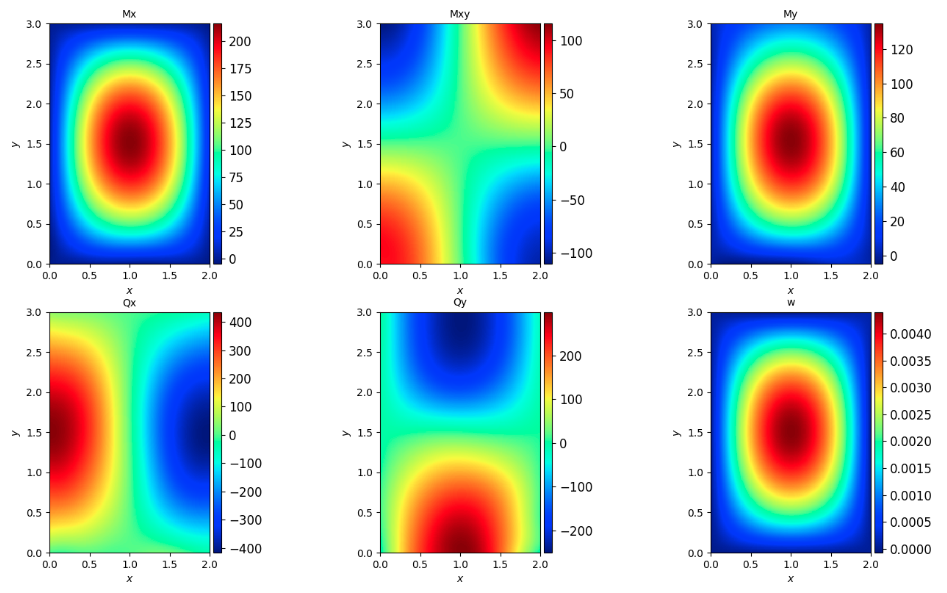


It can be seen that the model prediction results are basically consistent with the theoretical solution results.