Skip to content

NTopo: Mesh-free Topology Optimization using Implicit Neural Representations

python ntopo.py
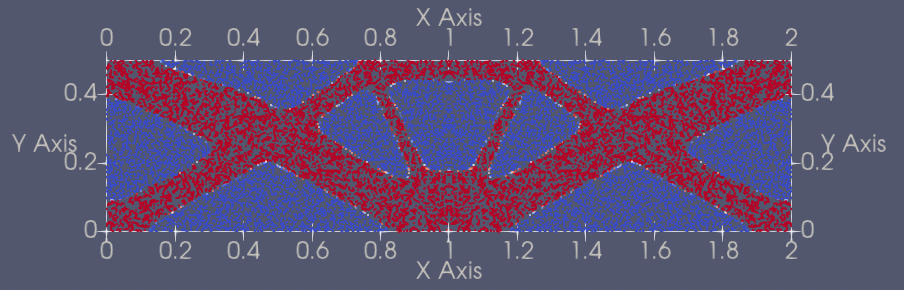
python ntopo.py mode=eval PROBLEM=Beam2D EVAL.pretrained_model_path_density=https://paddle-org.bj.bcebos.com/paddlescience/models/ntopo/beam2d_pretrained.pdparams
python ntopo.py mode=eval PROBLEM=Bridge2D EVAL.pretrained_model_path_density=https://paddle-org.bj.bcebos.com/paddlescience/models/ntopo/bridge2d_pretrained.pdparams
python ntopo.py mode=eval PROBLEM=Distributed2D EVAL.pretrained_model_path_density=https://paddle-org.bj.bcebos.com/paddlescience/models/ntopo/distributed2d_pretrained.pdparams
python ntopo.py mode=eval PROBLEM=LongBeam2D EVAL.pretrained_model_path_density=https://paddle-org.bj.bcebos.com/paddlescience/models/ntopo/longbeam2d_pretrained.pdparams
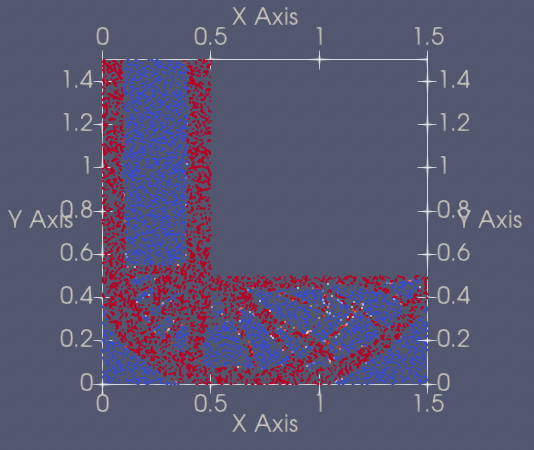
python ntopo.py mode=eval PROBLEM=LShape2D EVAL.pretrained_model_path_density=https://paddle-org.bj.bcebos.com/paddlescience/models/ntopo/lshape2d_pretrained.pdparams
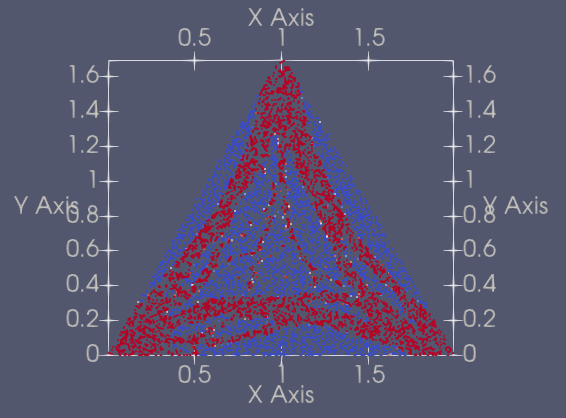
python ntopo.py mode=eval PROBLEM=Triangle2D EVAL.pretrained_model_path_density=https://paddle-org.bj.bcebos.com/paddlescience/models/ntopo/triangle2d_pretrained.pdparams
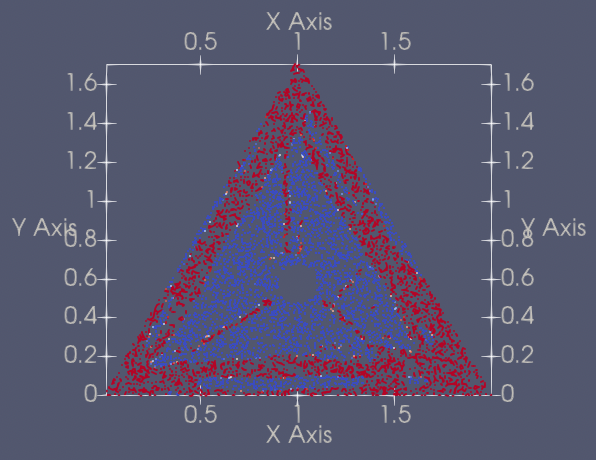
python ntopo.py mode=eval PROBLEM=TriangleVariants2D EVAL.pretrained_model_path_density=https://paddle-org.bj.bcebos.com/paddlescience/models/ntopo/trianglevariants2d_pretrained.pdparams
python ntopo.py --config-name ntopo.yaml mode=eval PROBLEM=Beam3D EVAL.pretrained_model_path_density=https://paddle-org.bj.bcebos.com/paddlescience/models/ntopo/beam3d_pretrained.pdparams
python ntopo.py --config-name ntopo.yaml mode=eval PROBLEM=Bridge3D EVAL.pretrained_model_path_density=https://paddle-org.bj.bcebos.com/paddlescience/models/ntopo/bridge3d_pretrained.pdparams

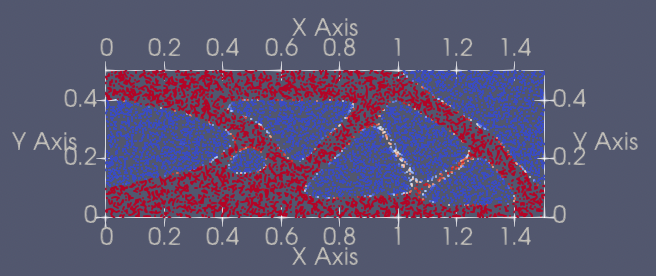
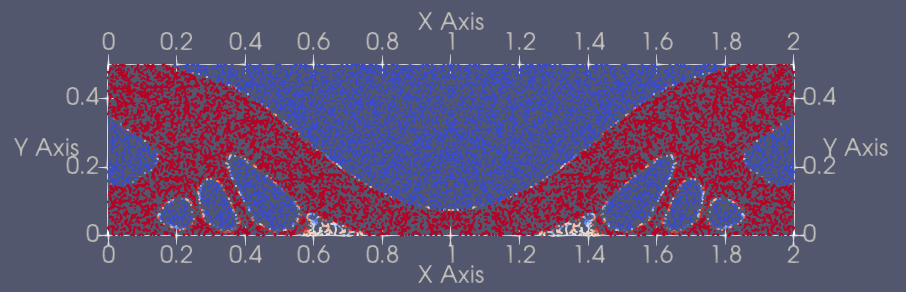
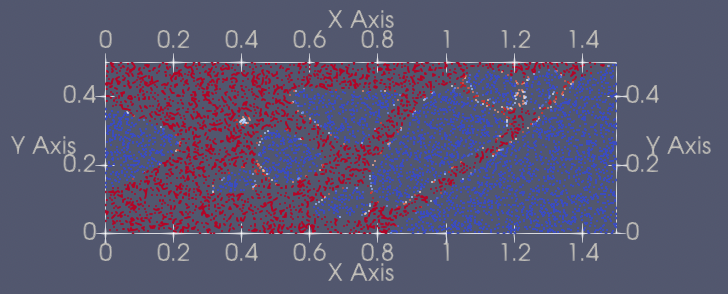
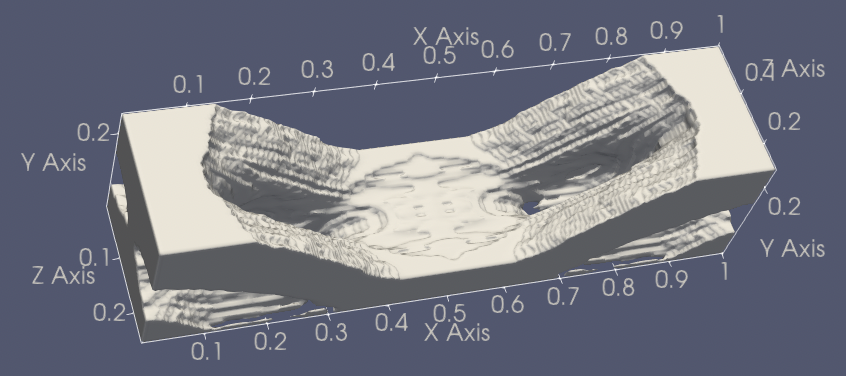
Note: Since the training method of this case is special and there is no reference metric, the visual results are generated directly after training to judge the training effect.

1. Background Introduction

In topology optimization problems, there is a common method called SIMP (Solid Isotropic Material with Penalization), which is a topology optimization method based on the density method. It describes the material distribution at each point in the design domain through continuous design variables (material density), and finally approximates the ideal "0-1" binary distribution (material presence or absence). Its core goal is to optimize the material layout to achieve specific performance goals (such as minimum compliance) under constraints (such as volume, stiffness).

In traditional numerical calculations, SIMP discretizes the design domain into finite element meshes, assigns a continuous density variable \(\rho \in [0,1]\) to each element, and then introduces a power law interpolation function and a penalty factor to penalize intermediate density values towards 0 or 1 through mathematical formulas to suppress gray areas. For example, the elastic modulus interpolation formula is: \(E(\rho) = \rho^p E_1\)

This case proposes a new machine learning method based on implicit neural representation to solve the difficult inverse problem of topology optimization. Traditional methods rely on meshing, while this case parameterizes the density field and displacement field mesh-free through MLP, using the continuous differentiability of neural networks to generate high-detail solutions. Experiments show that this method performs well in structural compliance objective optimization, and can explore the continuous solution space of topology optimization problems through self-supervised learning, overcoming the limitations of traditional methods in high-dimensional parameter spaces and nonlinear objective functions. The core innovation lies in combining neural representation with mesh-free optimization, providing an efficient and flexible solution for complex inverse problems.

2. Problem Definition

The goal of Topology Optimization (TO) is to find the material distribution that makes the structure most rigid under given boundary conditions, forces, and target material volume fraction. This problem can be formalized as a constrained bilevel minimization problem:

\[ \begin{cases} \min_{\rho}L_{comp}(\rho)=\int_{\Omega}e(\rho,u(\rho),\omega)d\omega \\ s.t. \quad u(\rho)=\arg\min_{u} L_{sim}(u,\rho) \\ \rho(\omega) \in {0, 1}, \quad \frac{1}{|\Omega|} \int_{\Omega} \rho d\omega = \hat{V} \\ \end{cases} \]

Where \(L_{comp}(\rho)\) is the compliance loss function; \(e(\rho, u(\rho), \omega)\) is the point compliance, proportional to the internal energy; \(u(\rho)\) is the displacement field, satisfying the force balance condition, obtained by minimizing the simulation loss \(L_{sim}(u, \rho)\); \(\rho(\omega)\) is the material density field, theoretically taking values of \(0\) or \(1\) (indicating absence or presence of material), but continuous values are allowed in actual optimization, and convergence to binary solutions is encouraged; \(\Omega\) is the design domain, \(\omega\) is the spatial coordinate; \(\hat{V}\) is the target material volume fraction.

3. Problem Solving

Next, we will explain how to convert the problem into PaddleScience code step by step and solve the problem using deep learning methods. In order to quickly understand PaddleScience, only key steps such as model construction, equation construction, and computational domain construction are described below, while other details please refer to API Documentation.

3.1 Model Construction

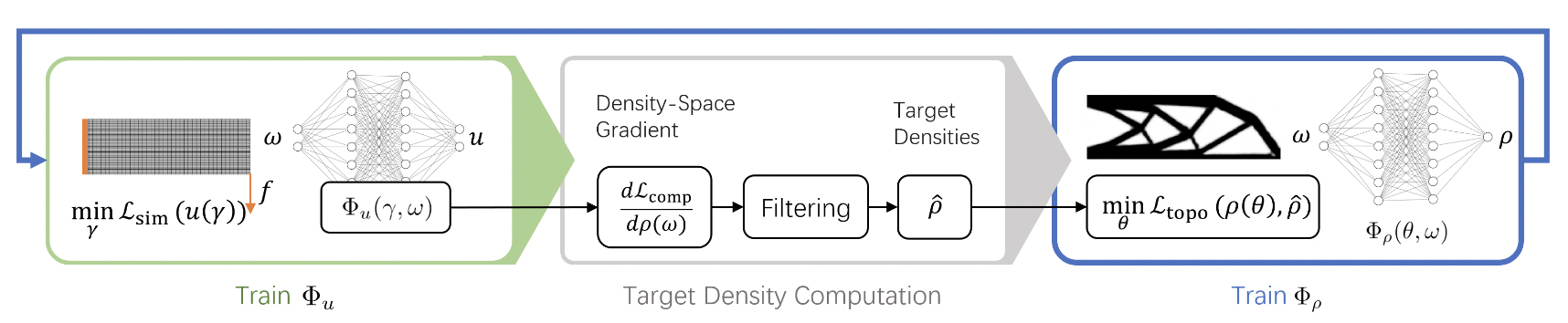
pipeline

Overall Training Process

The above figure shows the overall training process. By alternately training two neural networks, the displacement network and the density network, mapping the spatial coordinate \(ω\) to the equilibrium displacement \(u\) and the optimal density \(\rho\) respectively, the optimal material distribution is calculated. In each iteration, the displacement network is first updated by minimizing the total potential energy of the system, followed by sensitivity analysis to calculate the density space gradient, and generating the target density field \(\hat{\rho}\) through sensitivity filtering. Finally, the density network is updated by minimizing the convex optimization objective function based on the mean square error between the current density and the target density.

Both the displacement network and the density network are MLP networks using the SIREN activation function. For specific code, please refer to the model.py file in Complete Code.

3.2 Parameter and Hyperparameter Setting

We need to specify problem-related parameters, such as the name of the problem to be optimized (geometry type), material parameters, optimization target (volume percentage), etc.:

# set problem parameters
PROBLEM: "Beam2D"

# set working condition
NU: 0.3
E: 1.0
VOLUME_RATIO: 0.5
SIGMOID_ALPHA: 5.0
ENERGY_EXP: 3.0  # TODO: trainable parameter
PENALTY: 10
MAX_MOVE: 0.2
DAMPING: 0.5

USE_MMSE: true
USE_OC: true
FILTER: "Gaussian"  # "null" "Gaussian"
FILTER_RADIUS: 2.0

In addition, parameters required for other training such as training rounds and batch_size need to be specified in the configuration file. Note that the separate epochs parameter for the two networks needs to be set to \(1\):

# training settings
TRAIN:
  st_epoch: 1
  epochs: 100  # times for for-loop
  disp_net:
    epochs: 1
    iters_per_epoch: 1000
    optimizer:
      learning_rate: 3.0e-4
      beta2: 0.99
      epsilon: 1e-7
  density_net:
    epochs: 1
    iters_per_epoch: 50
    optimizer:
      learning_rate: 3.0e-4
      beta1: 0.8
      beta2: 0.9
      epsilon: 1e-7
  batch_size:
    constraint: 7500
    visualizer: 7500
  save_freq: 10
  eval_during_train: false
  eval_freq: 100
  # Due to the particularity of this case training process,
  # please use `pretrained_model_path` but not `checkpoint_path` to resume training
  # and manually adjust the above `st_epoch`
  pretrained_model_path_disp: null
  pretrained_model_path_density: null
  checkpoint_path_disp: null
  checkpoint_path_density: null
  enable_parallel: false # whether to enable parallel training

It is particularly important to note that some techniques are used in this case, such as Moving Mean Square Error (MMSE), Optimality Criteria method based on multiple batches (OC), and filtering. Their related parameters and the iters_per_epoch of training need to be set carefully. It is not that the larger a certain parameter is, the better. Different parameter settings may lead to different optimization results.

3.3 Optimizer Construction

The training process will call the optimizer to update model parameters. Here, the Adam optimizer is selected.

optimizer_density = ppsci.optimizer.Adam(**cfg.TRAIN.density_net.optimizer)(
    problem.density_net
)

# set stratified sampler
bounds = (
    (problem.geo_origin[0], problem.geo_dim[0]),

3.4 Equation Construction

As described in Problem Definition, formulas such as the elastic modulus interpolation formula are needed during model training, so equations need to be defined. For specific code, please refer to the equation.py file in Complete Code.

3.5 Problem Construction (including loss)

The computational domain of this problem is the initial geometric structure. This case provides classes for some 2D and 3D problems, which contain definitions of various parameters and conditions such as computational domain, boundary conditions, and force conditions. For specific code, please refer to the problems.py file in Complete Code.

It is worth noting that some techniques are used in this case, such as the Optimality Criteria method based on multiple batches (OC). This method requires a batch of input and output data, and then calculates the loss of this batch in some way.

3.6 Constraint Construction

There are 1 type of interior point constraint and 1 type of supervised constraint in the code of this case (but actually the label is not used when calculating loss. Since the API is called, it is introduced here according to the constraint method).

3.6.1 Interior Point Constraint

There is constraint InteriorConstraint for points inside the geometry:

        **train_dataloader_cfg,
        "batch_size": cfg.TRAIN.batch_size.constraint,
        "iters_per_epoch": cfg.TRAIN.disp_net.iters_per_epoch,
    },
    ppsci.loss.FunctionalLoss(problem.disp_loss_func),
    name="INTERIOR_DISP",
)

# re-assign to ITERS_PER_EPOCH_DISP
if cfg.TRAIN.enable_parallel:
    cfg.TRAIN.disp_net.iters_per_epoch = len(interior_disp.data_loader)

# wrap constraints together

The first parameter of InteriorConstraint is the equation (system) expression, used to describe how to calculate the constraint target. Here, fill in problem.equation["EEquation"].equations instantiated in the 3.4 Equation Construction chapter;

The second parameter is the target value of the constraint variable. In this problem, it is hoped that the \(E\) value E_xyz or E_xy related to the equation is optimized to 0;

The third parameter is the computational domain on which the constraint equation acts. Here, fill in the computational domain problem.geom["geo"] of the corresponding problem instantiated in the 3.5 Problem Construction chapter;

The fourth parameter is the sampling configuration on the computational domain.

The fifth parameter is the loss function. Here, the custom loss function problem.disp_loss_func is passed in through ppsci.loss.FunctionalLoss;

The sixth is the name of the constraint condition. Each constraint condition needs to be named for subsequent indexing. Here it is named "INTERIOR_DISP".

3.6.2 Supervised Constraint

Since a custom sampling method is defined in this case, the supervised constraint SupervisedConstraint is called here, and the sampling points are passed to it in the form of input:

        "dataset": {"name": "NamedArrayDataset", "input": input_},
        "sampler": {
            "name": "BatchSampler",
            "drop_last": True,
            "shuffle": False,
        },
        "num_workers": 0,
        "batch_size": int(np.prod(problem.batch_size) * problem.batch_raito),
    },
    func_module.FunctionalLossBatch(problem.density_loss_func),
    output_expr=problem.equation["EEquation"].equations,
    name="INTERIOR_DENSITY",
)

constraint_density = {interior_density.name: interior_density}

# set visualizer(optional)
pred_input_keys = ("x", "y")
if problem.dim == 3:
    pred_input_keys += ("z",)

The first parameter of SupervisedConstraint is the reading configuration of the supervised constraint, where the dataset field represents the training dataset information used, and each field represents:

  1. name: Dataset type, here NamedArrayDataset means dataset read from Array;
  2. input: Input data of Array type;

Note that there is no label value label.

The sampler field represents the sampling method, where each field represents:

  1. name: Sampler type, here BatchSampler means batch sampler;
  2. drop_last: Whether to discard samples that cannot make up a full mini-batch at the end, set to False;
  3. shuffle: Whether to shuffle the order when generating sample indices, set to True;

The num_workers field represents the number of threads when loading input;

The batch_size field represents the size of the batch;

The second parameter is the loss function. Here a loss function class is customized to receive the special batch loss function problem.density_loss_func of this case;

The third parameter is the name of the constraint condition. We need to name each constraint condition for subsequent indexing. Here it is named "INTERIOR_DENSITY".

3.7 Visualizer Construction

This case saves the optimization results as vtu files through the visualizer ppsci.visualize.VisualizerVtu at certain training intervals:

    "vis_density": ppsci.visualize.VisualizerVtu(
        pred_input_dict,
        {
            "density": lambda out: out["densities"],
        },
        batch_size=cfg.TRAIN.batch_size.visualizer,
        prefix="vtu_density",
    ),
}

# initialize solver
solver_disp = ppsci.solver.Solver(
    model=model_list,
    constraint=constraint_disp,
    output_dir=cfg.output_dir_disp,
    optimizer=optimizer_disp,
    epochs=cfg.TRAIN.disp_net.epochs,

3.8 Other Functions

As mentioned above, two models need to be trained alternately in this case, and some techniques are added, such as Moving Mean Square Error (MMSE), Optimality Criteria method based on multiple batches (OC), and filtering. Therefore, the training process of this case is quite different from single model training.

Therefore, in this case, based on the PaddleScience code, the following are customized:

  1. Trainer class, which defines a new training process based on the information in the received solver;
  2. FunctionalLossBatch class, which is based on ppsci.loss.base.Loss, redefines the loss processing method, and is called in Trainer;
  3. Sampler class, which defines the sampling method required by the case;
  4. Plot class. For geometries with symmetrical shapes, this case chooses to define only half of the symmetrical part, and then restore the complete result according to the mirror parameter in the problem. This class provides related processing functions;

For specific code, please refer to the functions.py file in Complete Code.

3.9 Model Training and Evaluation

After completing the above settings, pass the instantiated objects to ppsci.solver.Solver in order, and then train according to the customized training process. For specific code, please refer to the ntopo.py file in Complete Code.

Since topology optimization problems have no labels, multiple optimization results may be effective, so the training results need to be manually evaluated based on visual results.

4. Complete Code

ntopo.py
"""
Paper: https://arxiv.org/abs/2102.10782
Reference: https://github.com/JonasZehn/ntopo
"""
from os import makedirs
from os import path as osp

import functions as func_module
import hydra
import model as model_module
import numpy as np
import paddle
import problems as problems_module
from omegaconf import DictConfig

import ppsci
from ppsci.utils import save_load


def train(cfg: DictConfig):
    # make dirs
    makedirs(cfg.output_dir_disp, exist_ok=True)
    makedirs(cfg.output_dir_density, exist_ok=True)

    # set problem
    problem = getattr(problems_module, cfg.PROBLEM)(cfg)

    # set model
    problem.disp_net = model_module.DenseSIRENModel(**cfg.MODEL.disp_net)
    problem.density_net = model_module.DenseSIRENModel(**cfg.MODEL.density_net)

    # set transforms
    problem.disp_net.register_input_transform(problem.transform_in)
    problem.disp_net.register_output_transform(problem.transform_out_disp)
    problem.density_net.register_input_transform(problem.transform_in)
    problem.density_net.register_output_transform(problem.transform_out_density)

    model_list = ppsci.arch.ModelList((problem.disp_net, problem.density_net))

    # set optimizer
    optimizer_disp = ppsci.optimizer.Adam(**cfg.TRAIN.disp_net.optimizer)(
        problem.disp_net
    )
    optimizer_density = ppsci.optimizer.Adam(**cfg.TRAIN.density_net.optimizer)(
        problem.density_net
    )

    # set stratified sampler
    bounds = (
        (problem.geo_origin[0], problem.geo_dim[0]),
        (problem.geo_origin[1], problem.geo_dim[1]),
    )
    if problem.dim == 3:
        bounds += ((problem.geo_origin[2], problem.geo_dim[2]),)
    sampler = func_module.Sampler(problem.geom["geo"], bounds=bounds)

    # set dataloader config
    train_dataloader_cfg = {
        "dataset": "NamedArrayDataset",
        "sampler": {
            "name": "BatchSampler",
            "drop_last": True,
            "shuffle": False,
        },
        "num_workers": 0,
    }

    # set constraint
    interior_disp = ppsci.constraint.InteriorConstraint(
        problem.equation["EEquation"].equations,
        {"E_xyz": 0} if problem.dim == 3 else {"E_xy": 0},
        problem.geom["geo"],
        {
            **train_dataloader_cfg,
            "batch_size": cfg.TRAIN.batch_size.constraint,
            "iters_per_epoch": cfg.TRAIN.disp_net.iters_per_epoch,
        },
        ppsci.loss.FunctionalLoss(problem.disp_loss_func),
        name="INTERIOR_DISP",
    )

    # re-assign to ITERS_PER_EPOCH_DISP
    if cfg.TRAIN.enable_parallel:
        cfg.TRAIN.disp_net.iters_per_epoch = len(interior_disp.data_loader)

    # wrap constraints together
    constraint_disp = {interior_disp.name: interior_disp}

    input_, mask = sampler.sample_interior_stratified(
        n_samples=problem.batch_size,
        n_iter=cfg.TRAIN.density_net.iters_per_epoch,
    )
    interior_density = ppsci.constraint.SupervisedConstraint(
        {
            "dataset": {"name": "NamedArrayDataset", "input": input_},
            "sampler": {
                "name": "BatchSampler",
                "drop_last": True,
                "shuffle": False,
            },
            "num_workers": 0,
            "batch_size": int(np.prod(problem.batch_size) * problem.batch_raito),
        },
        func_module.FunctionalLossBatch(problem.density_loss_func),
        output_expr=problem.equation["EEquation"].equations,
        name="INTERIOR_DENSITY",
    )

    constraint_density = {interior_density.name: interior_density}

    # set visualizer(optional)
    pred_input_keys = ("x", "y")
    if problem.dim == 3:
        pred_input_keys += ("z",)

    # add inferencer data
    samplers = problem.geom["geo"].sample_interior(cfg.TRAIN.batch_size.visualizer)
    pred_input_dict = {}
    for key in pred_input_keys:
        pred_input_dict.update({key: samplers[key]})

    visualizer_disp = {
        "vis_disp": ppsci.visualize.VisualizerVtu(
            pred_input_dict,
            {key: lambda out, k=key: out[k] for key in cfg.MODEL.disp_net.output_keys},
            prefix="vtu_disp",
        ),
    }
    visualizer_density = {
        "vis_density": ppsci.visualize.VisualizerVtu(
            pred_input_dict,
            {
                "density": lambda out: out["densities"],
            },
            batch_size=cfg.TRAIN.batch_size.visualizer,
            prefix="vtu_density",
        ),
    }

    # initialize solver
    solver_disp = ppsci.solver.Solver(
        model=model_list,
        constraint=constraint_disp,
        output_dir=cfg.output_dir_disp,
        optimizer=optimizer_disp,
        epochs=cfg.TRAIN.disp_net.epochs,
        iters_per_epoch=cfg.TRAIN.disp_net.iters_per_epoch,
        seed=cfg.seed,
        equation=problem.equation,
        geom=problem.geom,
        log_freq=cfg.log_freq,
        save_freq=cfg.TRAIN.save_freq,
        eval_during_train=cfg.TRAIN.eval_during_train,
        eval_freq=cfg.TRAIN.eval_freq,
        visualizer=visualizer_disp,
        pretrained_model_path=cfg.TRAIN.pretrained_model_path_disp,
        checkpoint_path=cfg.TRAIN.checkpoint_path_disp,
    )

    solver_density = ppsci.solver.Solver(
        model=model_list,
        constraint=constraint_density,
        output_dir=cfg.output_dir_density,
        optimizer=optimizer_density,
        epochs=cfg.TRAIN.density_net.epochs,
        iters_per_epoch=cfg.TRAIN.density_net.iters_per_epoch,
        equation=problem.equation,
        geom=problem.geom,
        log_freq=cfg.log_freq,
        save_freq=cfg.TRAIN.save_freq,
        eval_during_train=cfg.TRAIN.eval_during_train,
        eval_freq=cfg.TRAIN.eval_freq,
        visualizer=visualizer_density,
        pretrained_model_path=cfg.TRAIN.pretrained_model_path_density,
        checkpoint_path=cfg.TRAIN.checkpoint_path_density,
    )

    # initialize density trainer
    if problem.use_mmse:
        density_trainer = func_module.Trainer(solver_density)

    # training
    solver_disp.train()

    for i in range(cfg.TRAIN.st_epoch, cfg.TRAIN.epochs + 1):
        ppsci.utils.logger.info(f"[Total Train][Epoch {i}/{cfg.TRAIN.epochs}]")

        input_, _ = sampler.sample_interior_stratified(
            n_samples=problem.batch_size,
            n_iter=cfg.TRAIN.density_net.iters_per_epoch,
        )

        interior_density = ppsci.constraint.SupervisedConstraint(
            {
                "dataset": {"name": "NamedArrayDataset", "input": input_},
                "sampler": {
                    "name": "BatchSampler",
                    "drop_last": True,
                    "shuffle": False,
                },
                "num_workers": 0,
                "batch_size": int(np.prod(problem.batch_size) * problem.batch_raito),
            },
            func_module.FunctionalLossBatch(problem.density_loss_func),
            output_expr=problem.equation["EEquation"].equations,
            name="INTERIOR_DENSITY",
        )
        solver_density.constraint["INTERIOR_DENSITY"] = interior_density

        solver_disp.train()
        if problem.use_mmse:
            density_trainer.train_batch()
        else:
            solver_density.train()

        # plotting during training
        if i == 1 or i % cfg.TRAIN.save_freq == 0 or i == cfg.TRAIN.epochs:
            visualizer_density["vis_density"].prefix = f"vtu_density_e{i}"
            solver_density.visualize()

            visualizer_disp["vis_disp"].prefix = f"vtu_disp_e{i}"
            solver_disp.visualize()

            save_load.save_checkpoint(
                solver_density.model,
                solver_density.optimizer,
                {"metric": "dummy", "epoch": i},
                solver_density.scaler,
                solver_density.output_dir,
                f"epoch_{i}",
                solver_density.equation,
            )


def evaluate(cfg: DictConfig):
    # set problem
    problem = getattr(problems_module, cfg.PROBLEM)(cfg)

    # set model
    problem.density_net = model_module.DenseSIRENModel(**cfg.MODEL.density_net)

    # set transforms
    problem.density_net.register_input_transform(problem.transform_in)
    problem.density_net.register_output_transform(problem.transform_out_density)

    if problem.dim == 2:
        # add inferencer data
        samplers = problem.geom["geo"].sample_interior(cfg.EVAL.num_sample)
        pred_input_dict = {}
        if problem.mirror:
            if problem.mirror[0]:
                pred_input_dict["x"] = np.concatenate(
                    [samplers["x"], 2 * problem.geo_dim[0] - samplers["x"]]
                )
                pred_input_dict["y"] = np.concatenate([samplers["y"], samplers["y"]])
            if problem.mirror[1]:
                pred_input_dict["x"] = np.concatenate([samplers["x"], samplers["x"]])
                pred_input_dict["y"] = np.concatenate(
                    [samplers["y"], 2 * problem.geo_dim[1] - samplers["y"]]
                )
        else:
            pred_input_dict["x"] = samplers["x"]
            pred_input_dict["y"] = samplers["y"]

        def compute_mirror_density(problem, out):
            densities = out["densities"][: cfg.EVAL.num_sample]
            if problem.mirror:
                if problem.mirror[0]:
                    densities = paddle.concat([densities, densities])
                if problem.mirror[1]:
                    densities = paddle.concat([densities, densities])
            return densities

        visualizer_density = {
            "vis_density": ppsci.visualize.VisualizerVtu(
                pred_input_dict,
                {"density": lambda out: compute_mirror_density(problem, out)},
                batch_size=pred_input_dict["x"].shape[0],
                prefix="vtu_density",
            ),
        }

        solver_density = ppsci.solver.Solver(
            model=problem.density_net,
            output_dir=cfg.output_dir,
            visualizer=visualizer_density,
            pretrained_model_path=cfg.EVAL.pretrained_model_path_density,
        )
        solver_density.visualize()
    elif problem.dim == 3:
        # load pretrained model
        save_load.load_pretrain(
            problem.density_net, cfg.EVAL.pretrained_model_path_density
        )
        # plotting
        plot = func_module.Plot(
            osp.join(cfg.output_dir, "density.obj"),
            problem,
            cfg.EVAL.n_cells,
            0.5,
        )
        plot.plot_3d()


@hydra.main(version_base=None, config_path="./conf", config_name="ntopo_2d.yaml")
def main(cfg: DictConfig):
    if cfg.mode == "train":
        train(cfg)
    elif cfg.mode == "eval":
        evaluate(cfg)
    else:
        raise ValueError(f"cfg.mode should in ['train', 'eval'], but got '{cfg.mode}'")


if __name__ == "__main__":
    main()
model.py
# Copyright (c) 2025 PaddlePaddle Authors. All Rights Reserved.

# Licensed under the Apache License, Version 2.0 (the "License");
# you may not use this file except in compliance with the License.
# You may obtain a copy of the License at

#     http://www.apache.org/licenses/LICENSE-2.0

# Unless required by applicable law or agreed to in writing, software
# distributed under the License is distributed on an "AS IS" BASIS,
# WITHOUT WARRANTIES OR CONDITIONS OF ANY KIND, either express or implied.
# See the License for the specific language governing permissions and
# limitations under the License.

from typing import Tuple

import numpy as np
import paddle
import paddle.nn as nn

from ppsci.arch import activation as act_mod
from ppsci.arch import base
from ppsci.utils import initializer


class DenseBlock(nn.Layer):
    def __init__(
        self,
        in_features: int,
        out_features: int,
        w0: float = 1.0,
        coef1: float = 6.0,
        coef2: float = 1.0,
        weight_init=True,
        bias_init=True,
        use_act=False,
        use_sqrt=False,
    ) -> None:
        super().__init__()
        self.linear = nn.Linear(in_features, out_features)
        self.act = act_mod.Siren(w0) if use_act else None

        if weight_init:
            self.init_param(self.linear.weight, coef1, coef2, use_sqrt)
        else:
            self.init_zeros(self.linear.weight)
        if bias_init:
            self.init_param(self.linear.bias, coef1, coef2)
        else:
            self.init_zeros(self.linear.bias)

    def init_param(self, param, coef1: float = 6.0, coef2: float = 1.0, use_sqrt=True):
        in_features = param.shape[0]
        with paddle.no_grad():
            initializer.uniform_(
                param,
                -np.sqrt(coef1 / in_features) * coef2,
                np.sqrt(coef1 / in_features) * coef2,
            ) if use_sqrt else initializer.uniform_(
                param,
                -coef1 / in_features * coef2,
                coef1 / in_features * coef2,
            )

    def init_zeros(self, param):
        initializer.zeros_(param)

    def forward(self, x):
        y = x
        y = self.linear(y)
        if self.act:
            y = self.act(y)
        return y


class DenseSIRENModel(base.Arch):
    """DenseSIRENModel network."""

    def __init__(
        self,
        input_keys: Tuple[str, ...],
        output_keys: Tuple[str, ...],
        num_layers: int,
        hidden_size: int,
        last_layer_init_scale: float,
    ):
        super().__init__()
        self.input_keys = input_keys
        self.output_keys = output_keys
        self.linears = []
        self.skip = (False, False, True, False, True, False)
        in_features = (
            len(input_keys),
            hidden_size,
            hidden_size,
            len(input_keys) + hidden_size,
            hidden_size,
            len(input_keys) + 2 * hidden_size,
        )
        out_features = (
            hidden_size,
            hidden_size,
            hidden_size,
            hidden_size,
            hidden_size,
            len(output_keys),
        )
        w0 = (60.0, 1.0, 1.0, 1.0, 1.0, 1.0)
        coef1 = (1.0, 6.0, 6.0, 6.0, 6.0, 6.0)
        coef2 = (1.0, 1.0, 1.0, 1.0, 1.0, last_layer_init_scale)
        weight_init = (True, True, True, True, True, True)
        bias_init = (True, True, True, True, True, False)
        use_act = (True, True, True, True, True, False)
        use_sqrt = (False, True, True, True, True, True)

        # initialize layers
        for i in range(num_layers):
            self.linears.append(
                DenseBlock(
                    in_features[i],
                    out_features[i],
                    w0[i],
                    coef1[i],
                    coef2[i],
                    weight_init[i],
                    bias_init[i],
                    use_act[i],
                    use_sqrt[i],
                )
            )
        self.linears = nn.LayerList(self.linears)

    def forward_tensor(self, x):
        y = x
        short = y
        for i, layer in enumerate(self.linears):
            y = layer(y)
            if self.skip[i]:
                y = paddle.concat([short, y], axis=-1)
                short = y
        return y

    def forward(self, x):
        if self._input_transform is not None:
            x = self._input_transform(x)

        y = self.concat_to_tensor(x, self.input_keys, axis=-1)
        y = self.forward_tensor(y)
        y = self.split_to_dict(y, self.output_keys, axis=-1)

        if self._output_transform is not None:
            y = self._output_transform(x, y)
        return y
equation.py
# Copyright (c) 2025 PaddlePaddle Authors. All Rights Reserved.

# Licensed under the Apache License, Version 2.0 (the "License");
# you may not use this file except in compliance with the License.
# You may obtain a copy of the License at

#     http://www.apache.org/licenses/LICENSE-2.0

# Unless required by applicable law or agreed to in writing, software
# distributed under the License is distributed on an "AS IS" BASIS,
# WITHOUT WARRANTIES OR CONDITIONS OF ANY KIND, either express or implied.
# See the License for the specific language governing permissions and
# limitations under the License.

from typing import Dict
from typing import Union

import numpy as np

from ppsci.autodiff import jacobian
from ppsci.equation.pde import base


class EEquation(base.PDE):
    r"""Linear elasticity equations.
    Use either (E, nu) or (lambda_, mu) to define the material properties.

    2D:
    $$
    \begin{cases}
        \sigma_{xx} = \mu \dfrac{\partial u}{\partial x} + \lambda(\dfrac{\partial u}{\partial x} + \dfrac{\partial v}{\partial y})
        \sigma_{xy} = \dfrac{\mu}{2}(\dfrac{\partial u}{\partial y} + \dfrac{\partial v}{\partial x})
        \sigma_{yy} = \mu \dfrac{\partial v}{\partial y} + \lambda(\dfrac{\partial u}{\partial x} + \dfrac{\partial v}{\partial y})
        E_{xy} = \dfrac{1}{2}(\dfrac{\partial u}{\partial x}\sigma_{xx} + (\dfrac{\partial u}{\partial y} + \dfrac{\partial v}{\partial x})\sigma_{xy} + \dfrac{\partial v}{\partial y}\sigma_{yy}) \\
    \end{cases}
    $$

    3D:
    $$
    \begin{cases}
        \epsilon_{xy} = \dfrac{1}{2}(\dfrac{\partial u}{\partial y} + \dfrac{\partial v}{\partial x})
        \epsilon_{xz} = \dfrac{1}{2}(\dfrac{\partial u}{\partial z} + \dfrac{\partial w}{\partial x})
        \epsilon_{zy} = \dfrac{1}{2}(\dfrac{\partial v}{\partial z} + \dfrac{\partial w}{\partial y})
        E_{xyz} = \dfrac{\lambda}{2}(\dfrac{\partial u}{\partial x} + \dfrac{\partial v}{\partial y} + \dfrac{\partial w}{\partial z})^2 + \mu (\dfrac{\partial^2 u}{\partial x^2} + \dfrac{\partial^2 v}{\partial y^2} + \dfrac{\partial^2 w}{\partial z^2}) + 2\mu (\epsilon_{xy}^2 + \epsilon_{xz}^2 + \epsilon_{yz}^2) \\
    \end{cases}
    $$

    Args:
        E (Optional[float]): The Young's modulus. Defaults to None.
        nu (Optional[float]): The Poisson's ratio. Defaults to None.
        lambda_ (Optional[float]): Lamé's first parameter. Defaults to None.
        mu (Optional[float]): Lamé's second parameter (shear modulus). Defaults to None.
        rho (float, optional): Mass density. Defaults to 1.
        dim (int, optional): Dimension of the linear elasticity (2 or 3). Defaults to 3.
        time (bool, optional): Whether contains time data. Defaults to False.

    Examples:
        >>> import ppsci
        >>> pde = ppsci.equation.LinearElasticity(
        ...     E=None, nu=None, lambda_=1e4, mu=100, dim=3
        ... )
    """

    def __init__(
        self,
        param_dict: Dict[str, Union[float, np.ndarray]],
        dim: int = 3,
        time: bool = False,
    ):
        super().__init__()
        self.param_keys = (
            "E",
            "nu",
            "lambda_",
            "mu",
            "u__x",
            "u__y",
            "u__z",
            "v__x",
            "v__y",
            "v__z",
            "w__x",
            "w__y",
            "w__z",
        )
        self.dim = dim
        self.time = time
        self.param_dict = param_dict
        for key in self.param_keys:
            if key in self.param_dict:
                setattr(self, key, self.param_dict[key])

        def init_params(out):
            for key in self.param_keys:
                if key not in self.param_dict:
                    setattr(self, key, out[key] if key in out else None)

            if self.u__x is None:
                self.u__x = jacobian(out["u"], out["x"])
            if self.u__y is None:
                self.u__y = jacobian(out["u"], out["y"])
            if self.v__x is None:
                self.v__x = jacobian(out["v"], out["x"])
            if self.v__y is None:
                self.v__y = jacobian(out["v"], out["y"])

            if self.dim == 3:
                if self.u__z is None:
                    self.u__z = jacobian(out["u"], out["z"])
                if self.v__z is None:
                    self.v__z = jacobian(out["v"], out["z"])
                if self.w__x is None:
                    self.w__x = jacobian(out["w"], out["x"])
                if self.w__y is None:
                    self.w__y = jacobian(out["w"], out["y"])
                if self.w__z is None:
                    self.w__z = jacobian(out["w"], out["z"])

        # Energy equations
        def E_xy_compute_func(out):
            init_params(out)
            sigma_xx = self.mu * self.u__x + self.lambda_ * (self.u__x + self.v__y)
            sigma_xy = 0.5 * self.mu * (self.u__y + self.v__x)
            sigma_yy = self.mu * self.v__y + self.lambda_ * (self.u__x + self.v__y)
            E_xy = 0.5 * (
                self.u__x * sigma_xx
                + (self.u__y + self.v__x) * sigma_xy
                + self.v__y * sigma_yy
            )
            return E_xy

        self.add_equation("E_xy", E_xy_compute_func)

        if self.dim == 3:

            def E_xyz_compute_func(out):
                init_params(out)
                eps12 = 0.5 * self.u__y + 0.5 * self.v__x
                eps13 = 0.5 * self.u__z + 0.5 * self.w__x
                eps23 = 0.5 * self.v__z + 0.5 * self.w__y

                trace_strain = self.u__x + self.v__y + self.w__z
                squared_diagonal = (
                    self.u__x * self.u__x
                    + self.v__y * self.v__y
                    + self.w__z * self.w__z
                )
                E_xyz = 0.5 * self.lambda_ * trace_strain * trace_strain + self.mu * (
                    squared_diagonal
                    + 2.0 * eps12 * eps12
                    + 2.0 * eps13 * eps13
                    + 2.0 * eps23 * eps23
                )
                return E_xyz

            self.add_equation("E_xyz", E_xyz_compute_func)
problems.py
  1
  2
  3
  4
  5
  6
  7
  8
  9
 10
 11
 12
 13
 14
 15
 16
 17
 18
 19
 20
 21
 22
 23
 24
 25
 26
 27
 28
 29
 30
 31
 32
 33
 34
 35
 36
 37
 38
 39
 40
 41
 42
 43
 44
 45
 46
 47
 48
 49
 50
 51
 52
 53
 54
 55
 56
 57
 58
 59
 60
 61
 62
 63
 64
 65
 66
 67
 68
 69
 70
 71
 72
 73
 74
 75
 76
 77
 78
 79
 80
 81
 82
 83
 84
 85
 86
 87
 88
 89
 90
 91
 92
 93
 94
 95
 96
 97
 98
 99
100
101
102
103
104
105
106
107
108
109
110
111
112
113
114
115
116
117
118
119
120
121
122
123
124
125
126
127
128
129
130
131
132
133
134
135
136
137
138
139
140
141
142
143
144
145
146
147
148
149
150
151
152
153
154
155
156
157
158
159
160
161
162
163
164
165
166
167
168
169
170
171
172
173
174
175
176
177
178
179
180
181
182
183
184
185
186
187
188
189
190
191
192
193
194
195
196
197
198
199
200
201
202
203
204
205
206
207
208
209
210
211
212
213
214
215
216
217
218
219
220
221
222
223
224
225
226
227
228
229
230
231
232
233
234
235
236
237
238
239
240
241
242
243
244
245
246
247
248
249
250
251
252
253
254
255
256
257
258
259
260
261
262
263
264
265
266
267
268
269
270
271
272
273
274
275
276
277
278
279
280
281
282
283
284
285
286
287
288
289
290
291
292
293
294
295
296
297
298
299
300
301
302
303
304
305
306
307
308
309
310
311
312
313
314
315
316
317
318
319
320
321
322
323
324
325
326
327
328
329
330
331
332
333
334
335
336
337
338
339
340
341
342
343
344
345
346
347
348
349
350
351
352
353
354
355
356
357
358
359
360
361
362
363
364
365
366
367
368
369
370
371
372
373
374
375
376
377
378
379
380
381
382
383
384
385
386
387
388
389
390
391
392
393
394
395
396
397
398
399
400
401
402
403
404
405
406
407
408
409
410
411
412
413
414
415
416
417
418
419
420
421
422
423
424
425
426
427
428
429
430
431
432
433
434
435
436
437
438
439
440
441
442
443
444
445
446
447
448
449
450
451
452
453
454
455
456
457
458
459
460
461
462
463
464
465
466
467
468
469
470
471
472
473
474
475
476
477
478
479
480
481
482
483
484
485
486
487
488
489
490
491
492
493
494
495
496
497
498
499
500
501
502
503
504
505
506
507
508
509
510
511
512
513
514
515
516
517
518
519
520
521
522
523
524
525
526
527
528
529
530
531
532
533
534
535
536
537
538
539
540
541
542
543
544
545
546
547
548
549
550
551
552
553
554
555
556
557
558
559
560
561
562
563
564
565
566
567
568
569
570
571
572
573
574
575
576
577
578
579
580
581
582
583
584
585
586
587
588
589
590
591
592
593
594
595
596
597
598
599
600
601
602
603
604
605
606
607
608
609
610
611
612
613
614
615
616
617
618
619
620
621
622
623
624
625
626
627
628
629
630
631
632
633
634
635
636
637
638
639
640
641
642
643
644
645
646
647
648
649
650
651
652
653
654
655
656
657
658
659
660
661
662
663
664
665
666
667
668
669
670
671
672
673
674
import equation as pdb_module
import numpy as np
import paddle
import paddle.nn.functional as F
from skimage.filters import gaussian

import ppsci
from ppsci.utils import logger


class GradientReversalLayer(paddle.autograd.PyLayer):
    @staticmethod
    def forward(ctx, x):
        return x.clone()

    @staticmethod
    def backward(ctx, grad_output):
        return -grad_output


class Problems:
    def __init__(self, cfg, geo_origin, geo_dim):
        self.cfg = cfg
        self.geo_origin = geo_origin
        self.geo_dim = geo_dim
        self.dim = len(geo_dim)
        self.volume = self.comput_volume()
        self.batch_raito = 1.0

        self.lambda_ = (
            (cfg.NU * cfg.E / ((1 - cfg.NU * cfg.NU)))
            if self.dim == 2
            else cfg.NU * cfg.E / ((1 + cfg.NU) * (1 - 2 * cfg.NU))
        )
        self.mu = cfg.E / (1 + cfg.NU) if self.dim == 2 else cfg.E / (2 * (1 + cfg.NU))
        self.equation = {
            "EEquation": pdb_module.EEquation(
                param_dict={"lambda_": self.lambda_, "mu": self.mu}, dim=self.dim
            ),
        }

        self.disp_net = None
        self.density_net = None

        self.volume_ratio = getattr(cfg, "VOLUME_RATIO", 0.5)
        self.alpha = getattr(cfg, "SIGMOID_ALPHA", 5.0)
        self.exponent = getattr(cfg, "ENERGY_EXP", 3.0)
        self.vol_penalty_strength = getattr(cfg, "PENALTY", 10.0)
        self.use_mmse = getattr(cfg, "USE_MMSE", False)
        self.use_oc = getattr(cfg, "USE_OC", False)
        self.max_move = getattr(cfg, "MAX_MOVE", 0.2)
        self.damping_parameter = getattr(cfg, "DAMPING", 0.5)
        self.filter = getattr(cfg, "FILTER", None)
        self.filter_radius = getattr(cfg, "FILTER_RADIUS", 2.0)

    def comput_volume(self):
        return np.prod(self.geo_dim)

    # transforms
    def transform_in(self, _in):
        x, y = _in["x"], _in["y"]
        x_scaled = 2.0 / self.geo_dim[0] * x + (
            -1.0 - 2.0 * self.geo_origin[0] / self.geo_dim[0]
        )
        y_scaled = 2.0 / self.geo_dim[1] * y + (
            -1.0 - 2.0 * self.geo_origin[1] / self.geo_dim[1]
        )

        sin_x_scaled, sin_y_scaled = paddle.sin(x_scaled), paddle.sin(y_scaled)

        in_trans = {
            "x_scaled": x_scaled,
            "y_scaled": y_scaled,
            "sin_x_scaled": sin_x_scaled,
            "sin_y_scaled": sin_y_scaled,
        }

        if self.dim == 3:
            z = _in["z"]
            z_scaled = 2.0 / self.geo_dim[2] * z + (
                -1.0 - 2.0 * self.geo_origin[2] / self.geo_dim[2]
            )
            sin_z_scaled = paddle.sin(z_scaled)
            in_trans["z_scaled"] = z_scaled
            in_trans["sin_z_scaled"] = sin_z_scaled

        return in_trans

    def transform_out_disp(self, _in, _out):
        "Different for each problems because of different boundary constraints."
        # logger.info("In default out transform of disp net")
        return _out

    def transform_out_density(self, _in, _out):
        density = _out["density"]
        offset = np.log(self.volume_ratio / (1.0 - self.volume_ratio))
        densities = F.sigmoid(self.alpha * density + offset)
        return {"densities": densities}

    # functions
    def compute_E(self, densities, E, reverse_grad=False):
        if reverse_grad:
            densities = GradientReversalLayer.apply(densities)
        E_densities = paddle.pow(densities, self.exponent) * E
        return self.volume * paddle.mean(E_densities, keepdim=True)

    def compute_force(self):
        "Different for each problems because of different force."
        logger.info("In default force compute function")
        return 0.0

    def compute_penalty(self, densities):
        target_volume = self.volume_ratio * self.volume
        volume_estimate = self.volume * paddle.mean(densities, keepdim=True)
        return (
            self.vol_penalty_strength
            * (volume_estimate - target_volume)
            * (volume_estimate - target_volume)
            / target_volume
        )

    # oc
    def compute_target_densities(self, densities_list, sensitivities_list):
        if self.use_oc:
            return self.compute_oc_multi_batch(densities_list, sensitivities_list)
        else:
            return self.compute_target_densities_gradient_descent(
                densities_list, sensitivities_list
            )

    def compute_oc_multi_batch(self, old_densities, sensitivities):
        target_volume = self.volume_ratio * self.volume
        logger.info(f"target_volume: {target_volume}")

        lagrange_lower_estimate = 0
        lagrange_upper_estimate = 1e9
        conv_threshold = 1e-3
        total_samples = len(old_densities) * old_densities[0].shape[0]
        dv = self.volume / total_samples

        density_lower_bound = [
            paddle.maximum(paddle.to_tensor(0.0), od - self.max_move)
            for od in old_densities
        ]
        density_upper_bound = [
            paddle.minimum(paddle.to_tensor(1.0), od + self.max_move)
            for od in old_densities
        ]

        while (lagrange_upper_estimate - lagrange_lower_estimate) / (
            lagrange_lower_estimate + lagrange_upper_estimate
        ) > conv_threshold:
            lagrange_current = 0.5 * (lagrange_upper_estimate + lagrange_lower_estimate)

            target_densities_div = [
                paddle.divide(
                    di,
                    paddle.to_tensor(
                        -dv * lagrange_current, dtype=paddle.get_default_dtype()
                    ),
                )
                for di in sensitivities
            ]
            di_div_max = float(paddle.max(paddle.concat(target_densities_div)))
            if np.isinf(di_div_max):
                logger.info("Warning! target_densities_div is nan")
                exit()

            target_densities_mul = [
                paddle.multiply(
                    old_densities[i],
                    paddle.pow(target_densities_div[i], self.damping_parameter),
                )
                for i in range(len(old_densities))
            ]

            target_densities_clip = [
                paddle.maximum(
                    density_lower_bound[i],
                    paddle.minimum(density_upper_bound[i], target_densities_mul[i]),
                )
                for i in range(len(old_densities))
            ]

            new_volume = self.volume * np.mean(
                [paddle.mean(di) for di in target_densities_clip]
            )

            if new_volume > target_volume:
                lagrange_lower_estimate = lagrange_current
            else:
                lagrange_upper_estimate = lagrange_current
        logger.info(f"new_volume: {new_volume}")
        return target_densities_clip

    def compute_target_densities_gradient_descent(
        self, densities_list, sensitivities_list
    ):
        projected_sensitivities = [
            (
                paddle.maximum(
                    paddle.to_tensor(0.0),
                    paddle.minimum(
                        paddle.to_tensor(1.0), densities_list[i] - sensitivities_list[i]
                    ),
                )
                - densities_list[i]
            )
            for i in range(len(densities_list))
        ]

        step_size = 0.05 / paddle.mean(
            paddle.to_tensor([paddle.abs(si) for si in projected_sensitivities]),
            keepdim=True,
        )
        return [
            densities_list[i] - step_size * sensitivities_list[i]
            for i in range(len(densities_list))
        ]

    # filter
    def gaussian_filter(self, sensitivities):
        sensitivities = paddle.reshape(sensitivities, self.batch_size)
        sensitivities_blur = gaussian(sensitivities.numpy(), 3).reshape([-1, 1])
        return paddle.to_tensor(sensitivities_blur, dtype=paddle.get_default_dtype())

    # loss functions
    def disp_loss_func(
        self,
        output_dict,
        label_dict=None,
        weight_dict={},
    ):
        densities = output_dict["densities"].detach().clone()
        E = output_dict["E_xy"] if self.dim == 2 else output_dict["E_xyz"]
        loss_E = self.compute_E(densities, E)
        loss_force = self.compute_force()
        return {"loss_E": loss_E, "loss_force": loss_force}

    def density_loss_func(
        self,
        output_dicts_list,
        label_dicts_list=None,
        weight_dicts_list=None,
        input_dicts_list=None,
    ):
        loss_list = []
        densities_list = []
        sensitivities_list = []

        if not isinstance(output_dicts_list, list):
            output_dicts_list = [output_dicts_list]

        for i, output_dict in enumerate(output_dicts_list):
            if isinstance(output_dict, list):
                output_dict = output_dict[0]

            densities = output_dict["densities"]
            E = output_dict["E_xy"] if self.dim == 2 else output_dict["E_xyz"]
            ppsci.autodiff.clear()

            loss_E = self.compute_E(densities, E, reverse_grad=True)
            loss = loss_E
            if not self.use_oc:
                loss_penalty = self.compute_penalty(densities)
                loss += loss_penalty
            loss_list.append(loss)

            sensitivities = paddle.grad(loss, densities)[0].detach().clone()
            densities = densities.detach().clone()

            # filter
            if self.filter == "Gaussian":
                sensitivities = self.gaussian_filter(sensitivities)

            densities_list.append(densities)
            sensitivities_list.append(sensitivities)
            ppsci.autodiff.clear()

        if not self.use_mmse:
            return {"loss_density": loss_list[0]}
        else:
            if input_dicts_list is None:
                raise ValueError("When use mmse, 'input_dicts_list' should not be None")

            target_densities_list = self.compute_target_densities(
                densities_list, sensitivities_list
            )
            logger.info(
                f"target density: {np.mean([td.numpy().mean() for td in target_densities_list])}"
            )

            def oc_loss_func(model, i):
                # cannot use `output_dict["densities"]` to get densities_i
                # because model is updated every time before entering this function
                input_dict = input_dicts_list[i]
                if isinstance(input_dict, list):
                    input_dict = input_dict[0]
                densities_i = model(input_dict)["densities"]
                loss = F.mse_loss(densities_i, target_densities_list[i], "mean")
                return loss

            return oc_loss_func

    # eval metric functions
    def density_metric_func(self, output_dict, *args):
        density = output_dict["densities"]
        logger.info(f"mean: {float(paddle.mean(density))}")
        logger.info(f"max: {float(paddle.max(density))}")
        logger.info(f"min: {float(paddle.min(density))}")
        metric_dict = {"densities": density.mean() - self.volume_ratio}
        return metric_dict


class Beam2D(Problems):
    def __init__(self, cfg):
        geo_origin = (0.0, 0.0)
        geo_dim = (1.5, 0.5)
        super().__init__(cfg, geo_origin, geo_dim)

        beam = ppsci.geometry.Rectangle((0.0, 0.0), (1.5, 0.5))
        self.geom = {"geo": beam}
        self.force = -0.0025
        self.mirror = None
        self.batch_size = (150, 50)

    # bc
    def transform_out_disp(self, _in, _out):
        x_scaled = _in["x_scaled"]
        x = self.geo_dim[0] / 2 * (1 + x_scaled) + self.geo_origin[0]
        u, v = x * _out["u"], x * _out["v"]
        return {"u": u, "v": v}

    # force
    def compute_force(self):
        input_pos = {
            "x": paddle.to_tensor([[1.5]], dtype=paddle.get_default_dtype()),
            "y": paddle.to_tensor([[0.0]], dtype=paddle.get_default_dtype()),
        }
        output_force = self.disp_net(input_pos)
        v = output_force["v"]
        return -paddle.mean(v * self.force, keepdim=True)


class Distributed2D(Problems):
    def __init__(self, cfg):
        geo_origin = (0.0, 0.0)
        geo_dim = (1.5, 0.5)
        super().__init__(cfg, geo_origin, geo_dim)

        beam = ppsci.geometry.Rectangle((0.0, 0.0), (1.5, 0.5))
        self.geom = {"geo": beam}
        self.force = -0.0025
        self.mirror = None
        self.batch_size = (150, 50)

    # bc
    def transform_out_disp(self, _in, _out):
        x_scaled = _in["x_scaled"]
        x = self.geo_dim[0] / 2 * (1 + x_scaled) + self.geo_origin[0]
        u, v = x * _out["u"], x * _out["v"]
        return {"u": u, "v": v}

    # force
    def get_force_pos(self):
        sample_num = 400
        input_pos_np = self.geom["geo"].sample_boundary(
            n=sample_num,
            criteria=lambda x, y: y >= self.geo_dim[1] - 1e-3,
        )
        return {
            "x": paddle.to_tensor(input_pos_np["x"], dtype=paddle.get_default_dtype()),
            "y": paddle.full((sample_num, 1), 0.5, dtype=paddle.get_default_dtype()),
        }

    def compute_force(self):
        input_pos = self.get_force_pos()
        output_force = self.disp_net(input_pos)
        v = output_force["v"]
        return -paddle.mean(v * self.force, keepdim=True)


class LongBeam2D(Problems):
    def __init__(self, cfg):
        geo_origin = (0.0, 0.0)
        geo_dim = (1.0, 0.5)
        super().__init__(cfg, geo_origin, geo_dim)

        long_beam = ppsci.geometry.Rectangle(geo_origin, geo_dim)
        self.geom = {"geo": long_beam}
        self.force = -0.0025
        self.mirror = [True, False]
        self.batch_size = (122, 61)

    # bc
    def transform_out_disp(self, _in, _out):
        x_scaled = _in["x_scaled"]
        x = self.geo_dim[0] / 2 * (1 + x_scaled) + self.geo_origin[0]
        u, v = (
            x * (x - 1) * _out["u"],
            x * _out["v"],
        )
        return {"u": u, "v": v}

    # force
    def compute_force(self):
        input_pos = {
            "x": paddle.to_tensor([[1.0]], dtype=paddle.get_default_dtype()),
            "y": paddle.to_tensor([[0.0]], dtype=paddle.get_default_dtype()),
        }
        output_force = self.disp_net(input_pos)
        v = output_force["v"]
        return -paddle.mean(v * self.force, keepdim=True)


class Bridge2D(Problems):
    def __init__(self, cfg):
        geo_origin = (0.0, 0.0)
        geo_dim = (1.0, 0.5)
        super().__init__(cfg, geo_origin, geo_dim)

        bridge = ppsci.geometry.Rectangle(geo_origin, geo_dim)
        self.geom = {"geo": bridge}
        self.force = -0.0025
        self.mirror = [True, False]
        self.batch_size = (122, 61)

    # bc
    def transform_out_disp(self, _in, _out):
        x_scaled = _in["x_scaled"]
        x = self.geo_dim[0] / 2 * (1 + x_scaled) + self.geo_origin[0]
        u, v = x * (x - 1) * _out["u"], x * _out["v"]
        return {"u": u, "v": v}

    # force
    def get_force_pos(self):
        sample_num = 400
        input_pos_np = self.geom["geo"].sample_boundary(
            n=sample_num,
            criteria=lambda x, y: y <= self.geo_origin[1] + 1e-3,
        )
        return {
            "x": paddle.to_tensor(input_pos_np["x"], dtype=paddle.get_default_dtype()),
            "y": paddle.full((sample_num, 1), 0.0, dtype=paddle.get_default_dtype()),
        }

    def compute_force(self):
        input_pos = self.get_force_pos()
        output_force = self.disp_net(input_pos)
        v = output_force["v"]
        return -paddle.mean(v * self.force, keepdim=True)


class Triangle2D(Problems):
    def __init__(self, cfg):
        geo_origin = (0.0, 0.0)
        geo_dim = (2.0, 3**0.5)
        super().__init__(cfg, geo_origin, geo_dim)

        triangle = ppsci.geometry.Triangle((0.0, 0.0), (2.0, 0.0), (1.0, 3**0.5))
        self.geom = {"geo": triangle}
        force = 0.0025
        self.mirror = None
        self.force = [
            [-(3**0.5) * 0.5 * force, -0.5 * force],
            [(3**0.5) * 0.5 * force, -0.5 * force],
            [0.0, 1 * force],
        ]
        self.batch_size = (200, 170)
        self.volume = 3**0.5
        self.batch_raito = 0.5
        self.filter = (
            None  # Gaussian filtering cannot be used for non-rectangular shapes
        )

    # force
    def compute_force(self):
        input_pos = {
            "x": paddle.to_tensor(
                [[0.0], [2.0], [1.0]], dtype=paddle.get_default_dtype()
            ),
            "y": paddle.to_tensor(
                [[0.0], [0.0], [3**0.5]], dtype=paddle.get_default_dtype()
            ),
        }
        output_force = self.disp_net(input_pos)
        u, v = output_force["u"], output_force["v"]
        force = paddle.to_tensor(self.force)
        return -paddle.mean(
            paddle.multiply(force[:, 0], u[:, 0])
            + paddle.multiply(force[:, 1], v[:, 0]),
            keepdim=True,
        )


class TriangleVariants2D(Problems):
    def __init__(self, cfg):
        geo_origin = (0.0, 0.0)
        geo_dim = (2.0, 3**0.5)
        super().__init__(cfg, geo_origin, geo_dim)

        triangle = ppsci.geometry.Triangle((0.0, 0.0), (2.0, 0.0), (1.0, 3**0.5))
        disk = ppsci.geometry.Disk((1.0, 3**0.5 / 3), 0.1)
        self.geom = {"geo": triangle - disk}
        force = 0.0025
        self.mirror = None
        self.force = [
            [-(3**0.5) * 0.5 * force, -0.5 * force],
            [(3**0.5) * 0.5 * force, -0.5 * force],
            [0.0, 1.0 * force],
        ]
        self.batch_size = (200, 170)
        self.volume = 3**0.5 - np.pi * 0.01
        self.batch_raito = 0.4
        self.filter = (
            None  # Gaussian filtering cannot be used for non-rectangular shapes
        )

    # bc
    def transform_out_disp(self, _in, _out):
        x_scaled, y_scaled = _in["x_scaled"], _in["y_scaled"]
        x = self.geo_dim[0] / 2 * (1 + x_scaled) + self.geo_origin[0]
        y = self.geo_dim[1] / 2 * (1 + y_scaled) + self.geo_origin[1]
        constraint = (x - 1) ** 2 + (y - 3**0.5 / 3) ** 2 - 0.15**2
        u, v = constraint * _out["u"], constraint * _out["v"]
        return {"u": u, "v": v}

    # force
    def compute_force(self):
        input_pos = {
            "x": paddle.to_tensor(
                [[0.0], [2.0], [1.0]], dtype=paddle.get_default_dtype()
            ),
            "y": paddle.to_tensor(
                [[0.0], [0.0], [3**0.5]], dtype=paddle.get_default_dtype()
            ),
        }
        output_force = self.disp_net(input_pos)
        u, v = output_force["u"], output_force["v"]
        force = paddle.to_tensor(self.force)
        return -paddle.mean(
            paddle.multiply(force[:, 0], u[:, 0])
            + paddle.multiply(force[:, 1], v[:, 0]),
            keepdim=True,
        )


class LShape2D(Problems):
    def __init__(self, cfg):
        geo_origin = (0.0, 0.0)
        geo_dim = (1.5, 1.5)
        super().__init__(cfg, geo_origin, geo_dim)

        rec_1 = ppsci.geometry.Rectangle((0.0, 0.0), (1.5, 1.5))
        rec_2 = ppsci.geometry.Rectangle((0.5, 0.5), (1.5, 1.5))
        custom_geo = rec_1 - rec_2
        self.geom = {"geo": custom_geo}

        self.force = -0.0025
        self.mirror = None
        self.batch_size = (150, 150)  # 12500 = 150 * 150 - 100 * 100
        self.volume = 1.25
        self.batch_raito = 5.0 / 9.0
        self.filter = (
            None  # Gaussian filtering cannot be used for non-rectangular shapes
        )

    # bc
    def transform_out_disp(self, _in, _out):
        y_scaled = _in["y_scaled"]
        y = self.geo_dim[0] / 2 * (1 + y_scaled) + self.geo_origin[0]
        u, v = (y - 1.5) * _out["u"], (y - 1.5) * _out["v"]
        return {"u": u, "v": v}

    # force
    def compute_force(self):
        input_pos = {
            "x": paddle.to_tensor([[1.5]], dtype=paddle.get_default_dtype()),
            "y": paddle.to_tensor([[0.5]], dtype=paddle.get_default_dtype()),
        }
        output_force = self.disp_net(input_pos)
        v = output_force["v"]
        return -paddle.mean(v * self.force, keepdim=True)


class Beam3D(Problems):
    def __init__(self, cfg):
        geo_origin = (0.0, 0.0, 0.0)
        geo_dim = (1.0, 0.5, 0.25)
        super().__init__(cfg, geo_origin, geo_dim)

        beam = ppsci.geometry.Cuboid(geo_origin, geo_dim)
        self.geom = {"geo": beam}
        self.force = (0.0, -0.0005, 0.0)
        self.mirror = [False, False, True]
        self.batch_size = (40, 20, 10)  # (80, 40, 20)
        self.input_force = self.get_input_force(sample_num=400)
        self.force_volume = self.geo_dim[2] - self.geo_origin[2]

    # bc
    def transform_out_disp(self, _in, _out):
        x_scaled, z_scaled = _in["x_scaled"], _in["z_scaled"]
        x = self.geo_dim[0] / 2 * (1 + x_scaled) + self.geo_origin[0]
        z = self.geo_dim[2] / 2 * (1 + z_scaled) + self.geo_origin[2]
        u, v, w = x * _out["u"], x * _out["v"], x * (z - self.geo_dim[2]) * _out["w"]
        return {"u": u, "v": v, "w": w}

    # force
    def get_input_force(self, sample_num):
        input_pos_np = self.geom["geo"].sample_boundary(
            n=sample_num,
            criteria=lambda x, y, z: np.logical_and(
                x >= self.geo_dim[0] - 1e-5,
                y <= self.geo_origin[1] + 1e-5,
            ),
        )
        return {
            "x": paddle.to_tensor(input_pos_np["x"], dtype=paddle.get_default_dtype()),
            "y": paddle.to_tensor(input_pos_np["y"], dtype=paddle.get_default_dtype()),
            "z": paddle.to_tensor(input_pos_np["z"], dtype=paddle.get_default_dtype()),
        }

    def compute_force(self):
        output_force = self.disp_net(self.input_force)
        u, v, w = output_force["u"], output_force["v"], output_force["w"]
        return -self.force_volume * paddle.mean(
            (u * self.force[0] + v * self.force[1] + w * self.force[2]), keepdim=True
        )


class Bridge3D(Problems):
    def __init__(self, cfg):
        geo_origin = (0.0, 0.0, 0.0)
        geo_dim = (1.0, 0.5, 0.25)
        super().__init__(cfg, geo_origin, geo_dim)

        bridge = ppsci.geometry.Cuboid(geo_origin, geo_dim)
        self.geom = {"geo": bridge}
        self.force = (0.0, -0.0025, 0.0)
        self.mirror = [True, False, True]
        self.batch_size = (40, 20, 10)  # (80, 40, 20)
        self.input_force = self.get_input_force(sample_num=500 * 1 * 125)
        self.force_volume = (geo_dim[0] - geo_origin[0]) * (geo_dim[2] - geo_origin[2])

    # bc
    def transform_out_disp(self, _in, _out):
        x_scaled, z_scaled = _in["x_scaled"], _in["z_scaled"]
        x = self.geo_dim[0] / 2 * (1 + x_scaled) + self.geo_origin[0]
        z = self.geo_dim[2] / 2 * (1 + z_scaled) + self.geo_origin[2]
        u, v, w = (
            x * (x - self.geo_dim[0]) * _out["u"],
            x * _out["v"],
            x * (z - self.geo_dim[2]) * _out["w"],
        )
        return {"u": u, "v": v, "w": w}

    # force
    def get_input_force(self, sample_num):
        input_pos_np = self.geom["geo"].sample_boundary(
            n=sample_num,
            criteria=lambda x, y, z: y == self.geo_origin[0],
        )
        return {
            "x": paddle.to_tensor(input_pos_np["x"], dtype=paddle.get_default_dtype()),
            "y": paddle.to_tensor(input_pos_np["y"], dtype=paddle.get_default_dtype()),
            "z": paddle.to_tensor(input_pos_np["z"], dtype=paddle.get_default_dtype()),
        }

    def compute_force(self):
        output_force = self.disp_net(self.input_force)
        u, v, w = output_force["u"], output_force["v"], output_force["w"]
        return -self.force_volume * paddle.mean(
            (u * self.force[0] + v * self.force[1] + w * self.force[2]), keepdim=True
        )
functions.py
  1
  2
  3
  4
  5
  6
  7
  8
  9
 10
 11
 12
 13
 14
 15
 16
 17
 18
 19
 20
 21
 22
 23
 24
 25
 26
 27
 28
 29
 30
 31
 32
 33
 34
 35
 36
 37
 38
 39
 40
 41
 42
 43
 44
 45
 46
 47
 48
 49
 50
 51
 52
 53
 54
 55
 56
 57
 58
 59
 60
 61
 62
 63
 64
 65
 66
 67
 68
 69
 70
 71
 72
 73
 74
 75
 76
 77
 78
 79
 80
 81
 82
 83
 84
 85
 86
 87
 88
 89
 90
 91
 92
 93
 94
 95
 96
 97
 98
 99
100
101
102
103
104
105
106
107
108
109
110
111
112
113
114
115
116
117
118
119
120
121
122
123
124
125
126
127
128
129
130
131
132
133
134
135
136
137
138
139
140
141
142
143
144
145
146
147
148
149
150
151
152
153
154
155
156
157
158
159
160
161
162
163
164
165
166
167
168
169
170
171
172
173
174
175
176
177
178
179
180
181
182
183
184
185
186
187
188
189
190
191
192
193
194
195
196
197
198
199
200
201
202
203
204
205
206
207
208
209
210
211
212
213
214
215
216
217
218
219
220
221
222
223
224
225
226
227
228
229
230
231
232
233
234
235
236
237
238
239
240
241
242
243
244
245
246
247
248
249
250
251
252
253
254
255
256
257
258
259
260
261
262
263
264
265
266
267
268
269
270
271
272
273
274
275
276
277
278
279
280
281
282
283
284
285
286
287
288
289
290
291
292
293
294
295
296
297
298
299
300
301
302
303
304
305
306
307
308
309
310
311
312
313
314
315
316
317
318
319
320
321
322
323
324
325
326
327
328
329
330
331
332
333
334
335
336
337
338
339
340
341
342
343
344
345
346
347
348
349
350
351
352
353
354
355
356
357
358
359
360
361
362
363
364
365
366
367
368
369
370
371
372
373
374
375
376
377
378
379
380
381
382
383
384
385
386
387
388
389
390
391
392
393
394
395
396
397
398
399
400
401
402
403
404
405
406
407
408
409
410
411
412
413
414
415
416
417
418
419
420
421
422
423
424
425
426
427
428
429
430
431
432
433
434
435
436
437
438
439
440
441
442
443
444
445
446
447
448
449
450
451
452
453
454
455
456
457
458
459
460
461
462
463
464
465
466
467
468
469
470
471
472
473
474
475
476
477
478
479
480
481
482
483
484
485
486
# Copyright (c) 2025 PaddlePaddle Authors. All Rights Reserved.

# Licensed under the Apache License, Version 2.0 (the "License");
# you may not use this file except in compliance with the License.
# You may obtain a copy of the License at

#     http://www.apache.org/licenses/LICENSE-2.0

# Unless required by applicable law or agreed to in writing, software
# distributed under the License is distributed on an "AS IS" BASIS,
# WITHOUT WARRANTIES OR CONDITIONS OF ANY KIND, either express or implied.
# See the License for the specific language governing permissions and
# limitations under the License.

from typing import Callable
from typing import Dict
from typing import List
from typing import Literal
from typing import Optional
from typing import Tuple
from typing import Union

import numpy as np
import paddle
from paddle import nn
from paddle.distributed.fleet.utils import hybrid_parallel_util as hpu
from skimage import measure

import ppsci
from ppsci import geometry
from ppsci.autodiff import clear
from ppsci.solver import Solver
from ppsci.utils import logger
from ppsci.utils import misc
from ppsci.utils import save_load


class Trainer:
    def __init__(self, solver: "Solver") -> None:
        self.solver = solver

    def run_forward(
        self,
        expr_dicts: Tuple[Dict[str, Callable], ...],
        input_dicts: Tuple[Dict[str, "paddle.Tensor"], ...],
        model: nn.Layer,
    ) -> Tuple["paddle.Tensor", ...]:
        """Forward computation for training, including model forward and equation
        forward.

        Args:
            expr_dicts (Tuple[Dict[str, Callable], ...]): Tuple of expression dicts.
            input_dicts (Tuple[Dict[str, paddle.Tensor], ...]): Tuple of input dicts.
            model (nn.Layer): NN model.

        Returns:
            Tuple[paddle.Tensor, ...]: Tuple of output for each expression.
        """
        output_dicts = []
        for i, expr_dict in enumerate(expr_dicts):
            # model forward
            output_dict = model(input_dicts[i])

            # equation forward
            data_dict = {k: v for k, v in input_dicts[i].items()}
            data_dict.update(output_dict)
            for name, expr in expr_dict.items():
                output_dict[name] = expr(data_dict)

            # put field 'area' into output_dict
            if "area" in input_dicts[i]:
                output_dict["area"] = input_dicts[i]["area"]

            output_dicts.append(output_dict)

            # clear differentiation cache
            clear()
        return output_dicts

    def train_forward(self):
        input_dicts_list = []
        label_dicts_list = []
        weight_dicts_list = []
        output_dicts_list = []
        for _ in range(1, self.solver.iters_per_epoch + 1):
            loss_dict = misc.Prettydefaultdict(float)
            loss_dict["loss"] = 0.0

            input_dicts = []
            label_dicts = []
            weight_dicts = []
            for _, _constraint in self.solver.constraint.items():
                try:
                    input_dict, label_dict, weight_dict = next(_constraint.data_iter)
                except StopIteration:
                    _constraint.data_iter = iter(_constraint.data_loader)
                    input_dict, label_dict, weight_dict = next(_constraint.data_iter)

                for v in input_dict.values():
                    v.stop_gradient = False

                # gather each constraint's input, label, weight to a list
                input_dicts.append(input_dict)
                label_dicts.append(label_dict)
                weight_dicts.append(weight_dict)

            output_dicts = self.run_forward(
                (
                    _constraint.output_expr
                    for _constraint in self.solver.constraint.values()
                ),
                input_dicts,
                self.solver.model,
            )
            input_dicts_list.append(input_dicts)
            label_dicts_list.append(label_dicts)
            weight_dicts_list.append(weight_dicts)
            output_dicts_list.append(output_dicts)
        return input_dicts_list, label_dicts_list, weight_dicts_list, output_dicts_list

    def train_backward(self, constraint_losses_list):
        for iter_id in range(1, self.solver.iters_per_epoch + 1):
            # compute loss for each constraint according to its' own output, label and weight
            total_loss = 0
            for i, _ in enumerate(self.solver.constraint.values()):
                loss = constraint_losses_list[i]
                if isinstance(loss, Callable):
                    total_loss += loss(self.solver.model, iter_id - 1)
                elif isinstance(loss, List):
                    total_loss += loss[iter_id - 1]

            if self.solver.use_amp:
                total_loss_scaled = self.solver.scaler.scale(total_loss)
                total_loss_scaled.backward()
            else:
                total_loss.backward()

            # update parameters
            if (
                iter_id % self.solver.update_freq == 0
                or iter_id == self.solver.iters_per_epoch
            ):
                if self.solver.world_size > 1:
                    # fuse + allreduce manually before optimization if use DDP + no_sync
                    # details in https://github.com/PaddlePaddle/Paddle/issues/48898#issuecomment-1343838622
                    hpu.fused_allreduce_gradients(
                        list(self.solver.model.parameters()), None
                    )
                if self.solver.use_amp:
                    self.solver.scaler.minimize(
                        self.solver.optimizer, total_loss_scaled
                    )
                else:
                    self.solver.optimizer.step()
                self.solver.optimizer.clear_grad()

            # update learning rate by step
            if (
                self.solver.lr_scheduler is not None
                and not self.solver.lr_scheduler.by_epoch
            ):
                self.solver.lr_scheduler.step()

            # update and log training information
            self.solver.global_step += 1

    def train_batch(self):
        """Training."""
        self.solver.global_step = (
            self.solver.best_metric["epoch"] * self.solver.iters_per_epoch
        )

        for epoch_id in range(
            self.solver.best_metric["epoch"] + 1, self.solver.epochs + 1
        ):
            # forward
            (
                input_dicts_list,
                label_dicts_list,
                weight_dicts_list,
                output_dicts_list,
            ) = self.train_forward()

            # batch loss
            constraint_losses_list = []
            for _, _constraint in enumerate(self.solver.constraint.values()):
                if not isinstance(_constraint.loss, FunctionalLossBatch):
                    raise TypeError(
                        "Loss function of constraint should be FunctionalLossBatch when using train_batch"
                    )
                constraint_loss_list = _constraint.loss(
                    output_dicts_list,
                    label_dicts_list,
                    weight_dicts_list,
                    input_dicts_list,
                )
                constraint_losses_list.append(constraint_loss_list)

            # backward
            self.train_backward(constraint_losses_list)

            # log training summation at end of a epoch
            metric_msg = ", ".join(
                [
                    self.solver.train_output_info[key].avg_info
                    for key in self.solver.train_output_info
                ]
            )
            logger.info(
                f"[Train][Epoch {epoch_id}/{self.solver.epochs}][Avg] {metric_msg}"
            )
            self.solver.train_output_info.clear()

            cur_metric = float("inf")
            # evaluate during training
            if (
                self.solver.eval_during_train
                and epoch_id % self.solver.eval_freq == 0
                and epoch_id >= self.solver.start_eval_epoch
            ):
                cur_metric, metric_dict_group = self.eval(epoch_id)
                if cur_metric < self.solver.best_metric["metric"]:
                    self.solver.best_metric["metric"] = cur_metric
                    self.solver.best_metric["epoch"] = epoch_id
                    save_load.save_checkpoint(
                        self.solver.model,
                        self.solver.optimizer,
                        self.solver.best_metric,
                        self.solver.scaler,
                        self.solver.output_dir,
                        "best_model",
                        self.solver.equation,
                    )
                logger.info(
                    f"[Eval][Epoch {epoch_id}]"
                    f"[best metric: {self.solver.best_metric['metric']}]"
                    f"[best epoch: {self.solver.best_metric['epoch']}]"
                    f"[current metric: {cur_metric}]"
                )
                for metric_dict in metric_dict_group.values():
                    logger.scaler(
                        {f"eval/{k}": v for k, v in metric_dict.items()},
                        epoch_id,
                        self.vdl_writer,
                        self.wandb_writer,
                    )

                # visualize after evaluation
                if self.solver.visualizer is not None:
                    self.solver.visualize(epoch_id)

            # update learning rate by epoch
            if (
                self.solver.lr_scheduler is not None
                and self.solver.lr_scheduler.by_epoch
            ):
                self.solver.lr_scheduler.step()

            # save epoch model every save_freq epochs
            if self.solver.save_freq > 0 and epoch_id % self.solver.save_freq == 0:
                save_load.save_checkpoint(
                    self.solver.model,
                    self.solver.optimizer,
                    {"metric": cur_metric, "epoch": epoch_id},
                    self.solver.scaler,
                    self.solver.output_dir,
                    f"epoch_{epoch_id}",
                    self.solver.equation,
                )

            # save the latest model for convenient resume training
            save_load.save_checkpoint(
                self.solver.model,
                self.solver.optimizer,
                {"metric": cur_metric, "epoch": epoch_id},
                self.solver.scaler,
                self.solver.output_dir,
                "latest",
                self.solver.equation,
            )

        # close VisualDL
        if self.solver.vdl_writer is not None:
            self.solver.vdl_writer.close()


class FunctionalLossBatch(ppsci.loss.base.Loss):
    def __init__(
        self,
        loss_expr: Callable,
        reduction: Literal["mean", "sum"] = "mean",
        weight: Optional[Union[float, Dict[str, float]]] = None,
    ):
        if reduction not in ["mean", "sum"]:
            raise ValueError(
                f"reduction should be 'mean' or 'sum', but got {reduction}"
            )
        super().__init__(reduction, weight)
        self.loss_expr = loss_expr

    def forward(
        self,
        output_dicts_list,
        label_dicts_list=None,
        weight_dicts_list=None,
        input_dicts_list=None,
    ):
        return self.loss_expr(
            output_dicts_list, label_dicts_list, weight_dicts_list, input_dicts_list
        )


class Sampler:
    def __init__(
        self,
        geom: geometry.Geometry,
        bounds: Tuple[Tuple[float, float], ...],
        criteria: Optional[Callable] = None,
    ) -> None:
        self.geom = geom
        self.dim = geom.ndim
        self.dim_keys = geom.dim_keys
        self.bounds = bounds
        self.criteria = criteria

    def stratified_random(self, n_samples: Tuple[int, ...]) -> np.ndarray:
        """Stratified random."""
        # Divide the geometry into uniformly sized chunks
        # and randomly sample within each chunk.

        zeros = np.zeros(n_samples)
        grid_points = np.transpose(np.where(zeros == 0)).astype(
            paddle.get_default_dtype()
        )
        all_samples = np.prod(n_samples)
        for i in range(self.dim):
            random = np.random.uniform(0.0, 1.0, (all_samples))
            grid_size = (self.bounds[i][1] - self.bounds[i][0]) / n_samples[i]
            grid_points[:, i] = (grid_points[:, i] + random) * grid_size
        return grid_points

    def sample_interior_stratified(self, n_samples: Tuple[int, ...], n_iter: int):
        """Sample random points in the geometry and return those meet criteria."""
        points = self.stratified_random(n_samples)
        for _ in range(1, n_iter):
            points = np.concatenate((points, self.stratified_random(n_samples)), axis=0)

        if self.criteria is not None:
            criteria_mask = self.criteria(*np.split(points, self.dim, axis=1)).flatten()
            points = points[criteria_mask]
        else:
            criteria_mask = self.geom.is_inside(points)
            points = points[criteria_mask]
        points_dict = {}
        for i in range(self.dim):
            points_dict[self.dim_keys[i]] = points[:, i].reshape([-1, 1])

        return points_dict, criteria_mask


class Plot:
    def __init__(self, filename, problem, n_cells, threshold=0.25) -> None:
        self.filename = filename
        self.problem = problem
        self.n_cells = n_cells
        self.threshold = threshold

    def prepare_data(self):
        cx = 0.5 * self.problem.geo_dim[0] / self.n_cells[0]
        cy = 0.5 * self.problem.geo_dim[1] / self.n_cells[1]
        cz = 0.5 * self.problem.geo_dim[2] / self.n_cells[2]

        x = np.linspace(
            self.problem.geo_origin[0] + cx,
            self.problem.geo_dim[0] - cx,
            num=self.n_cells[0],
            dtype=paddle.get_default_dtype(),
        )
        y = np.linspace(
            self.problem.geo_origin[1] + cy,
            self.problem.geo_dim[1] - cy,
            num=self.n_cells[1],
            dtype=paddle.get_default_dtype(),
        )
        z = np.linspace(
            self.problem.geo_origin[2] + cz,
            self.problem.geo_dim[2] - cz,
            num=self.n_cells[2],
            dtype=paddle.get_default_dtype(),
        )
        xs, ys, zs = np.meshgrid(x, y, z, indexing="ij")

        input_dict = {}
        input_dict["x"] = paddle.to_tensor(
            xs.reshape(-1, 1), dtype=paddle.get_default_dtype()
        )
        input_dict["y"] = paddle.to_tensor(
            ys.reshape(-1, 1), dtype=paddle.get_default_dtype()
        )
        input_dict["z"] = paddle.to_tensor(
            zs.reshape(-1, 1), dtype=paddle.get_default_dtype()
        )

        self.input_dict = input_dict

    def compute_densities(self):
        self.densities = (
            self.problem.density_net(self.input_dict)["densities"]
            .numpy()
            .reshape(self.n_cells)
        )

    def compute_mirror(self):
        if self.problem.mirror[0]:
            self.densities = np.concatenate(
                (
                    self.densities,
                    self.densities[::-1, :, :],
                ),
                axis=0,
            )
        if self.problem.mirror[1]:
            self.densities = np.concatenate(
                (
                    self.densities,
                    self.densities[:, ::-1, :],
                ),
                axis=1,
            )
        if self.problem.mirror[2]:
            self.densities = np.concatenate(
                (
                    self.densities,
                    self.densities[:, :, ::-1],
                ),
                axis=2,
            )

    def pad_with_zeros(self):
        self.density_grid = np.pad(
            self.density_grid, ((1, 1), (1, 1), (1, 1)), "constant", constant_values=0.0
        )

    def save_solid(self):
        if self.problem.mirror:
            for i in range(len(self.problem.mirror)):
                self.n_cells[i] *= 2 if self.problem.mirror[i] else 1
        self.density_grid = np.reshape(
            self.densities, (self.n_cells[0], self.n_cells[1], self.n_cells[2])
        )
        self.pad_with_zeros()

        if (
            np.amax(self.density_grid) < self.threshold
            or np.amin(self.density_grid) > self.threshold
        ):
            print("Warning! Cannot save density grid cause the levelset is empty")
            return

        verts, faces, normals, _ = measure.marching_cubes(
            self.density_grid,
            level=self.threshold,
            spacing=[0.005, 0.005, 0.005],
            gradient_direction="ascent",
            method="lewiner",
        )

        with open(self.filename, "w") as file:
            for item in verts:
                file.write(f"v {item[0]} {item[1]} {item[2]}\n")

            for item in normals:
                file.write(f"vn {item[0]} {item[1]} {item[2]}\n")

            for item in faces:
                idx_0 = item[0] + 1
                idx_1 = item[1] + 1
                idx_2 = item[2] + 1
                file.write(f"f {idx_0}//{idx_0} {idx_1}//{idx_1} {idx_2}//{idx_2}\n")

    def plot_3d(self):
        self.prepare_data()
        self.compute_densities()
        if self.problem.mirror:
            self.compute_mirror()
        self.save_solid()

5. Result Display

The optimization results on different problems are shown below.

No. Problem Name Pretrained Model Result
1 Beam2D beam2d_pretrained.pdparams beam2d
2 Bridge2D bridge2d_pretrained.pdparams bridge2d
3 Distributed2D distributed2d_pretrained.pdparams distributed2d
4 LongBeam2D longbeam2d_pretrained.pdparams longbeam2d
5 LShape2D lshape2d_pretrained.pdparams lshape2d
6 Triangle2D triangle2d_pretrained.pdparams triangle2d
7 TriangleVariants2D trianglevariants2d_pretrained.pdparams trianglevariants2d
8 Beam3D beam3d_pretrained.pdparams beam3d
9 Bridge3D bridge3d_pretrained.pdparams bridge3d

6. References