Skip to content

TopOpt

AI Studio Quick Experience

# linux
wget -c https://paddle-org.bj.bcebos.com/paddlescience/datasets/topopt/top_dataset.h5 -P ./datasets/
# windows
# curl https://paddle-org.bj.bcebos.com/paddlescience/datasets/topopt/top_dataset.h5 --create-dirs -o ./datasets/top_dataset.h5
python topopt.py
# linux
wget -c https://paddle-org.bj.bcebos.com/paddlescience/datasets/topopt/top_dataset.h5 -P ./datasets/
# windows
# curl https://paddle-org.bj.bcebos.com/paddlescience/datasets/topopt/top_dataset.h5 --create-dirs -o ./datasets/top_dataset.h5
python topopt.py mode=eval 'EVAL.pretrained_model_path_dict={'Uniform': 'https://paddle-org.bj.bcebos.com/paddlescience/models/topopt/uniform_pretrained.pdparams', 'Poisson5': 'https://paddle-org.bj.bcebos.com/paddlescience/models/topopt/poisson5_pretrained.pdparams', 'Poisson10': 'https://paddle-org.bj.bcebos.com/paddlescience/models/topopt/poisson10_pretrained.pdparams', 'Poisson30': 'https://paddle-org.bj.bcebos.com/paddlescience/models/topopt/poisson30_pretrained.pdparams'}'
python topopt.py mode=export INFER.pretrained_model_name=Uniform
python topopt.py mode=export INFER.pretrained_model_name=Poisson5
python topopt.py mode=export INFER.pretrained_model_name=Poisson10
python topopt.py mode=export INFER.pretrained_model_name=Poisson30
# linux
wget -c https://paddle-org.bj.bcebos.com/paddlescience/datasets/topopt/top_dataset.h5 -P ./datasets/
# windows
# curl https://paddle-org.bj.bcebos.com/paddlescience/datasets/topopt/top_dataset.h5 --create-dirs -o ./datasets/top_dataset.h5
python topopt.py mode=infer INFER.pretrained_model_name=Uniform INFER.img_num=3
# linux
wget -c https://paddle-org.bj.bcebos.com/paddlescience/datasets/topopt/top_dataset.h5 -P ./datasets/
# windows
# curl https://paddle-org.bj.bcebos.com/paddlescience/datasets/topopt/top_dataset.h5 --create-dirs -o ./datasets/top_dataset.h5
python topopt.py mode=infer INFER.pretrained_model_name=Poisson5 INFER.img_num=3
# linux
wget -c https://paddle-org.bj.bcebos.com/paddlescience/datasets/topopt/top_dataset.h5 -P ./datasets/
# windows
# curl https://paddle-org.bj.bcebos.com/paddlescience/datasets/topopt/top_dataset.h5 --create-dirs -o ./datasets/top_dataset.h5
python topopt.py mode=infer INFER.pretrained_model_name=Poisson10 INFER.img_num=3
# linux
wget -c https://paddle-org.bj.bcebos.com/paddlescience/datasets/topopt/top_dataset.h5 -P ./datasets/
# windows
# curl https://paddle-org.bj.bcebos.com/paddlescience/datasets/topopt/top_dataset.h5 --create-dirs -o ./datasets/top_dataset.h5
python topopt.py mode=infer INFER.pretrained_model_name=Poisson30 INFER.img_num=3
Pretrained Model Metrics
topopt_uniform_pretrained.pdparams loss(sup_validator): [0.14336, 0.10211, 0.07927, 0.06433, 0.04970, 0.04612, 0.04201, 0.03566, 0.03623, 0.03314, 0.02929, 0.02857, 0.02498, 0.02517, 0.02523, 0.02618]
metric.Binary_Acc(sup_validator): [0.9410, 0.9673, 0.9718, 0.9727, 0.9818, 0.9824, 0.9826, 0.9845, 0.9856, 0.9892, 0.9892, 0.9907, 0.9890, 0.9916, 0.9914, 0.9922]
metric.IoU(sup_validator): [0.8887, 0.9367, 0.9452, 0.9468, 0.9644, 0.9655, 0.9659, 0.9695, 0.9717, 0.9787, 0.9787, 0.9816, 0.9784, 0.9835, 0.9831, 0.9845]
topopt_poisson5_pretrained.pdparams loss(sup_validator): [0.11926, 0.09162, 0.08014, 0.06390, 0.05839, 0.05264, 0.04921, 0.04737, 0.04872, 0.04564, 0.04226, 0.04267, 0.04407, 0.04172, 0.03939, 0.03927]
metric.Binary_Acc(sup_validator): [0.9471, 0.9619, 0.9702, 0.9742, 0.9782, 0.9801, 0.9803, 0.9825, 0.9824, 0.9837, 0.9850, 0.9850, 0.9870, 0.9863, 0.9870, 0.9872]
metric.IoU(sup_validator): [0.8995, 0.9267, 0.9421, 0.9497, 0.9574, 0.9610, 0.9614, 0.9657, 0.9655, 0.9679, 0.9704, 0.9704, 0.9743, 0.9730, 0.9744, 0.9747]
topopt_poisson10_pretrained.pdparams loss(sup_validator): [0.12886, 0.07201, 0.05946, 0.04622, 0.05072, 0.04178, 0.03823, 0.03677, 0.03623, 0.03029, 0.03398, 0.02978, 0.02861, 0.02946, 0.02831, 0.02817]
metric.Binary_Acc(sup_validator): [0.9457, 0.9703, 0.9745, 0.9798, 0.9827, 0.9845, 0.9859, 0.9870, 0.9882, 0.9880, 0.9893, 0.9899, 0.9882, 0.9899, 0.9905, 0.9904]
metric.IoU(sup_validator): [0.8969, 0.9424, 0.9502, 0.9604, 0.9660, 0.9696, 0.9722, 0.9743, 0.9767, 0.9762, 0.9789, 0.9800, 0.9768, 0.9801, 0.9813, 0.9810]
topopt_poisson30_pretrained.pdparams loss(sup_validator): [0.19111, 0.10081, 0.06930, 0.04631, 0.03821, 0.03441, 0.02738, 0.03040, 0.02787, 0.02385, 0.02037, 0.02065, 0.01840, 0.01896, 0.01970, 0.01676]
metric.Binary_Acc(sup_validator): [0.9257, 0.9595, 0.9737, 0.9832, 0.9828, 0.9883, 0.9885, 0.9892, 0.9901, 0.9916, 0.9924, 0.9925, 0.9926, 0.9929, 0.9937, 0.9936]
metric.IoU(sup_validator): [0.8617, 0.9221, 0.9488, 0.9670, 0.9662, 0.9769, 0.9773, 0.9786, 0.9803, 0.9833, 0.9850, 0.9853, 0.9855, 0.9860, 0.9875, 0.9873]

1. Background Introduction

Topology Optimization is a mathematical method that optimizes the distribution of materials within a given design area to maximize system performance for a given set of loads, boundary conditions, and constraints. This problem is challenging because it requires the solution to be binary, that is, it should indicate whether material exists or does not exist in each part of the design area. A common example of this optimization is minimizing the elastic strain energy of an object given the total weight and boundary conditions. With the development of the automotive and aerospace industries in the 20th century, topology optimization has expanded its application to many other disciplines: such as fluid, acoustics, electromagnetics, optics, and their combinations. SIMP (Simplied Isotropic Material with Penalization) is currently a widespread, simple and efficient topology optimization solution method. It improves the convergence of binary solutions by penalizing intermediate values of material density.

2. Problem Definition

Topology Optimization Problem:

\[ \begin{aligned} & \underset{\mathbf{x}}{\text{min}} \quad && c(\mathbf{u}(\mathbf{x}), \mathbf{x}) = \sum_{j=1}^{N} E_{j}(x_{j})\mathbf{u}_{j}^{\intercal}\mathbf{k}_{0}\mathbf{u}_{j} \\ & \text{s.t.} \quad && V(\mathbf{x})/V_{0} = f_{0} \\ & \quad && \mathbf{K}\mathbf{U} = \mathbf{F} \\ & \quad && x_{j} \in \{0, 1\}, \quad j = 1,...,N \end{aligned} \]

Where: \(x_{j}\) is material distribution; \(c\) is compliance; \(\mathbf{u}_{j}\) is element displacement vector; \(\mathbf{k}_{0}\) is element stiffness matrix for an element with unit Youngs modulu; \(\mathbf{U}\), \(\mathbf{F}\) are global displacement and force vectors; \(\mathbf{K}\) is global stiffness matrix; \(V(\mathbf{x})\), \(V_{0}\) are material volume and design area volume; \(f_{0}\) is pre-specified volume ratio.

3. Problem Solving

In actual solving of the above problem, for simplification, the last constraint condition will be changed to a continuous form: \(x_{j} \in [0, 1], \quad j = 1,...,N\). The common optimization algorithm is the SIMP algorithm, which is a gradient-based iterative method and penalizes non-binary solutions: \(E_{j}(x_{j}) = E_{\text{min}} + x_{j}^{p}(E_{0} - E_{\text{min}})\). We will not expand on the SIMP algorithm here. Since using the SIMP method, the solver only needs to perform the initial \(N_{0}\) iterations to obtain a basic view very close to the final result, this case hopes to predict the optimization solution given after 100 iterations of SIMP by using the \(N_{0}\)-th initial iteration result of SIMP and its corresponding gradient information as the input of Unet.

3.1 Dataset Preparation

The downloaded dataset is processed synthetic data, and the format after processing is "iters": shape = (10000, 100, 40, 40), "target": shape = (10000, 1, 40, 40)

  • 10000 - Number of randomly generated problems

  • 100 - SIMP iterations

  • 40 - Image height

  • 40 - Image width

Please store the dataset address in ./datasets/top_dataset.h5

Generate training set: The original code uses all 10000 problems to generate training data.

def generate_train_test(
    data_iters: np.ndarray,
    data_targets: np.ndarray,
    train_test_ratio: float,
    n_sample: int,
) -> Union[
    Tuple[np.ndarray, np.ndarray], Tuple[np.ndarray, np.ndarray, np.ndarray, np.ndarray]
]:
    """Generate training and testing set

    Args:
        data_iters (np.ndarray): data with 100 channels corresponding to the results of 100 steps of SIMP algorithm
        data_targets (np.ndarray): final optimization solution given by SIMP algorithm
        train_test_ratio (float): split ratio of training and testing sets, if `train_test_ratio` = 1 then only return training data
        n_sample (int): number of total samples in training and testing sets to be sampled from the h5 dataset

    Returns:
        Union[Tuple[np.ndarray, np.ndarray], Tuple[np.ndarray, np.ndarray, np.ndarray, np.ndarray]]: if `train_test_ratio` = 1, return (train_inputs, train_labels), else return (train_inputs, train_labels, test_inputs, test_labels)
    """
    n_obj = len(data_iters)
    idx = np.arange(n_obj)
    np.random.shuffle(idx)
    train_idx = idx[: int(train_test_ratio * n_sample)]
    if train_test_ratio == 1.0:
        return data_iters[train_idx], data_targets[train_idx]

    test_idx = idx[int(train_test_ratio * n_sample) :]
    train_iters = data_iters[train_idx]
    train_targets = data_targets[train_idx]
    test_iters = data_iters[test_idx]
    test_targets = data_targets[test_idx]
    return train_iters, train_targets, test_iters, test_targets
# read h5 data
h5data = h5py.File(cfg.DATA_PATH, "r")
data_iters = np.array(h5data["iters"])
data_targets = np.array(h5data["targets"])

# generate training dataset
inputs_train, labels_train = func_module.generate_train_test(
    data_iters, data_targets, cfg.train_test_ratio, cfg.n_samples

3.2 Model Construction

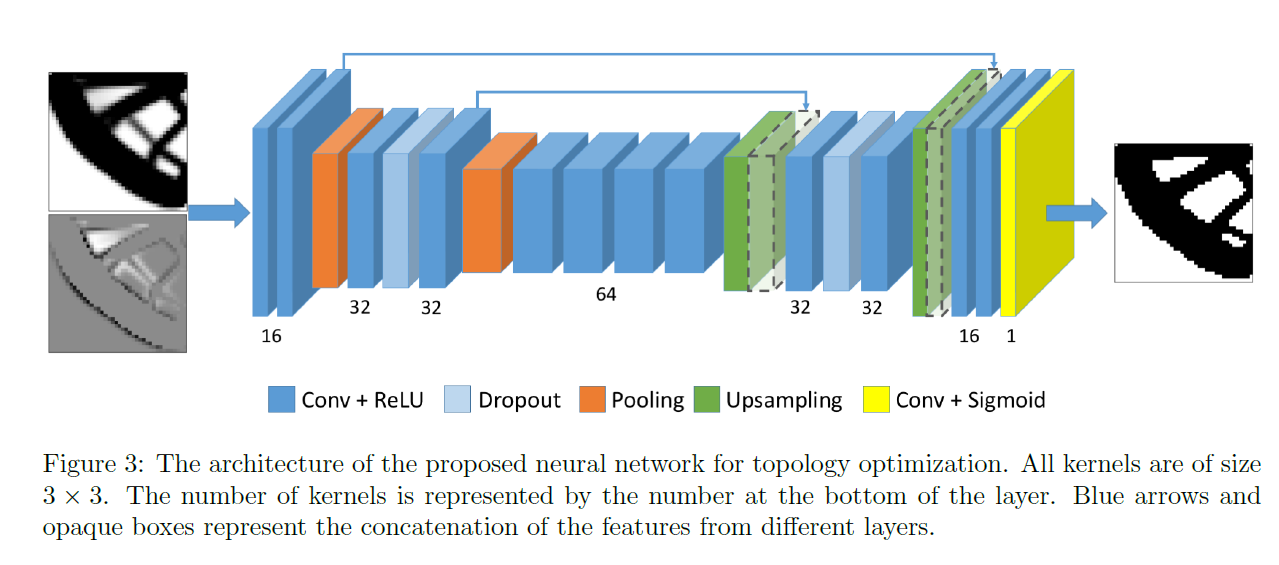
The image \(I\) obtained after the \(N_{0}\) initial iteration steps of SIMP can be seen as the final structure blurred. Since the image \(I^*\) given by the final optimization solution does not contain information about the intermediate process, \(I^*\) can be interpreted as the mask of image \(I\). Thus, the optimization process \(I \rightarrow I^*\) can be seen as a binary image segmentation or foreground-background segmentation process, so the Unet model is constructed for prediction. The specific network structure is shown in the figure: Unet
# set model

Detailed model code is in examples/topopt/topoptmodel.py.

3.3 Parameter Setting

Based on the paper and original code, the following training parameters are given:

DATA_PATH: ./datasets/top_dataset.h5

# model settings
MODEL:
  in_channel: 2
  out_channel: 1
# 4 training cases parameters
LEARNING_RATE = cfg.TRAIN.learning_rate / (1 + cfg.TRAIN.epochs // 15)

3.4 data transform

Based on the paper and original code, the following custom data transform code is given, including random horizontal or vertical flip and random 90 degree rotation, transform input and label simultaneously:

def augmentation(
    input_dict: Dict[str, np.ndarray],
    label_dict: Dict[str, np.ndarray],
    weight_dict: Dict[str, np.ndarray] = None,
) -> Tuple[Dict[str, np.ndarray], Dict[str, np.ndarray], Dict[str, np.ndarray]]:
    """Apply random transformation from D4 symmetry group

    Args:
        input_dict (Dict[str, np.ndarray]): input dict of np.ndarray size `(batch_size, any, height, width)`
        label_dict (Dict[str, np.ndarray]): label dict of np.ndarray size `(batch_size, 1, height, width)`
        weight_dict (Dict[str, np.ndarray]): weight dict if any
    """
    inputs = input_dict["input"]
    labels = label_dict["output"]
    assert len(inputs.shape) == 3
    assert len(labels.shape) == 3

    # random horizontal flip
    if np.random.random() > 0.5:
        inputs = np.flip(inputs, axis=2)
        labels = np.flip(labels, axis=2)
    # random vertical flip
    if np.random.random() > 0.5:
        inputs = np.flip(inputs, axis=1)
        labels = np.flip(labels, axis=1)
    # random 90* rotation
    if np.random.random() > 0.5:
        new_perm = list(range(len(inputs.shape)))
        new_perm[-2], new_perm[-1] = new_perm[-1], new_perm[-2]
        inputs = np.transpose(inputs, new_perm)
        labels = np.transpose(labels, new_perm)

3.5 Constraint Construction

In this case, we use supervised learning method for training, so supervised constraint SupervisedConstraint is used, code as follows:

# set constraints
sup_constraint = ppsci.constraint.SupervisedConstraint(
    {
        "dataset": {
            "name": "NamedArrayDataset",
            "input": {"input": inputs_train},
            "label": {"output": labels_train},
            "transforms": (
                {
                    "FunctionalTransform": {
                        "transform_func": func_module.augmentation,
                    },
                },
            ),
        },
        "batch_size": cfg.TRAIN.batch_size,
        "sampler": {
            "name": "BatchSampler",
            "drop_last": False,
            "shuffle": True,
        },
    },
    ppsci.loss.FunctionalLoss(loss_wrapper(cfg)),
    name="sup_constraint",
)

The first parameter of SupervisedConstraint is the reading configuration of supervised constraint. The "dataset" field in the configuration represents the training dataset information used, and its various fields represent:

  1. name: Dataset type, here "NamedArrayDataset" represents the np.ndarray type dataset read sequentially by batch;
  2. input: Input variable dictionary: {"input_name": input_dataset};
  3. label: Label variable dictionary: {"label_name": label_dataset};
  4. transforms: Dataset preprocessing configuration, where "FunctionalTransform" is user-defined preprocessing method.

The "batch_size" field in the reading configuration represents the batch size specified during training, and the "sampler" field represents the relevant sampling configuration of dataloader.

The second parameter is the loss function. Here custom loss is used, and the value corresponding to \(\beta\) in the loss formula is determined by cfg.vol_coeff.

The third parameter is the name of the constraint condition, which is convenient for subsequent indexing. Here it is named "sup_constraint".

After the constraint construction is completed, encapsulate it into a dictionary with the name we just named as the keyword for subsequent access.

3.6 Sampler Construction

The second dimension of the original data has 100 channels, corresponding to the 100 iteration results of the SIMP algorithm. The goal of this case model is to directly predict the final optimization solution result after 100 steps of iteration of the SIMP algorithm using the iteration result of a certain step in the middle of SIMP. Here, a channel sampler needs to be constructed to randomly extract a channel or directly specify a channel from the second dimension of the input model data according to a certain probability distribution, and then input it into the network for training or inference. This case puts the sampling step into the forward method of the model.

def uniform_sampler() -> Callable[[], int]:
    """Generate uniform sampling function from 1 to 99

    Returns:
        sampler (Callable[[], int]): uniform sampling from 1 to 99
    """
    return lambda: np.random.randint(1, 99)


def poisson_sampler(lam: int) -> Callable[[], int]:
    """Generate poisson sampling function with parameter lam with range 1 to 99

    Args:
        lam (int): poisson rate parameter

    Returns:
        sampler (Callable[[], int]): poisson sampling function with parameter lam with range 1 to 99
    """

    def func():
        iter_ = max(np.random.poisson(lam), 1)
        iter_ = min(iter_, 99)
        return iter_

    return func


def generate_sampler(sampler_type: str = "Fixed", num: int = 0) -> Callable[[], int]:
    """Generate sampler for the number of initial iteration steps

    Args:
        sampler_type (str): "Poisson" for poisson sampler; "Uniform" for uniform sampler; "Fixed" for choosing a fixed number of initial iteration steps.
        num (int): If `sampler_type` == "Poisson", `num` specifies the poisson rate parameter; If `sampler_type` == "Fixed", `num` specifies the fixed number of initial iteration steps.

    Returns:
        sampler (Callable[[], int]): sampler for the number of initial iteration steps
    """
    if sampler_type == "Poisson":
        return poisson_sampler(num)
    elif sampler_type == "Uniform":
        return uniform_sampler()
    else:
        return lambda: num
# initialize SIMP iteration stop time sampler

3.7 Optimizer Construction

The training process will call the optimizer to update model parameters. Here Adam optimizer is selected.

# set optimizer
optimizer = ppsci.optimizer.Adam(learning_rate=LEARNING_RATE, epsilon=1.0e-7)(
    model

3.8 Loss and Metric Construction

3.8.1 Loss Construction

Loss function is confidence loss + beta * volume fraction constraints:

\[ \mathcal{L} = \mathcal{L}_{\text{conf}}(X_{\text{true}}, X_{\text{pred}}) + \beta * \mathcal{L}_{\text{vol}}(X_{\text{true}}, X_{\text{pred}}) \]

confidence loss is binary cross-entropy:

\[ \mathcal{L}_{\text{conf}}(X_{\text{true}}, X_{\text{pred}}) = -\frac{1}{NM}\sum_{i=1}^{N}\sum_{j=1}^{M}\left[X_{\text{true}}^{ij}\log(X_{\text{pred}}^{ij}) + (1 - X_{\text{true}}^{ij})\log(1 - X_{\text{pred}}^{ij})\right] \]

volume fraction constraints:

\[ \mathcal{L}_{\text{vol}}(X_{\text{true}}, X_{\text{pred}}) = (\bar{X}_{\text{pred}} - \bar{X}_{\text{true}})^2 \]

Loss construction code is as follows:

# define loss wrapper
def loss_wrapper(cfg: DictConfig):
    def loss_expr(output_dict, label_dict, weight_dict=None):
        label_true = label_dict["output"].reshape((-1, 1))
        label_pred = output_dict["output"].reshape((-1, 1))
        conf_loss = paddle.mean(
            nn.functional.log_loss(label_pred, label_true, epsilon=1.0e-7)
        )
        vol_loss = paddle.square(paddle.mean(label_true - label_pred))
        return {"output": conf_loss + cfg.vol_coeff * vol_loss}

3.8.2 Metric Construction

The original code of this case chooses Binary Accuracy and IoU for evaluation:

\[ \text{Bin. Acc.} = \frac{w_{00}+w_{11}}{n_{0}+n_{1}} \]
\[ \text{IoU} = \frac{1}{2}\left[\frac{w_{00}}{n_{0}+w_{10}} + \frac{w_{11}}{n_{1}+w_{01}}\right] \]

Where \(n_{0} = w_{00} + w_{01}\), \(n_{1} = w_{10} + w_{11}\), \(w_{tp}\) represents the number of pixel points that are actually class \(t\) and predicted as class \(p\) Metric construction code is as follows:

# define metric
def val_metric(output_dict, label_dict, weight_dict=None):
    label_pred = output_dict["output"]
    label_true = label_dict["output"]
    accurates = paddle.equal(paddle.round(label_true), paddle.round(label_pred))
    acc = paddle.mean(paddle.cast(accurates, dtype=paddle.get_default_dtype()))
    true_negative = paddle.sum(
        paddle.multiply(
            paddle.equal(paddle.round(label_pred), 0.0),
            paddle.equal(paddle.round(label_true), 0.0),
        ),
        dtype=paddle.get_default_dtype(),
    )
    true_positive = paddle.sum(
        paddle.multiply(
            paddle.equal(paddle.round(label_pred), 1.0),
            paddle.equal(paddle.round(label_true), 1.0),
        ),
        dtype=paddle.get_default_dtype(),
    )
    false_negative = paddle.sum(
        paddle.multiply(
            paddle.equal(paddle.round(label_pred), 1.0),
            paddle.equal(paddle.round(label_true), 0.0),
        ),
        dtype=paddle.get_default_dtype(),
    )
    false_positive = paddle.sum(
        paddle.multiply(
            paddle.equal(paddle.round(label_pred), 0.0),
            paddle.equal(paddle.round(label_true), 1.0),
        ),
        dtype=paddle.get_default_dtype(),
    )
    n_negative = paddle.add(false_negative, true_negative)
    n_positive = paddle.add(true_positive, false_positive)
    iou = 0.5 * paddle.add(
        paddle.divide(true_negative, paddle.add(n_negative, false_positive)),
        paddle.divide(true_positive, paddle.add(n_positive, false_negative)),
    )

3.9 Model Training

This case has four sub-cases according to different choices of samplers. Case parameters are as follows:

- INFER.export_path
- INFER.batch_size
- mode

Training code is as follows:

# train models for 4 cases
for sampler_key, num in cfg.CASE_PARAM:

    # initialize SIMP iteration stop time sampler
    SIMP_stop_point_sampler = func_module.generate_sampler(sampler_key, num)

    # initialize logger for training
    sampler_name = sampler_key + str(num) if num else sampler_key
    OUTPUT_DIR = osp.join(
        cfg.output_dir, f"{sampler_name}_vol_coeff{cfg.vol_coeff}"
    )
    logger.init_logger("ppsci", osp.join(OUTPUT_DIR, "train.log"), "info")

    # set model
    model = TopOptNN(**cfg.MODEL, channel_sampler=SIMP_stop_point_sampler)

    # set optimizer
    optimizer = ppsci.optimizer.Adam(learning_rate=LEARNING_RATE, epsilon=1.0e-7)(
        model
    )

    # initialize solver
    solver = ppsci.solver.Solver(
        model,
        constraint,
        OUTPUT_DIR,
        optimizer,
        epochs=cfg.TRAIN.epochs,
        iters_per_epoch=ITERS_PER_EPOCH,
        eval_during_train=cfg.TRAIN.eval_during_train,
        seed=cfg.seed,
    )

    # train model

3.10 Evaluation Model

For the four trained models, different channel samplers are used respectively (the second dimension of the original data corresponds to the 100-step output result of the SIMP algorithm, uniformly taking the 5th, 10th, 15th, 20th, ..., 80th channels of the second dimension of the original data and their corresponding gradient information as new inputs to construct the evaluation dataset) for evaluation. During each evaluation, only cfg.EVAL.num_val_step bacth data are taken to calculate their average Binary Accuracy and IoU metrics; at the same time, the evaluation result needs to be compared with the threshold judgment result of the input data itself (0.5 as the threshold). Please refer to Complete Code for specific code.

3.10.1 Validator Construction

To apply PaddleScience API, here a validator SupervisedValidator is constructed for evaluation at each evaluation:

sup_validator = ppsci.validate.SupervisedValidator(
    {
        "dataset": {
            "name": "NamedArrayDataset",
            "input": {"input": inputs_eval},
            "label": {"output": labels_eval},
            "transforms": (
                {
                    "FunctionalTransform": {
                        "transform_func": func_module.augmentation,
                    },
                },
            ),
        },
        "batch_size": cfg.EVAL.batch_size,
        "sampler": {
            "name": "BatchSampler",
            "drop_last": False,
            "shuffle": True,
        },
        "num_workers": 0,
    },
    ppsci.loss.FunctionalLoss(loss_wrapper(cfg)),
    {"output": lambda out: out["output"]},
    {"metric": ppsci.metric.FunctionalMetric(val_metric)},
    name="sup_validator",
)

The validator configuration is similar to the setting of Constraint Construction. In the reading configuration, "num_workers": 0 means single-thread reading; evaluation metric "metric" is custom evaluation metric, including Binary Accuracy and IoU.

3.11 Evaluation Result Visualization

Use ppsci.utils.misc.plot_curve() method to directly plot the results of Binary Accuracy and IoU:

ppsci.utils.misc.plot_curve(
    acc_results_summary,
    xlabel="iteration",
    ylabel="accuracy",
    output_dir=cfg.output_dir,
)
ppsci.utils.misc.plot_curve(
    iou_results_summary, xlabel="iteration", ylabel="iou", output_dir=cfg.output_dir

4. Complete Code

topopt.py
  1
  2
  3
  4
  5
  6
  7
  8
  9
 10
 11
 12
 13
 14
 15
 16
 17
 18
 19
 20
 21
 22
 23
 24
 25
 26
 27
 28
 29
 30
 31
 32
 33
 34
 35
 36
 37
 38
 39
 40
 41
 42
 43
 44
 45
 46
 47
 48
 49
 50
 51
 52
 53
 54
 55
 56
 57
 58
 59
 60
 61
 62
 63
 64
 65
 66
 67
 68
 69
 70
 71
 72
 73
 74
 75
 76
 77
 78
 79
 80
 81
 82
 83
 84
 85
 86
 87
 88
 89
 90
 91
 92
 93
 94
 95
 96
 97
 98
 99
100
101
102
103
104
105
106
107
108
109
110
111
112
113
114
115
116
117
118
119
120
121
122
123
124
125
126
127
128
129
130
131
132
133
134
135
136
137
138
139
140
141
142
143
144
145
146
147
148
149
150
151
152
153
154
155
156
157
158
159
160
161
162
163
164
165
166
167
168
169
170
171
172
173
174
175
176
177
178
179
180
181
182
183
184
185
186
187
188
189
190
191
192
193
194
195
196
197
198
199
200
201
202
203
204
205
206
207
208
209
210
211
212
213
214
215
216
217
218
219
220
221
222
223
224
225
226
227
228
229
230
231
232
233
234
235
236
237
238
239
240
241
242
243
244
245
246
247
248
249
250
251
252
253
254
255
256
257
258
259
260
261
262
263
264
265
266
267
268
269
270
271
272
273
274
275
276
277
278
279
280
281
282
283
284
285
286
287
288
289
290
291
292
293
294
295
296
297
298
299
300
301
302
303
304
305
306
307
308
309
310
311
312
313
314
315
316
317
318
319
320
321
322
323
324
325
326
327
328
329
330
331
332
333
334
335
336
337
338
339
340
341
342
343
344
345
346
347
348
349
350
351
352
353
354
355
356
357
358
359
360
361
362
363
364
365
366
367
368
369
370
371
372
373
374
375
376
377
378
379
380
381
382
383
384
385
386
387
388
389
390
391
392
393
394
395
396
397
398
399
400
401
402
403
404
405
406
407
408
409
410
411
412
413
414
415
416
417
418
419
420
421
422
423
424
425
426
427
428
429
430
431
432
433
434
435
436
437
438
439
440
441
442
443
444
445
446
447
448
449
# Copyright (c) 2023 PaddlePaddle Authors. All Rights Reserved.

# Licensed under the Apache License, Version 2.0 (the "License");
# you may not use this file except in compliance with the License.
# You may obtain a copy of the License at

#     http://www.apache.org/licenses/LICENSE-2.0

# Unless required by applicable law or agreed to in writing, software
# distributed under the License is distributed on an "AS IS" BASIS,
# WITHOUT WARRANTIES OR CONDITIONS OF ANY KIND, either express or implied.
# See the License for the specific language governing permissions and
# limitations under the License.

from os import path as osp
from typing import Dict

import functions as func_module
import h5py
import hydra
import numpy as np
import paddle
from omegaconf import DictConfig
from paddle import nn
from topoptmodel import TopOptNN

import ppsci
from ppsci.utils import logger


def train(cfg: DictConfig):
    # set random seed for reproducibility
    ppsci.utils.misc.set_random_seed(cfg.seed)
    # initialize logger
    logger.init_logger("ppsci", osp.join(cfg.output_dir, f"{cfg.mode}.log"), "info")

    # 4 training cases parameters
    LEARNING_RATE = cfg.TRAIN.learning_rate / (1 + cfg.TRAIN.epochs // 15)
    ITERS_PER_EPOCH = int(cfg.n_samples * cfg.train_test_ratio / cfg.TRAIN.batch_size)

    # read h5 data
    h5data = h5py.File(cfg.DATA_PATH, "r")
    data_iters = np.array(h5data["iters"])
    data_targets = np.array(h5data["targets"])

    # generate training dataset
    inputs_train, labels_train = func_module.generate_train_test(
        data_iters, data_targets, cfg.train_test_ratio, cfg.n_samples
    )

    # set constraints
    sup_constraint = ppsci.constraint.SupervisedConstraint(
        {
            "dataset": {
                "name": "NamedArrayDataset",
                "input": {"input": inputs_train},
                "label": {"output": labels_train},
                "transforms": (
                    {
                        "FunctionalTransform": {
                            "transform_func": func_module.augmentation,
                        },
                    },
                ),
            },
            "batch_size": cfg.TRAIN.batch_size,
            "sampler": {
                "name": "BatchSampler",
                "drop_last": False,
                "shuffle": True,
            },
        },
        ppsci.loss.FunctionalLoss(loss_wrapper(cfg)),
        name="sup_constraint",
    )
    constraint = {sup_constraint.name: sup_constraint}

    # train models for 4 cases
    for sampler_key, num in cfg.CASE_PARAM:

        # initialize SIMP iteration stop time sampler
        SIMP_stop_point_sampler = func_module.generate_sampler(sampler_key, num)

        # initialize logger for training
        sampler_name = sampler_key + str(num) if num else sampler_key
        OUTPUT_DIR = osp.join(
            cfg.output_dir, f"{sampler_name}_vol_coeff{cfg.vol_coeff}"
        )
        logger.init_logger("ppsci", osp.join(OUTPUT_DIR, "train.log"), "info")

        # set model
        model = TopOptNN(**cfg.MODEL, channel_sampler=SIMP_stop_point_sampler)

        # set optimizer
        optimizer = ppsci.optimizer.Adam(learning_rate=LEARNING_RATE, epsilon=1.0e-7)(
            model
        )

        # initialize solver
        solver = ppsci.solver.Solver(
            model,
            constraint,
            OUTPUT_DIR,
            optimizer,
            epochs=cfg.TRAIN.epochs,
            iters_per_epoch=ITERS_PER_EPOCH,
            eval_during_train=cfg.TRAIN.eval_during_train,
            seed=cfg.seed,
        )

        # train model
        solver.train()


# evaluate 4 models
def evaluate(cfg: DictConfig):
    # set random seed for reproducibility
    ppsci.utils.misc.set_random_seed(cfg.seed)
    # initialize logger
    logger.init_logger("ppsci", osp.join(cfg.output_dir, f"{cfg.mode}.log"), "info")

    # fixed iteration stop times for evaluation
    iterations_stop_times = range(5, 85, 5)
    model = TopOptNN(**cfg.MODEL)

    # evaluation for 4 cases
    acc_results_summary = {}
    iou_results_summary = {}

    # read h5 data
    h5data = h5py.File(cfg.DATA_PATH, "r")
    data_iters = np.array(h5data["iters"])
    data_targets = np.array(h5data["targets"])

    for case_name, model_path in cfg.EVAL.pretrained_model_path_dict.items():
        acc_results, iou_results = evaluate_model(
            cfg, model, model_path, data_iters, data_targets, iterations_stop_times
        )

        acc_results_summary[case_name] = acc_results
        iou_results_summary[case_name] = iou_results

    # calculate thresholding results
    th_acc_results = []
    th_iou_results = []
    for stop_iter in iterations_stop_times:
        SIMP_stop_point_sampler = func_module.generate_sampler("Fixed", stop_iter)

        current_acc_results = []
        current_iou_results = []

        # only calculate for NUM_VAL_STEP times of iteration
        for _ in range(cfg.EVAL.num_val_step):
            input_full_channel, label = func_module.generate_train_test(
                data_iters, data_targets, 1.0, cfg.EVAL.batch_size
            )
            # thresholding
            SIMP_initial_iter_time = SIMP_stop_point_sampler()  # channel k
            input_channel_k = paddle.to_tensor(
                input_full_channel, dtype=paddle.get_default_dtype()
            )[:, SIMP_initial_iter_time, :, :]
            input_channel_k_minus_1 = paddle.to_tensor(
                input_full_channel, dtype=paddle.get_default_dtype()
            )[:, SIMP_initial_iter_time - 1, :, :]
            input = paddle.stack(
                (input_channel_k, input_channel_k - input_channel_k_minus_1), axis=1
            )
            out = paddle.cast(
                paddle.to_tensor(input)[:, 0:1, :, :] > 0.5,
                dtype=paddle.get_default_dtype(),
            )
            th_result = val_metric(
                {"output": out},
                {"output": paddle.to_tensor(label, dtype=paddle.get_default_dtype())},
            )
            acc_results, iou_results = th_result["Binary_Acc"], th_result["IoU"]
            current_acc_results.append(acc_results)
            current_iou_results.append(iou_results)

        th_acc_results.append(np.mean(current_acc_results))
        th_iou_results.append(np.mean(current_iou_results))

    acc_results_summary["thresholding"] = th_acc_results
    iou_results_summary["thresholding"] = th_iou_results

    ppsci.utils.misc.plot_curve(
        acc_results_summary,
        xlabel="iteration",
        ylabel="accuracy",
        output_dir=cfg.output_dir,
    )
    ppsci.utils.misc.plot_curve(
        iou_results_summary, xlabel="iteration", ylabel="iou", output_dir=cfg.output_dir
    )


def evaluate_model(
    cfg, model, pretrained_model_path, data_iters, data_targets, iterations_stop_times
):
    # load model parameters
    solver = ppsci.solver.Solver(
        model,
        epochs=1,
        iters_per_epoch=cfg.EVAL.num_val_step,
        eval_with_no_grad=True,
        pretrained_model_path=pretrained_model_path,
    )

    acc_results = []
    iou_results = []

    # evaluation for different fixed iteration stop times
    for stop_iter in iterations_stop_times:
        # only evaluate for NUM_VAL_STEP times of iteration
        inputs_eval, labels_eval = func_module.generate_train_test(
            data_iters, data_targets, 1.0, cfg.EVAL.batch_size * cfg.EVAL.num_val_step
        )

        sup_validator = ppsci.validate.SupervisedValidator(
            {
                "dataset": {
                    "name": "NamedArrayDataset",
                    "input": {"input": inputs_eval},
                    "label": {"output": labels_eval},
                    "transforms": (
                        {
                            "FunctionalTransform": {
                                "transform_func": func_module.augmentation,
                            },
                        },
                    ),
                },
                "batch_size": cfg.EVAL.batch_size,
                "sampler": {
                    "name": "BatchSampler",
                    "drop_last": False,
                    "shuffle": True,
                },
                "num_workers": 0,
            },
            ppsci.loss.FunctionalLoss(loss_wrapper(cfg)),
            {"output": lambda out: out["output"]},
            {"metric": ppsci.metric.FunctionalMetric(val_metric)},
            name="sup_validator",
        )
        validator = {sup_validator.name: sup_validator}
        solver.validator = validator

        # modify the channel_sampler in model
        SIMP_stop_point_sampler = func_module.generate_sampler("Fixed", stop_iter)
        solver.model.channel_sampler = SIMP_stop_point_sampler

        _, eval_result = solver.eval()

        current_acc_results = eval_result["metric"]["Binary_Acc"]
        current_iou_results = eval_result["metric"]["IoU"]

        acc_results.append(current_acc_results)
        iou_results.append(current_iou_results)

    return acc_results, iou_results


# define loss wrapper
def loss_wrapper(cfg: DictConfig):
    def loss_expr(output_dict, label_dict, weight_dict=None):
        label_true = label_dict["output"].reshape((-1, 1))
        label_pred = output_dict["output"].reshape((-1, 1))
        conf_loss = paddle.mean(
            nn.functional.log_loss(label_pred, label_true, epsilon=1.0e-7)
        )
        vol_loss = paddle.square(paddle.mean(label_true - label_pred))
        return {"output": conf_loss + cfg.vol_coeff * vol_loss}

    return loss_expr


# define metric
def val_metric(output_dict, label_dict, weight_dict=None):
    label_pred = output_dict["output"]
    label_true = label_dict["output"]
    accurates = paddle.equal(paddle.round(label_true), paddle.round(label_pred))
    acc = paddle.mean(paddle.cast(accurates, dtype=paddle.get_default_dtype()))
    true_negative = paddle.sum(
        paddle.multiply(
            paddle.equal(paddle.round(label_pred), 0.0),
            paddle.equal(paddle.round(label_true), 0.0),
        ),
        dtype=paddle.get_default_dtype(),
    )
    true_positive = paddle.sum(
        paddle.multiply(
            paddle.equal(paddle.round(label_pred), 1.0),
            paddle.equal(paddle.round(label_true), 1.0),
        ),
        dtype=paddle.get_default_dtype(),
    )
    false_negative = paddle.sum(
        paddle.multiply(
            paddle.equal(paddle.round(label_pred), 1.0),
            paddle.equal(paddle.round(label_true), 0.0),
        ),
        dtype=paddle.get_default_dtype(),
    )
    false_positive = paddle.sum(
        paddle.multiply(
            paddle.equal(paddle.round(label_pred), 0.0),
            paddle.equal(paddle.round(label_true), 1.0),
        ),
        dtype=paddle.get_default_dtype(),
    )
    n_negative = paddle.add(false_negative, true_negative)
    n_positive = paddle.add(true_positive, false_positive)
    iou = 0.5 * paddle.add(
        paddle.divide(true_negative, paddle.add(n_negative, false_positive)),
        paddle.divide(true_positive, paddle.add(n_positive, false_negative)),
    )
    return {"Binary_Acc": acc, "IoU": iou}


# export model
def export(cfg: DictConfig):
    # set model
    model = TopOptNN(**cfg.MODEL)

    # initialize solver
    solver = ppsci.solver.Solver(
        model,
        eval_with_no_grad=True,
        pretrained_model_path=cfg.INFER.pretrained_model_path_dict[
            cfg.INFER.pretrained_model_name
        ],
    )

    # export model
    from paddle.static import InputSpec

    input_spec = [{"input": InputSpec([None, 2, 40, 40], "float32", name="input")}]

    solver.export(input_spec, cfg.INFER.export_path)


def inference(cfg: DictConfig):
    # read h5 data
    h5data = h5py.File(cfg.DATA_PATH, "r")
    data_iters = np.array(h5data["iters"])
    data_targets = np.array(h5data["targets"])
    idx = np.random.choice(len(data_iters), cfg.INFER.img_num, False)
    data_iters = data_iters[idx]
    data_targets = data_targets[idx]

    sampler = func_module.generate_sampler(cfg.INFER.sampler_key, cfg.INFER.sampler_num)
    data_iters = channel_sampling(sampler, data_iters)

    from deploy.python_infer import pinn_predictor

    predictor = pinn_predictor.PINNPredictor(cfg)

    input_dict = {"input": data_iters}
    output_dict = predictor.predict(input_dict, cfg.INFER.batch_size)

    # mapping data to output_key
    output_dict = {
        store_key: output_dict[infer_key]
        for store_key, infer_key in zip({"output"}, output_dict.keys())
    }

    save_topopt_img(
        input_dict,
        output_dict,
        data_targets,
        cfg.INFER.save_res_path,
        cfg.INFER.res_img_figsize,
        cfg.INFER.save_npy,
    )


# used for inference
def channel_sampling(sampler, input):
    SIMP_initial_iter_time = sampler()
    input_channel_k = input[:, SIMP_initial_iter_time, :, :]
    input_channel_k_minus_1 = input[:, SIMP_initial_iter_time - 1, :, :]
    input = np.stack(
        (input_channel_k, input_channel_k - input_channel_k_minus_1), axis=1
    )
    return input


# used for inference
def save_topopt_img(
    input_dict: Dict[str, np.ndarray],
    output_dict: Dict[str, np.ndarray],
    ground_truth: np.ndarray,
    save_dir: str,
    figsize: tuple = None,
    save_npy: bool = False,
):

    input = input_dict["input"]
    output = output_dict["output"]
    import os

    import matplotlib.pyplot as plt

    os.makedirs(save_dir, exist_ok=True)
    for i in range(len(input)):
        plt.figure(figsize=figsize)
        plt.subplot(1, 4, 1)
        plt.axis("off")
        plt.imshow(input[i][0], cmap="gray")
        plt.title("Input Image")
        plt.subplot(1, 4, 2)
        plt.axis("off")
        plt.imshow(input[i][1], cmap="gray")
        plt.title("Input Gradient")
        plt.subplot(1, 4, 3)
        plt.axis("off")
        plt.imshow(np.round(output[i][0]), cmap="gray")
        plt.title("Prediction")
        plt.subplot(1, 4, 4)
        plt.axis("off")
        plt.imshow(np.round(ground_truth[i][0]), cmap="gray")
        plt.title("Ground Truth")
        plt.show()
        plt.savefig(osp.join(save_dir, f"Prediction_{i}.png"))
        plt.close()
        if save_npy:
            with open(osp(save_dir, f"Prediction_{i}.npy"), "wb") as f:
                np.save(f, output[i])


@hydra.main(version_base=None, config_path="./conf", config_name="topopt.yaml")
def main(cfg: DictConfig):
    if cfg.mode == "train":
        train(cfg)
    elif cfg.mode == "eval":
        evaluate(cfg)
    elif cfg.mode == "export":
        export(cfg)
    elif cfg.mode == "infer":
        inference(cfg)
    else:
        raise ValueError(
            f"cfg.mode should in ['train', 'eval', 'export', 'infer'], but got '{cfg.mode}'"
        )


if __name__ == "__main__":
    main()
functions.py
# Copyright (c) 2023 PaddlePaddle Authors. All Rights Reserved.

# Licensed under the Apache License, Version 2.0 (the "License");
# you may not use this file except in compliance with the License.
# You may obtain a copy of the License at

#     http://www.apache.org/licenses/LICENSE-2.0

# Unless required by applicable law or agreed to in writing, software
# distributed under the License is distributed on an "AS IS" BASIS,
# WITHOUT WARRANTIES OR CONDITIONS OF ANY KIND, either express or implied.
# See the License for the specific language governing permissions and
# limitations under the License.

from typing import Callable
from typing import Dict
from typing import Tuple
from typing import Union

import numpy as np


def uniform_sampler() -> Callable[[], int]:
    """Generate uniform sampling function from 1 to 99

    Returns:
        sampler (Callable[[], int]): uniform sampling from 1 to 99
    """
    return lambda: np.random.randint(1, 99)


def poisson_sampler(lam: int) -> Callable[[], int]:
    """Generate poisson sampling function with parameter lam with range 1 to 99

    Args:
        lam (int): poisson rate parameter

    Returns:
        sampler (Callable[[], int]): poisson sampling function with parameter lam with range 1 to 99
    """

    def func():
        iter_ = max(np.random.poisson(lam), 1)
        iter_ = min(iter_, 99)
        return iter_

    return func


def generate_sampler(sampler_type: str = "Fixed", num: int = 0) -> Callable[[], int]:
    """Generate sampler for the number of initial iteration steps

    Args:
        sampler_type (str): "Poisson" for poisson sampler; "Uniform" for uniform sampler; "Fixed" for choosing a fixed number of initial iteration steps.
        num (int): If `sampler_type` == "Poisson", `num` specifies the poisson rate parameter; If `sampler_type` == "Fixed", `num` specifies the fixed number of initial iteration steps.

    Returns:
        sampler (Callable[[], int]): sampler for the number of initial iteration steps
    """
    if sampler_type == "Poisson":
        return poisson_sampler(num)
    elif sampler_type == "Uniform":
        return uniform_sampler()
    else:
        return lambda: num


def generate_train_test(
    data_iters: np.ndarray,
    data_targets: np.ndarray,
    train_test_ratio: float,
    n_sample: int,
) -> Union[
    Tuple[np.ndarray, np.ndarray], Tuple[np.ndarray, np.ndarray, np.ndarray, np.ndarray]
]:
    """Generate training and testing set

    Args:
        data_iters (np.ndarray): data with 100 channels corresponding to the results of 100 steps of SIMP algorithm
        data_targets (np.ndarray): final optimization solution given by SIMP algorithm
        train_test_ratio (float): split ratio of training and testing sets, if `train_test_ratio` = 1 then only return training data
        n_sample (int): number of total samples in training and testing sets to be sampled from the h5 dataset

    Returns:
        Union[Tuple[np.ndarray, np.ndarray], Tuple[np.ndarray, np.ndarray, np.ndarray, np.ndarray]]: if `train_test_ratio` = 1, return (train_inputs, train_labels), else return (train_inputs, train_labels, test_inputs, test_labels)
    """
    n_obj = len(data_iters)
    idx = np.arange(n_obj)
    np.random.shuffle(idx)
    train_idx = idx[: int(train_test_ratio * n_sample)]
    if train_test_ratio == 1.0:
        return data_iters[train_idx], data_targets[train_idx]

    test_idx = idx[int(train_test_ratio * n_sample) :]
    train_iters = data_iters[train_idx]
    train_targets = data_targets[train_idx]
    test_iters = data_iters[test_idx]
    test_targets = data_targets[test_idx]
    return train_iters, train_targets, test_iters, test_targets


def augmentation(
    input_dict: Dict[str, np.ndarray],
    label_dict: Dict[str, np.ndarray],
    weight_dict: Dict[str, np.ndarray] = None,
) -> Tuple[Dict[str, np.ndarray], Dict[str, np.ndarray], Dict[str, np.ndarray]]:
    """Apply random transformation from D4 symmetry group

    Args:
        input_dict (Dict[str, np.ndarray]): input dict of np.ndarray size `(batch_size, any, height, width)`
        label_dict (Dict[str, np.ndarray]): label dict of np.ndarray size `(batch_size, 1, height, width)`
        weight_dict (Dict[str, np.ndarray]): weight dict if any
    """
    inputs = input_dict["input"]
    labels = label_dict["output"]
    assert len(inputs.shape) == 3
    assert len(labels.shape) == 3

    # random horizontal flip
    if np.random.random() > 0.5:
        inputs = np.flip(inputs, axis=2)
        labels = np.flip(labels, axis=2)
    # random vertical flip
    if np.random.random() > 0.5:
        inputs = np.flip(inputs, axis=1)
        labels = np.flip(labels, axis=1)
    # random 90* rotation
    if np.random.random() > 0.5:
        new_perm = list(range(len(inputs.shape)))
        new_perm[-2], new_perm[-1] = new_perm[-1], new_perm[-2]
        inputs = np.transpose(inputs, new_perm)
        labels = np.transpose(labels, new_perm)

    return {"input": inputs}, {"output": labels}, weight_dict
topoptmodel.py
# Copyright (c) 2023 PaddlePaddle Authors. All Rights Reserved.

# Licensed under the Apache License, Version 2.0 (the "License");
# you may not use this file except in compliance with the License.
# You may obtain a copy of the License at

#     http://www.apache.org/licenses/LICENSE-2.0

# Unless required by applicable law or agreed to in writing, software
# distributed under the License is distributed on an "AS IS" BASIS,
# WITHOUT WARRANTIES OR CONDITIONS OF ANY KIND, either express or implied.
# See the License for the specific language governing permissions and
# limitations under the License.

import paddle
from paddle import nn

import ppsci


# NCHW data format
class TopOptNN(ppsci.arch.UNetEx):
    """Neural network for Topology Optimization, inherited from `ppsci.arch.UNetEx`

    [Sosnovik, I., & Oseledets, I. (2019). Neural networks for topology optimization. Russian Journal of Numerical Analysis and Mathematical Modelling, 34(4), 215-223.](https://arxiv.org/pdf/1709.09578)

    Args:
        input_key (str): Name of function data for input.
        output_key (str): Name of function data for output.
        in_channel (int): Number of channels of input.
        out_channel (int): Number of channels of output.
        kernel_size (int, optional): Size of kernel of convolution layer. Defaults to 3.
        filters (Tuple[int, ...], optional): Number of filters. Defaults to (16, 32, 64).
        layers (int, optional): Number of encoders or decoders. Defaults to 3.
        channel_sampler (callable, optional): The sampling function for the initial iteration time
                (corresponding to the channel number of the input) of SIMP algorithm. The default value
                is None, when it is None, input for the forward method should be sampled and prepared
                with the shape of [batch, 2, height, width] before passing to forward method.
        weight_norm (bool, optional): Whether use weight normalization layer. Defaults to True.
        batch_norm (bool, optional): Whether add batch normalization layer. Defaults to True.
        activation (Type[nn.Layer], optional): Name of activation function. Defaults to nn.ReLU.

    Examples:
        >>> import ppsci
        >>> model = ppsci.arch.ppsci.arch.TopOptNN("input", "output", 2, 1, 3, (16, 32, 64), 2, lambda: 1, Flase, False)
    """

    def __init__(
        self,
        input_key="input",
        output_key="output",
        in_channel=2,
        out_channel=1,
        kernel_size=3,
        filters=(16, 32, 64),
        layers=2,
        channel_sampler=None,
        weight_norm=False,
        batch_norm=False,
        activation=nn.ReLU,
    ):
        super().__init__(
            input_key=input_key,
            output_key=output_key,
            in_channel=in_channel,
            out_channel=out_channel,
            kernel_size=kernel_size,
            filters=filters,
            layers=layers,
            weight_norm=weight_norm,
            batch_norm=batch_norm,
            activation=activation,
        )
        self.in_channel = in_channel
        self.out_channel = out_channel
        self.filters = filters
        self.channel_sampler = channel_sampler
        self.activation = activation

        # Modify Layers
        self.encoder[1] = nn.Sequential(
            nn.MaxPool2D(self.in_channel, padding="SAME"),
            self.encoder[1][0],
            nn.Dropout2D(0.1),
            self.encoder[1][1],
        )
        self.encoder[2] = nn.Sequential(
            nn.MaxPool2D(2, padding="SAME"), self.encoder[2]
        )
        # Conv2D used in reference code in decoder
        self.decoders[0] = nn.Sequential(
            nn.Conv2D(
                self.filters[-1], self.filters[-1], kernel_size=3, padding="SAME"
            ),
            self.activation(),
            nn.Conv2D(
                self.filters[-1], self.filters[-1], kernel_size=3, padding="SAME"
            ),
            self.activation(),
        )
        self.decoders[1] = nn.Sequential(
            nn.Conv2D(
                sum(self.filters[-2:]), self.filters[-2], kernel_size=3, padding="SAME"
            ),
            self.activation(),
            nn.Dropout2D(0.1),
            nn.Conv2D(
                self.filters[-2], self.filters[-2], kernel_size=3, padding="SAME"
            ),
            self.activation(),
        )
        self.decoders[2] = nn.Sequential(
            nn.Conv2D(
                sum(self.filters[:-1]), self.filters[-3], kernel_size=3, padding="SAME"
            ),
            self.activation(),
            nn.Conv2D(
                self.filters[-3], self.filters[-3], kernel_size=3, padding="SAME"
            ),
            self.activation(),
        )
        self.output = nn.Sequential(
            nn.Conv2D(
                self.filters[-3], self.out_channel, kernel_size=3, padding="SAME"
            ),
            nn.Sigmoid(),
        )

    def forward(self, x):
        if self.channel_sampler is not None:
            SIMP_initial_iter_time = self.channel_sampler()  # channel k
            input_channel_k = x[self.input_keys[0]][:, SIMP_initial_iter_time, :, :]
            input_channel_k_minus_1 = x[self.input_keys[0]][
                :, SIMP_initial_iter_time - 1, :, :
            ]
            x = paddle.stack(
                (input_channel_k, input_channel_k - input_channel_k_minus_1), axis=1
            )
        else:
            x = x[self.input_keys[0]]
        # encode
        upsampling_size = []
        skip_connection = []
        n_encoder = len(self.encoder)
        for i in range(n_encoder):
            x = self.encoder[i](x)
            if i is not (n_encoder - 1):
                upsampling_size.append(x.shape[-2:])
                skip_connection.append(x)

        # decode
        n_decoder = len(self.decoders)
        for i in range(n_decoder):
            x = self.decoders[i](x)
            if i is not (n_decoder - 1):
                up_size = upsampling_size.pop()
                x = nn.UpsamplingNearest2D(up_size)(x)
                skip_output = skip_connection.pop()
                x = paddle.concat((skip_output, x), axis=1)

        out = self.output(x)
        return {self.output_keys[0]: out}

5. Result Display

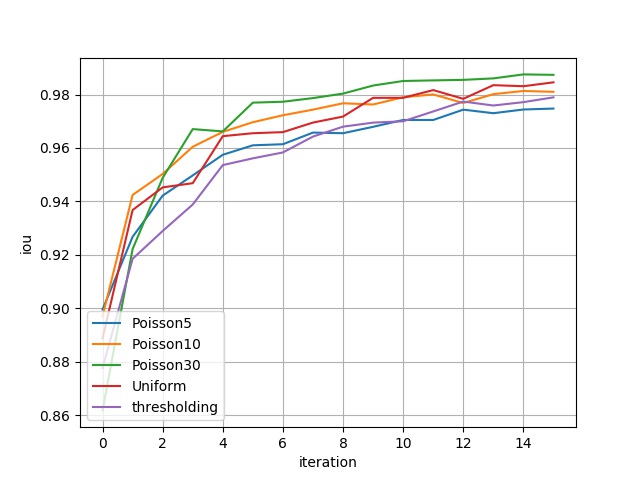
The figure below shows the performance of 4 models on 16 different evaluation datasets respectively, including two metrics: Binary Accuracy and IoU. The abscissa represents different evaluation datasets, for example: abscissa \(i\) represents the evaluation dataset constructed by the \(5\cdot(i+1)\)-th channel of the second dimension of the original data and its corresponding gradient information; the ordinate is the evaluation metric. The metric corresponding to thresholding can be understood as benchmark.
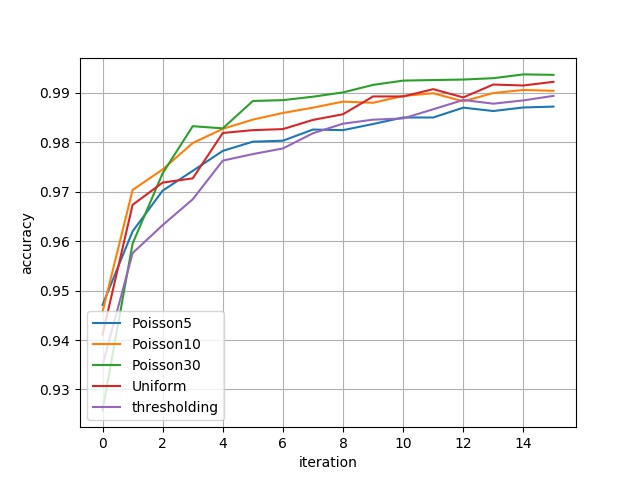
bin_acc

Binary Accuracy Result

iou

IoU Result

The metrics in the above figure are represented in a table as:

bin_acc eval_dataset_ch_5 eval_dataset_ch_10 eval_dataset_ch_15 eval_dataset_ch_20 eval_dataset_ch_25 eval_dataset_ch_30 eval_dataset_ch_35 eval_dataset_ch_40 eval_dataset_ch_45 eval_dataset_ch_50 eval_dataset_ch_55 eval_dataset_ch_60 eval_dataset_ch_65 eval_dataset_ch_70 eval_dataset_ch_75 eval_dataset_ch_80
Poisson5 0.9471 0.9619 0.9702 0.9742 0.9782 0.9801 0.9803 0.9825 0.9824 0.9837 0.9850 0.9850 0.9870 0.9863 0.9870 0.9872
Poisson10 0.9457 0.9703 0.9745 0.9798 0.9827 0.9845 0.9859 0.9870 0.9882 0.9880 0.9893 0.9899 0.9882 0.9899 0.9905 0.9904
Poisson30 0.9257 0.9595 0.9737 0.9832 0.9828 0.9883 0.9885 0.9892 0.9901 0.9916 0.9924 0.9925 0.9926 0.9929 0.9937 0.9936
Uniform 0.9410 0.9673 0.9718 0.9727 0.9818 0.9824 0.9826 0.9845 0.9856 0.9892 0.9892 0.9907 0.9890 0.9916 0.9914 0.9922
iou eval_dataset_ch_5 eval_dataset_ch_10 eval_dataset_ch_15 eval_dataset_ch_20 eval_dataset_ch_25 eval_dataset_ch_30 eval_dataset_ch_35 eval_dataset_ch_40 eval_dataset_ch_45 eval_dataset_ch_50 eval_dataset_ch_55 eval_dataset_ch_60 eval_dataset_ch_65 eval_dataset_ch_70 eval_dataset_ch_75 eval_dataset_ch_80
Poisson5 0.8995 0.9267 0.9421 0.9497 0.9574 0.9610 0.9614 0.9657 0.9655 0.9679 0.9704 0.9704 0.9743 0.9730 0.9744 0.9747
Poisson10 0.8969 0.9424 0.9502 0.9604 0.9660 0.9696 0.9722 0.9743 0.9767 0.9762 0.9789 0.9800 0.9768 0.9801 0.9813 0.9810
Poisson30 0.8617 0.9221 0.9488 0.9670 0.9662 0.9769 0.9773 0.9786 0.9803 0.9833 0.9850 0.9853 0.9855 0.9860 0.9875 0.9873
Uniform 0.8887 0.9367 0.9452 0.9468 0.9644 0.9655 0.9659 0.9695 0.9717 0.9787 0.9787 0.9816 0.9784 0.9835 0.9831 0.9845

6. References