Skip to content

neuraloperator

# darcy-flow dataset download
# linux
wget -c https://paddle-org.bj.bcebos.com/paddlescience/datasets/neuraloperator/darcy_flow/darcy_train_16.npy -P ./datasets/darcyflow/
wget -c https://paddle-org.bj.bcebos.com/paddlescience/datasets/neuraloperator/darcy_flow/darcy_test_32.npy -P ./datasets/darcyflow/
wget -c https://paddle-org.bj.bcebos.com/paddlescience/datasets/neuraloperator/darcy_flow/darcy_test_16.npy -P ./datasets/darcyflow/
# windows
# curl https://paddle-org.bj.bcebos.com/paddlescience/datasets/neuraloperator/darcy_flow/darcy_train_16.npy -o ./datasets/darcyflow/darcy_train_16.npy
# curl https://paddle-org.bj.bcebos.com/paddlescience/datasets/neuraloperator/darcy_flow/darcy_test_32.npy -o ./datasets/darcyflow/darcy_test_32.npy
# curl https://paddle-org.bj.bcebos.com/paddlescience/datasets/neuraloperator/darcy_flow/darcy_test_16.npy -o ./datasets/darcyflow/darcy_test_16.npy
# tfno model training
python train_tfno.py
# uno model training
python train_uno.py

# SWE dataset download
# linux
wget -c https://paddle-org.bj.bcebos.com/paddlescience/datasets/neuraloperator/SWE_data/train_SWE_32x64.npy -P ./datasets/SWE/
wget -c https://paddle-org.bj.bcebos.com/paddlescience/datasets/neuraloperator/SWE_data/test_SWE_64x128.npy -P ./datasets/SWE/
wget -c https://paddle-org.bj.bcebos.com/paddlescience/datasets/neuraloperator/SWE_data/test_SWE_32x64.npy -P ./datasets/SWE/
# windows
# curl https://paddle-org.bj.bcebos.com/paddlescience/datasets/neuraloperator/SWE_data/train_SWE_32x64.npy -o ./datasets/SWE/train_SWE_32x64.npy
# curl https://paddle-org.bj.bcebos.com/paddlescience/datasets/neuraloperator/SWE_data/test_SWE_64x128.npy -o ./datasets/SWE/test_SWE_64x128.npy
# curl https://paddle-org.bj.bcebos.com/paddlescience/datasets/neuraloperator/SWE_data/test_SWE_32x64.npy -o ./datasets/SWE/test_SWE_32x64.npy

# sfno model training
python train_sfno.py
# darcy-flow dataset download
# linux
wget -c https://paddle-org.bj.bcebos.com/paddlescience/datasets/neuraloperator/darcy_flow/darcy_train_16.npy -P ./datasets/darcyflow/
wget -c https://paddle-org.bj.bcebos.com/paddlescience/datasets/neuraloperator/darcy_flow/darcy_test_32.npy -P ./datasets/darcyflow/
wget -c https://paddle-org.bj.bcebos.com/paddlescience/datasets/neuraloperator/darcy_flow/darcy_test_16.npy -P ./datasets/darcyflow/
# windows
# curl https://paddle-org.bj.bcebos.com/paddlescience/datasets/neuraloperator/darcy_flow/darcy_train_16.npy -o ./datasets/darcyflow/darcy_train_16.npy
# curl https://paddle-org.bj.bcebos.com/paddlescience/datasets/neuraloperator/darcy_flow/darcy_test_32.npy -o ./datasets/darcyflow/darcy_test_32.npy
# curl https://paddle-org.bj.bcebos.com/paddlescience/datasets/neuraloperator/darcy_flow/darcy_test_16.npy -o ./datasets/darcyflow/darcy_test_16.npy
# tfno model evaluation
python train_tfno.py mode=eval EVAL.pretrained_model_path=https://paddle-org.bj.bcebos.com/paddlescience/models/neuraloperator/neuraloperator_tfno.pdparams
# uno model evaluation
python train_uno.py mode=eval EVAL.pretrained_model_path=https://paddle-org.bj.bcebos.com/paddlescience/models/neuraloperator/neuraloperator_uno.pdparams

# SWE dataset download
# linux
wget -c https://paddle-org.bj.bcebos.com/paddlescience/datasets/neuraloperator/SWE_data/train_SWE_32x64.npy -P ./datasets/SWE/
wget -c https://paddle-org.bj.bcebos.com/paddlescience/datasets/neuraloperator/SWE_data/test_SWE_64x128.npy -P ./datasets/SWE/
wget -c https://paddle-org.bj.bcebos.com/paddlescience/datasets/neuraloperator/SWE_data/test_SWE_32x64.npy -P ./datasets/SWE/
# windows
# curl https://paddle-org.bj.bcebos.com/paddlescience/datasets/neuraloperator/SWE_data/train_SWE_32x64.npy -o ./datasets/SWE/train_SWE_32x64.npy
# curl https://paddle-org.bj.bcebos.com/paddlescience/datasets/neuraloperator/SWE_data/test_SWE_64x128.npy -o ./datasets/SWE/test_SWE_64x128.npy
# curl https://paddle-org.bj.bcebos.com/paddlescience/datasets/neuraloperator/SWE_data/test_SWE_32x64.npy -o ./datasets/SWE/test_SWE_32x64.npy
# sfno model evaluation
python train_sfno.py mode=eval EVAL.pretrained_model_path=https://paddle-org.bj.bcebos.com/paddlescience/models/neuraloperator/neuraloperator_sfno.pdparams
# tfno model export
python train_tfno.py mode=export INFER.pretrained_model_path=https://paddle-org.bj.bcebos.com/paddlescience/models/neuraloperator/neuraloperator_tfno.pdparams
# uno model export
python train_uno.py mode=export INFER.pretrained_model_path=https://paddle-org.bj.bcebos.com/paddlescience/models/neuraloperator/neuraloperator_uno.pdparams
# sfno model export
python train_sfno.py mode=export INFER.pretrained_model_path=https://paddle-org.bj.bcebos.com/paddlescience/models/neuraloperator/neuraloperator_sfno.pdparams
# tfno model inference
python train_tfno.py mode=infer
# uno model inference
python train_uno.py mode=infer
# sfno model inference
python train_sfno.py mode=infer
Model 16_h1 16_l2 32_h1 32_l2
tfno model 0.13113 0.08514 0.30353 0.12408
Model 16_h1 16_l2 32_h1 32_l2
uno model 0.18360 0.11040 0.74840 0.60193
Model 32x64_l2 64x128_l2
sfno model 1.01075 2.33481

1. Background Introduction

Many scientific and engineering problems, such as molecular dynamics, micromechanics, and turbulent flows, require repeated solutions of complex systems of partial differential equations (PDEs) to obtain different values of certain parameters. To accurately capture the phenomena being modeled, these systems often require fine discretization. However, this also leads to slow and sometimes inefficient operation of traditional numerical solvers. In this context, machine learning methods promise to revolutionize the scientific field by providing fast solvers that can approximate or enhance traditional methods. However, it is worth noting that classical neural networks map between finite-dimensional spaces, so they can only learn solutions related to specific discretizations, which is a limitation in practical applications. To overcome this limitation, a new recent study proposes using neural networks to learn mesh-free, infinite-dimensional operators. This neural operator solves the mesh dependency problem in finite-dimensional operator methods by generating a set of parameters that are used for different discretizations and are mesh-independent. The study formulated a new neural operator by directly parameterizing the integral kernel in Fourier space, thereby creating an expressive and efficient architecture. The paper experimentally verified the Burgers equation, Darcy flow, and Navier-Stokes equation. It is worth mentioning that the Fourier Neural Operator, as the first machine learning-based method, successfully simulated turbulence with zero-shot super-resolution, and its speed is three orders of magnitude faster than traditional PDE solvers.

2. Model Principle

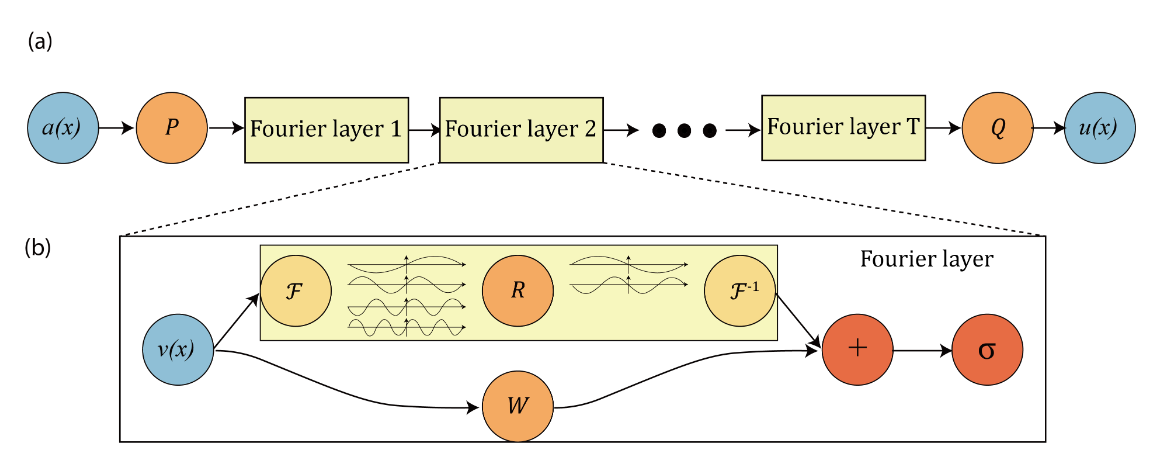
This chapter only briefly introduces the model principle of NeuralOperator. For detailed theoretical derivation, please read Fourier Neural Operator for Parametric Partial Differential Equations. NeuralOperator introduces the Fourier neural operator, a novel deep learning architecture capable of learning mappings between infinite-dimensional spaces of functions; the integral operator is restricted to convolution and instantiated via linear transformation in the Fourier domain. The Fourier Neural Operator is the first work to learn the resolution-invariant solution operator of the Navier-Stokes equation family in the turbulent regime, where previous graph-based neural operators did not converge. This method shares the same learned network parameters regardless of the discretization used on the input and output spaces.

The overall structure of the model is shown in the figure:
NeuralOperator-arch

NeuralOperator Network Model

The NeuralOperator paper uses TFNO and UNO models to train the Darcy-Flow dataset and performs validation and inference; uses the SFNO model to train the Spherical Shallow Water (SWE) dataset and performs validation and inference. Next, they are introduced separately.

2.1 Model Training and Inference Process

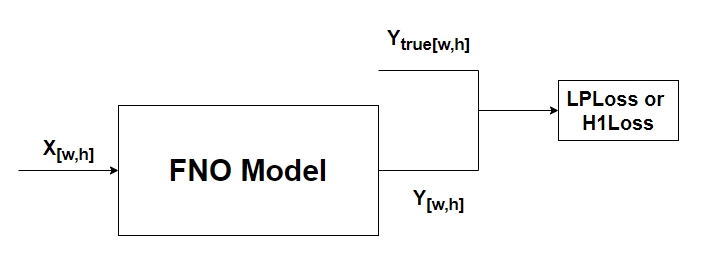
The model pre-training phase trains the model based on randomly initialized network weights, as shown in the figure below, where \(X_{[w,h]}\) represents the two-dimensional partial differential data of size \(w*h\), \(Y_{[w,h]}\) represents the predicted numerical solution of the two-dimensional partial differential equation of size \(w*h\), and \(Y_{true[w,h]}\) represents the real numerical solution of the two-dimensional partial differential equation. Finally, the output predicted by the network model and the ground truth calculate the LpLoss or H1 loss function.
FNO-pretraining

FNO Model Pre-training

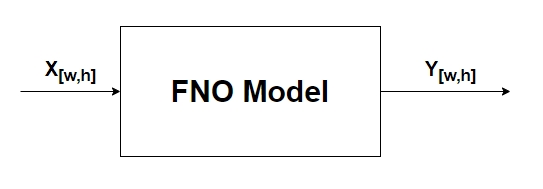
In the inference phase, given the two-dimensional partial differential data of size \(w*h\), the numerical solution of the two-dimensional partial differential equation of size \(w*h\) is predicted.
FNO-infer

FNO Model Inference

3. TFNO Model Training for Darcy-Flow Implementation

Next, we will explain how to implement the training and inference of the TFNO model on darcy-flow data based on PaddleScience code. For other details in this case, please refer to API Documentation.

3.1 Dataset Introduction

Use the 2D Darcy-Flow dataset. The partial differential equation for this problem is:

\(-\nabla\cdot (k(x)\nabla u(x))=f(x),x\in D\)

Where x is the position, u(x) is the fluid pressure, k(x) is the permeability field, and f(x) is a function of pressure. The Darcy flow problem can be used to describe flow in porous media, elastic materials, and heat conduction. Here, we define a two-dimensional plane area \(D=[0,1]×[0,1]\), and we hope to obtain a model that can estimate the u fluid pressure given the k permeability field.

Training data and test data:

The dataset includes 1000 training data of 16x16 resolution; 50 test data of 32x32 resolution and 50 test data of 32x32 resolution. The data format is saved in NPY format.

3.2 Model Pre-training

3.2.1 Constraint Construction

This case solves the problem based on data-driven methods, so it is necessary to use SupervisedConstraint built in PaddleScience to construct supervised constraints. Before defining constraints, you need to first specify various parameters used for data loading in supervised constraints.

The code for data loading is as follows:

examples/neuraloperator/train_tfno.py
# set train dataloader config
train_dataloader_cfg = {
    "dataset": {
        "name": "DarcyFlowDataset",
        "data_dir": cfg.FILE_PATH,
        "input_keys": cfg.MODEL.input_keys,
        "label_keys": cfg.DATASET.label_keys,
        "train_resolution": cfg.DATASET.train_resolution,
        "test_resolutions": cfg.DATASET.test_resolutions,
        "grid_boundaries": cfg.DATASET.grid_boundaries,
        "encode_input": cfg.DATASET.encode_input,
        "encode_output": cfg.DATASET.encode_output,
        "encoding": cfg.DATASET.encoding,
        "channel_dim": cfg.DATASET.channel_dim,
        "data_split": "train",
    },
    "sampler": {
        "name": "BatchSampler",
        "drop_last": False,
        "shuffle": True,
    },
    "batch_size": cfg.TRAIN.batch_size,
    "num_workers": 0,
}

Among them, the "dataset" field defines the used Dataset class name as DarcyFlowDataset, the "sampler" field defines the used Sampler class name as BatchSampler, setting batch_size to 16 and num_works to 0.

The code for defining supervised constraints is as follows:

examples/neuraloperator/train_tfno.py
# set loss
l2loss = metric.LpLoss_train(d=2, p=2)
h1loss = metric.H1Loss_train(d=2)
if cfg.TRAIN.training_loss == "l2":
    train_loss = l2loss
if cfg.TRAIN.training_loss == "h1":
    train_loss = h1loss

# set constraint
sup_constraint = ppsci.constraint.SupervisedConstraint(
    train_dataloader_cfg,
    loss=ppsci.loss.FunctionalLoss(train_loss),
    name="Sup",
)
constraint = {sup_constraint.name: sup_constraint}

The first parameter of SupervisedConstraint is the data loading method, here train_dataloader_cfg defined above is used;

The second parameter is the definition of loss function, here the custom loss function h1 is used;

The third parameter is the name of the constraint condition, which is convenient for subsequent indexing. Here it is named Sup.

3.2.2 Model Construction

In this case, darcy-flow is implemented based on the TFNO network model, expressed in PaddleScience code as follows:

examples/neuraloperator/train_tfno.py
model = ppsci.arch.TFNO2dNet(
    **cfg.MODEL,
)

The parameters of the network model are set through the configuration file as follows:

examples/neuraloperator/conf/tfno_darcyflow_pretrain.yaml
# model settings
MODEL:
  input_keys: ["x"]
  output_keys: ["y"]
  n_modes_height: 16
  n_modes_width: 16
  in_channels: 3
  out_channels: 1
  hidden_channels: 32
  projection_channels: 64
  n_layers: 4

  use_mlp: False
  mlp:
    expansion: 0.5
    dropout: 0.0
  norm: "group_norm"
  fno_skip: "linear"
  mlp_skip: "soft-gating"
  separable: false
  preactivation: false
  factorization: "dense"
  rank: 1.0
  joint_factorization: false
  fixed_rank_modes: null
  implementation: "factorized"
  domain_padding: null #0.078125
  domain_padding_mode: "one-sided" #symmetric
  fft_norm: "forward"

Among them, input_keys and output_keys represent the names of input and output variables of the network model respectively.

3.2.3 Learning Rate and Optimizer Construction

The learning rate method used in this case is StepDecay, and the learning rate size is set to 5e-3. The optimizer uses Adam, expressed in PaddleScience code as follows:

examples/neuraloperator/train_tfno.py
# init optimizer and lr scheduler
if cfg.TRAIN.lr_scheduler.type == "ReduceOnPlateau":
    lr_scheduler = paddle.optimizer.lr.ReduceOnPlateau(
        learning_rate=cfg.TRAIN.lr_scheduler.learning_rate,
        factor=cfg.TRAIN.lr_scheduler.gamma,
        patience=cfg.TRAIN.lr_scheduler.scheduler_patience,
        mode="min",
    )
elif cfg.TRAIN.lr_scheduler.type == "CosineAnnealingDecay":
    lr_scheduler = paddle.optimizer.lr.CosineAnnealingDecay(
        learning_rate=cfg.TRAIN.lr_scheduler.learning_rate,
        T_max=cfg.TRAIN.lr_scheduler.scheduler_T_max,
    )()
elif cfg.TRAIN.lr_scheduler.type == "StepDecay":
    lr_scheduler = ppsci.optimizer.lr_scheduler.Step(
        epochs=cfg.TRAIN.lr_scheduler.epochs,
        iters_per_epoch=ITERS_PER_EPOCH,
        learning_rate=cfg.TRAIN.lr_scheduler.learning_rate,
        step_size=cfg.TRAIN.lr_scheduler.step_size,
        gamma=cfg.TRAIN.lr_scheduler.gamma,
    )()
else:
    raise ValueError(f"Got scheduler={cfg.TRAIN.lr_scheduler.type}")
optimizer = ppsci.optimizer.Adam(lr_scheduler, weight_decay=cfg.TRAIN.wd)(model)

3.2.4 Validator Construction

In this case, the validation set is used to evaluate the training status of the current model at certain training epoch intervals during the training process, and SupervisedValidator is needed to construct the validator. The code is as follows:

examples/neuraloperator/train_tfno.py
# set eval dataloader config
eval_dataloader_cfg_16 = {
    "dataset": {
        "name": "DarcyFlowDataset",
        "data_dir": cfg.FILE_PATH,
        "input_keys": cfg.MODEL.input_keys,
        "label_keys": cfg.DATASET.label_keys,
        "train_resolution": cfg.DATASET.train_resolution,
        "test_resolutions": cfg.DATASET.test_resolutions,
        "grid_boundaries": cfg.DATASET.grid_boundaries,
        "encode_input": cfg.DATASET.encode_input,
        "encode_output": cfg.DATASET.encode_output,
        "encoding": cfg.DATASET.encoding,
        "channel_dim": cfg.DATASET.channel_dim,
        "data_split": "test_16x16",
    },
    "sampler": {
        "name": "BatchSampler",
        "drop_last": False,
        "shuffle": False,
    },
    "batch_size": cfg.EVAL.batch_size,
    "num_workers": 0,
}

eval_dataloader_cfg_32 = {
    "dataset": {
        "name": "DarcyFlowDataset",
        "data_dir": cfg.FILE_PATH,
        "input_keys": cfg.MODEL.input_keys,
        "label_keys": cfg.DATASET.label_keys,
        "train_resolution": cfg.DATASET.train_resolution,
        "test_resolutions": cfg.DATASET.test_resolutions,
        "grid_boundaries": cfg.DATASET.grid_boundaries,
        "encode_input": cfg.DATASET.encode_input,
        "encode_output": cfg.DATASET.encode_output,
        "encoding": cfg.DATASET.encoding,
        "channel_dim": cfg.DATASET.channel_dim,
        "data_split": "test_32x32",
    },
    "sampler": {
        "name": "BatchSampler",
        "drop_last": False,
        "shuffle": False,
    },
    "batch_size": cfg.EVAL.batch_size,
    "num_workers": 0,
}

h1_eval_metric = metric.H1Loss(d=2)
l2_eval_metric = metric.LpLoss(d=2, p=2)
sup_validator_16 = ppsci.validate.SupervisedValidator(
    eval_dataloader_cfg_16,
    loss=ppsci.loss.FunctionalLoss(train_loss),
    metric={
        "h1": ppsci.metric.FunctionalMetric(h1_eval_metric),
        "l2": ppsci.metric.FunctionalMetric(l2_eval_metric),
    },
    name="Sup_Validator_16x16",
)

sup_validator_32 = ppsci.validate.SupervisedValidator(
    eval_dataloader_cfg_32,
    loss=ppsci.loss.FunctionalLoss(train_loss),
    metric={
        "h1": ppsci.metric.FunctionalMetric(h1_eval_metric),
        "l2": ppsci.metric.FunctionalMetric(l2_eval_metric),
    },
    name="Sup_Validator_32x32",
)

validator = {
    sup_validator_16.name: sup_validator_16,
    sup_validator_32.name: sup_validator_32,
}

The SupervisedValidator validator is similar to SupervisedConstraint, the difference is that the validator needs to set the evaluation metric metric, here custom evaluation metrics hlLoss and LpLoss are used respectively.

3.2.5 Model Training and Evaluation

After completing the above settings, you only need to pass the instantiated objects to ppsci.solver.Solver in order, and then start training and evaluation.

examples/neuraloperator/train_tfno.py
# initialize solver
solver = ppsci.solver.Solver(
    model,
    constraint,
    cfg.output_dir,
    optimizer,
    lr_scheduler,
    cfg.TRAIN.epochs,
    ITERS_PER_EPOCH,
    eval_during_train=cfg.TRAIN.eval_during_train,
    seed=cfg.seed,
    validator=validator,
    compute_metric_by_batch=cfg.EVAL.compute_metric_by_batch,
    eval_with_no_grad=cfg.EVAL.eval_with_no_grad,
    pretrained_model_path=cfg.TRAIN.pretrained_model_path,
)
# train model
solver.train()
# evaluate after finished training
solver.eval()

3.3 Model Evaluation Visualization

3.3.1 Evaluating Model on Test Set

The code for constructing the model is:

examples/neuraloperator/train_tfno.py
model = ppsci.arch.TFNO2dNet(
    **cfg.MODEL,
)

The code for constructing the validator is:

examples/neuraloperator/train_tfno.py
# set eval dataloader config
eval_dataloader_cfg_16 = {
    "dataset": {
        "name": "DarcyFlowDataset",
        "data_dir": cfg.FILE_PATH,
        "input_keys": cfg.MODEL.input_keys,
        "label_keys": cfg.DATASET.label_keys,
        "train_resolution": cfg.DATASET.train_resolution,
        "test_resolutions": cfg.DATASET.test_resolutions,
        "grid_boundaries": cfg.DATASET.grid_boundaries,
        "encode_input": cfg.DATASET.encode_input,
        "encode_output": cfg.DATASET.encode_output,
        "encoding": cfg.DATASET.encoding,
        "channel_dim": cfg.DATASET.channel_dim,
        "data_split": "test_16x16",
    },
    "sampler": {
        "name": "BatchSampler",
        "drop_last": False,
        "shuffle": False,
    },
    "batch_size": cfg.EVAL.batch_size,
    "num_workers": 0,
}

eval_dataloader_cfg_32 = {
    "dataset": {
        "name": "DarcyFlowDataset",
        "data_dir": cfg.FILE_PATH,
        "input_keys": cfg.MODEL.input_keys,
        "label_keys": cfg.DATASET.label_keys,
        "train_resolution": cfg.DATASET.train_resolution,
        "test_resolutions": cfg.DATASET.test_resolutions,
        "grid_boundaries": cfg.DATASET.grid_boundaries,
        "encode_input": cfg.DATASET.encode_input,
        "encode_output": cfg.DATASET.encode_output,
        "encoding": cfg.DATASET.encoding,
        "channel_dim": cfg.DATASET.channel_dim,
        "data_split": "test_32x32",
    },
    "sampler": {
        "name": "BatchSampler",
        "drop_last": False,
        "shuffle": False,
    },
    "batch_size": cfg.EVAL.batch_size,
    "num_workers": 0,
}

# set loss
l2loss = metric.LpLoss_train(d=2, p=2)
h1loss = metric.H1Loss_train(d=2)
if cfg.TRAIN.training_loss == "l2":
    train_loss = l2loss
if cfg.TRAIN.training_loss == "h1":
    train_loss = h1loss

h1_eval_metric = metric.H1Loss(d=2)
l2_eval_metric = metric.LpLoss(d=2, p=2)
sup_validator_16 = ppsci.validate.SupervisedValidator(
    eval_dataloader_cfg_16,
    loss=ppsci.loss.FunctionalLoss(train_loss),
    metric={
        "h1": ppsci.metric.FunctionalMetric(h1_eval_metric),
        "l2": ppsci.metric.FunctionalMetric(l2_eval_metric),
    },
    name="Sup_Validator_16x16",
)

sup_validator_32 = ppsci.validate.SupervisedValidator(
    eval_dataloader_cfg_32,
    loss=ppsci.loss.FunctionalLoss(train_loss),
    metric={
        "h1": ppsci.metric.FunctionalMetric(h1_eval_metric),
        "l2": ppsci.metric.FunctionalMetric(l2_eval_metric),
    },
    name="Sup_Validator_32x32",
)
validator = {
    sup_validator_16.name: sup_validator_16,
    sup_validator_32.name: sup_validator_32,
}

3.3.2 Model Export

The code for constructing the model is:

examples/neuraloperator/train_tfno.py
# set model
model = ppsci.arch.TFNO2dNet(
    **cfg.MODEL,
)

Instantiate ppsci.solver.Solver:

examples/neuraloperator/train_tfno.py
# initialize solver
solver = ppsci.solver.Solver(
    model,
    pretrained_model_path=cfg.INFER.pretrained_model_path,
)

Construct model input format and export static model:

examples/neuraloperator/train_tfno.py
# export model
from paddle.static import InputSpec

input_spec = [
    {
        key: InputSpec([None, 3, 16, 16], "float32", name=key)
        for key in model.input_keys
    },
]
solver.export(input_spec, cfg.INFER.export_path)

In the InputSpec function, the first parameter sets the model input size, the second parameter sets the input data type, and the third sets the Key of the input data.

3.3.3 Model Inference

Create predictor:

examples/neuraloperator/train_tfno.py
import predictor

predictor = predictor.FNOPredictor(cfg)

Prepare prediction data:

examples/neuraloperator/train_tfno.py
data = np.load(cfg.INFER.data_path, allow_pickle=True).item()

input_data = data["x"][0].reshape(-1, 1, *data["x"].shape[1:]).astype("float32")
label = data["y"][0].astype("float32")

Perform model prediction and prediction value display:

examples/neuraloperator/train_tfno.py
pred_data = predictor.predict(input_data, cfg.INFER.batch_size)

fig = plt.figure(figsize=(7, 7))

ax = fig.add_subplot(1, 3, 1)
ax.imshow(input_data.squeeze(), cmap="gray")
ax.set_title("k(x)")
plt.xticks([], [])
plt.yticks([], [])

ax = fig.add_subplot(1, 3, 2)
ax.imshow(label)
ax.set_title("Ground-truth y")
plt.xticks([], [])
plt.yticks([], [])

ax = fig.add_subplot(1, 3, 3)
ax.imshow(pred_data.squeeze())
ax.set_title("Model prediction")
plt.xticks([], [])
plt.yticks([], [])
plt.savefig(cfg.output_dir)
logger.message("save success")
plt.close(fig)

4. UNO Model Training for Darcy-Flow Implementation

4.1 Dataset Introduction

Dataset is the same as Section 3.1.

4.2 Model Pre-training

4.2.1 Constraint Construction

This case solves the problem based on data-driven methods, so it is necessary to use SupervisedConstraint built in PaddleScience to construct supervised constraints. Before defining constraints, you need to first specify various parameters used for data loading in supervised constraints.

The code for data loading is as follows:

examples/neuraloperator/train_uno.py
# set train dataloader config
train_dataloader_cfg = {
    "dataset": {
        "name": "DarcyFlowDataset",
        "data_dir": cfg.FILE_PATH,
        "input_keys": cfg.MODEL.input_keys,
        "label_keys": cfg.DATASET.label_keys,
        "train_resolution": cfg.DATASET.train_resolution,
        "test_resolutions": cfg.DATASET.test_resolutions,
        "grid_boundaries": cfg.DATASET.grid_boundaries,
        "encode_input": cfg.DATASET.encode_input,
        "encode_output": cfg.DATASET.encode_output,
        "encoding": cfg.DATASET.encoding,
        "channel_dim": cfg.DATASET.channel_dim,
        "data_split": "train",
    },
    "sampler": {
        "name": "BatchSampler",
        "drop_last": True,
        "shuffle": True,
    },
    "batch_size": cfg.TRAIN.batch_size,
    "num_workers": 0,
}

Among them, the "dataset" field defines the used Dataset class name as DarcyFlowDataset, the "sampler" field defines the used Sampler class name as BatchSampler, setting batch_size to 16 and num_works to 0.

The code for defining supervised constraints is as follows:

examples/neuraloperator/train_uno.py
# set loss
l2loss = metric.LpLoss_train(d=2, p=2)
h1loss = metric.H1Loss_train(d=2)
if cfg.TRAIN.training_loss == "l2":
    train_loss = l2loss
if cfg.TRAIN.training_loss == "h1":
    train_loss = h1loss

# set constraint
sup_constraint = ppsci.constraint.SupervisedConstraint(
    train_dataloader_cfg,
    loss=ppsci.loss.FunctionalLoss(train_loss),
    name="Sup",
)
constraint = {sup_constraint.name: sup_constraint}

The first parameter of SupervisedConstraint is the data loading method, here train_dataloader_cfg defined above is used;

The second parameter is the definition of loss function, here the custom loss function h1 is used;

The third parameter is the name of the constraint condition, which is convenient for subsequent indexing. Here it is named Sup.

4.2.2 Model Construction

In this case, darcy-flow is implemented based on the UNO network model, expressed in PaddleScience code as follows:

examples/neuraloperator/train_uno.py
model = ppsci.arch.UNONet(
    **cfg.MODEL,
)

The parameters of the network model are set through the configuration file as follows:

examples/neuraloperator/conf/uno_darcyflow_pretrain.yaml
# model settings
MODEL:
  input_keys: ["x"]
  output_keys: ["y"]
  in_channels: 3
  out_channels: 1
  hidden_channels: 64
  projection_channels: 64
  n_layers: 5
  uno_out_channels: [32, 64, 64, 64, 32]
  uno_n_modes: [[16, 16], [8, 8], [8, 8], [8, 8], [16, 16]]
  uno_scalings: [[1.0, 1.0], [0.5, 0.5], [1, 1], [2, 2], [1, 1]]
  horizontal_skips_map: null
  incremental_n_modes: null

  use_mlp: false
  mlp:
    expansion: 0.5
    dropout: 0.0
  norm: "group_norm"
  fno_skip: "linear"
  horizontal_skip: "linear"
  mlp_skip: "soft-gating"
  separable: false
  preactivation: false
  factorization: null
  rank: 1.0
  joint_factorization: false
  fixed_rank_modes: null
  implementation: "factorized"
  domain_padding: 0.2 #0.078125
  domain_padding_mode: "one-sided" #symmetric
  fft_norm: "forward"

Among them, input_keys and output_keys represent the names of input and output variables of the network model respectively.

4.2.3 Learning Rate and Optimizer Construction

The learning rate method used in this case is StepDecay, and the learning rate size is set to 5e-3. The optimizer uses Adam, expressed in PaddleScience code as follows:

examples/neuraloperator/train_uno.py
# init optimizer and lr scheduler
if cfg.TRAIN.lr_scheduler.type == "ReduceOnPlateau":
    lr_scheduler = paddle.optimizer.lr.ReduceOnPlateau(
        learning_rate=cfg.TRAIN.lr_scheduler.learning_rate,
        factor=cfg.TRAIN.lr_scheduler.gamma,
        patience=cfg.TRAIN.lr_scheduler.scheduler_patience,
        mode="min",
    )
elif cfg.TRAIN.lr_scheduler.type == "CosineAnnealingDecay":
    lr_scheduler = paddle.optimizer.lr.CosineAnnealingDecay(
        learning_rate=cfg.TRAIN.lr_scheduler.learning_rate,
        T_max=cfg.TRAIN.lr_scheduler.scheduler_T_max,
    )()
elif cfg.TRAIN.lr_scheduler.type == "StepDecay":
    lr_scheduler = ppsci.optimizer.lr_scheduler.Step(
        epochs=cfg.TRAIN.lr_scheduler.epochs,
        iters_per_epoch=ITERS_PER_EPOCH,
        learning_rate=cfg.TRAIN.lr_scheduler.learning_rate,
        step_size=cfg.TRAIN.lr_scheduler.step_size,
        gamma=cfg.TRAIN.lr_scheduler.gamma,
    )()
else:
    raise ValueError(f"Got scheduler={cfg.TRAIN.lr_scheduler.type}")
optimizer = ppsci.optimizer.Adam(lr_scheduler, weight_decay=cfg.TRAIN.wd)(model)

4.2.4 Validator Construction

In this case, the validation set is used to evaluate the training status of the current model at certain training epoch intervals during the training process, and SupervisedValidator is needed to construct the validator. The code is as follows:

examples/neuraloperator/train_uno.py
# set eval dataloader config
eval_dataloader_cfg_16 = {
    "dataset": {
        "name": "DarcyFlowDataset",
        "data_dir": cfg.FILE_PATH,
        "input_keys": cfg.MODEL.input_keys,
        "label_keys": cfg.DATASET.label_keys,
        "train_resolution": cfg.DATASET.train_resolution,
        "test_resolutions": cfg.DATASET.test_resolutions,
        "grid_boundaries": cfg.DATASET.grid_boundaries,
        "encode_input": cfg.DATASET.encode_input,
        "encode_output": cfg.DATASET.encode_output,
        "encoding": cfg.DATASET.encoding,
        "channel_dim": cfg.DATASET.channel_dim,
        "data_split": "test_16x16",
    },
    "sampler": {
        "name": "BatchSampler",
        "drop_last": False,
        "shuffle": False,
    },
    "batch_size": cfg.EVAL.batch_size,
    "num_workers": 0,
}

eval_dataloader_cfg_32 = {
    "dataset": {
        "name": "DarcyFlowDataset",
        "data_dir": cfg.FILE_PATH,
        "input_keys": cfg.MODEL.input_keys,
        "label_keys": cfg.DATASET.label_keys,
        "train_resolution": cfg.DATASET.train_resolution,
        "test_resolutions": cfg.DATASET.test_resolutions,
        "grid_boundaries": cfg.DATASET.grid_boundaries,
        "encode_input": cfg.DATASET.encode_input,
        "encode_output": cfg.DATASET.encode_output,
        "encoding": cfg.DATASET.encoding,
        "channel_dim": cfg.DATASET.channel_dim,
        "data_split": "test_32x32",
    },
    "sampler": {
        "name": "BatchSampler",
        "drop_last": False,
        "shuffle": False,
    },
    "batch_size": cfg.EVAL.batch_size,
    "num_workers": 0,
}

h1_eval_metric = metric.H1Loss(d=2)
l2_eval_metric = metric.LpLoss(d=2, p=2)
sup_validator_16 = ppsci.validate.SupervisedValidator(
    eval_dataloader_cfg_16,
    loss=ppsci.loss.FunctionalLoss(train_loss),
    metric={
        "h1": ppsci.metric.FunctionalMetric(h1_eval_metric),
        "l2": ppsci.metric.FunctionalMetric(l2_eval_metric),
    },
    name="Sup_Validator_16x16",
)

sup_validator_32 = ppsci.validate.SupervisedValidator(
    eval_dataloader_cfg_32,
    loss=ppsci.loss.FunctionalLoss(train_loss),
    metric={
        "h1": ppsci.metric.FunctionalMetric(h1_eval_metric),
        "l2": ppsci.metric.FunctionalMetric(l2_eval_metric),
    },
    name="Sup_Validator_32x32",
)

validator = {
    sup_validator_16.name: sup_validator_16,
    sup_validator_32.name: sup_validator_32,
}

The SupervisedValidator validator is similar to SupervisedConstraint, the difference is that the validator needs to set the evaluation metric metric, here custom evaluation metrics hlLoss and LpLoss are used respectively.

4.2.5 Model Training and Evaluation

After completing the above settings, you only need to pass the instantiated objects to ppsci.solver.Solver in order, and then start training and evaluation.

examples/neuraloperator/train_uno.py
# initialize solver
solver = ppsci.solver.Solver(
    model,
    constraint,
    cfg.output_dir,
    optimizer,
    lr_scheduler,
    cfg.TRAIN.epochs,
    ITERS_PER_EPOCH,
    eval_during_train=cfg.TRAIN.eval_during_train,
    seed=cfg.seed,
    validator=validator,
    compute_metric_by_batch=cfg.EVAL.compute_metric_by_batch,
    eval_with_no_grad=cfg.EVAL.eval_with_no_grad,
    pretrained_model_path=cfg.TRAIN.pretrained_model_path,
)
# train model
solver.train()
# evaluate after finished training
solver.eval()

4.3 Model Evaluation Visualization

4.3.1 Evaluating Model on Test Set

The code for constructing the model is:

examples/neuraloperator/train_uno.py
model = ppsci.arch.UNONet(
    **cfg.MODEL,
)

The code for constructing the validator is:

examples/neuraloperator/train_uno.py
# set eval dataloader config
eval_dataloader_cfg_16 = {
    "dataset": {
        "name": "DarcyFlowDataset",
        "data_dir": cfg.FILE_PATH,
        "input_keys": cfg.MODEL.input_keys,
        "label_keys": cfg.DATASET.label_keys,
        "train_resolution": cfg.DATASET.train_resolution,
        "test_resolutions": cfg.DATASET.test_resolutions,
        "grid_boundaries": cfg.DATASET.grid_boundaries,
        "encode_input": cfg.DATASET.encode_input,
        "encode_output": cfg.DATASET.encode_output,
        "encoding": cfg.DATASET.encoding,
        "channel_dim": cfg.DATASET.channel_dim,
        "data_split": "test_16x16",
    },
    "sampler": {
        "name": "BatchSampler",
        "drop_last": False,
        "shuffle": False,
    },
    "batch_size": cfg.EVAL.batch_size,
    "num_workers": 0,
}

eval_dataloader_cfg_32 = {
    "dataset": {
        "name": "DarcyFlowDataset",
        "data_dir": cfg.FILE_PATH,
        "input_keys": cfg.MODEL.input_keys,
        "label_keys": cfg.DATASET.label_keys,
        "train_resolution": cfg.DATASET.train_resolution,
        "test_resolutions": cfg.DATASET.test_resolutions,
        "grid_boundaries": cfg.DATASET.grid_boundaries,
        "encode_input": cfg.DATASET.encode_input,
        "encode_output": cfg.DATASET.encode_output,
        "encoding": cfg.DATASET.encoding,
        "channel_dim": cfg.DATASET.channel_dim,
        "data_split": "test_32x32",
    },
    "sampler": {
        "name": "BatchSampler",
        "drop_last": False,
        "shuffle": False,
    },
    "batch_size": cfg.EVAL.batch_size,
    "num_workers": 0,
}

# set loss
l2loss = metric.LpLoss_train(d=2, p=2)
h1loss = metric.H1Loss_train(d=2)
if cfg.TRAIN.training_loss == "l2":
    train_loss = l2loss
if cfg.TRAIN.training_loss == "h1":
    train_loss = h1loss

h1_eval_metric = metric.H1Loss(d=2)
l2_eval_metric = metric.LpLoss(d=2, p=2)
sup_validator_16 = ppsci.validate.SupervisedValidator(
    eval_dataloader_cfg_16,
    loss=ppsci.loss.FunctionalLoss(train_loss),
    metric={
        "h1": ppsci.metric.FunctionalMetric(h1_eval_metric),
        "l2": ppsci.metric.FunctionalMetric(l2_eval_metric),
    },
    name="Sup_Validator_16x16",
)

sup_validator_32 = ppsci.validate.SupervisedValidator(
    eval_dataloader_cfg_32,
    loss=ppsci.loss.FunctionalLoss(train_loss),
    metric={
        "h1": ppsci.metric.FunctionalMetric(h1_eval_metric),
        "l2": ppsci.metric.FunctionalMetric(l2_eval_metric),
    },
    name="Sup_Validator_32x32",
)
validator = {
    sup_validator_16.name: sup_validator_16,
    sup_validator_32.name: sup_validator_32,
}

4.3.2 Model Export

The code for constructing the model is:

examples/neuraloperator/train_uno.py
# set model
model = ppsci.arch.UNONet(
    **cfg.MODEL,
)

Instantiate ppsci.solver.Solver:

examples/neuraloperator/train_uno.py
# initialize solver
solver = ppsci.solver.Solver(
    model,
    pretrained_model_path=cfg.INFER.pretrained_model_path,
)

Construct model input format and export static model:

examples/neuraloperator/train_uno.py
# export model
from paddle.static import InputSpec

input_spec = [
    {
        key: InputSpec([None, 3, 16, 16], "float32", name=key)
        for key in model.input_keys
    },
]
solver.export(input_spec, cfg.INFER.export_path)

In the InputSpec function, the first parameter sets the model input size, the second parameter sets the input data type, and the third sets the Key of the input data.

4.3.3 Model Inference

Create predictor:

examples/neuraloperator/train_uno.py
import predictor

predictor = predictor.FNOPredictor(cfg)

Prepare prediction data:

examples/neuraloperator/train_uno.py
data = np.load(cfg.INFER.data_path, allow_pickle=True).item()

input_data = data["x"][0].reshape(-1, 1, *data["x"].shape[1:]).astype("float32")
label = data["y"][0].astype("float32")

Perform model prediction and prediction value display:

examples/neuraloperator/train_uno.py
pred_data = predictor.predict(input_data, cfg.INFER.batch_size)

fig = plt.figure(figsize=(7, 7))

ax = fig.add_subplot(1, 3, 1)
ax.imshow(input_data.squeeze(), cmap="gray")
ax.set_title("k(x)")
plt.xticks([], [])
plt.yticks([], [])

ax = fig.add_subplot(1, 3, 2)
ax.imshow(label)
ax.set_title("Ground-truth y")
plt.xticks([], [])
plt.yticks([], [])

ax = fig.add_subplot(1, 3, 3)
ax.imshow(pred_data.squeeze())
ax.set_title("Model prediction")
plt.xticks([], [])
plt.yticks([], [])
plt.savefig(cfg.output_dir)
logger.message("save success")
plt.close(fig)

5. SFNO Model Training for Spherical Shallow Water Equations (SWE) Implementation

5.1 Dataset Introduction

Spherical Shallow Water Equations (SWE) are a set of partial differential equations describing shallow water flow on the surface of a rotating earth. Shallow water equations are usually used to simulate fluid motion in oceans, lakes and rivers. When the vertical scale of the fluid is much smaller than its horizontal scale, the vertical structure of the fluid can be ignored and only its horizontal motion is considered.

Spherical shallow water equations can be mathematically represented by the following system of equations:

\(\frac{\partial u}{\partial t} +u\cdot \nabla u=-g\nabla h-fu+F\)

\(\frac{\partial h}{\partial t}+\nabla \cdot (hu)=0\)

Where:

𝑢 is the horizontal velocity field, usually containing velocity components in longitude and latitude directions.

ℎ is the displacement of fluid height (or water surface height) relative to the reference horizontal plane.

𝑔 is gravitational acceleration.

𝑓 is the Coriolis parameter, which is related to the Earth's rotation and latitude, f=2Ωsinϕ, where Ω is the Earth's rotation angle and 𝜙 is the latitude.

𝐹 is the vector of friction and other external forces (such as wind).

∇ is the horizontal gradient operator.

Spherical shallow water equations consider the spherical geometry of the Earth, so a spherical coordinate system is used. In practical applications, these equations usually need to be discretized and solved numerically to facilitate simulation on computers.

Training data and test data:

The dataset includes 200 training data of 32x64 resolution; 50 test data of 32x64 resolution and 50 test data of 64x128 resolution. The data format is saved in NPY format.

5.2 Model Pre-training

5.2.1 Constraint Construction

This case solves the problem based on data-driven methods, so it is necessary to use SupervisedConstraint built in PaddleScience to construct supervised constraints. Before defining constraints, you need to first specify various parameters used for data loading in supervised constraints.

The code for data loading is as follows:

examples/neuraloperator/train_sfno.py
# set train dataloader config
train_dataloader_cfg = {
    "dataset": {
        "name": "SphericalSWEDataset",
        "data_dir": cfg.FILE_PATH,
        "input_keys": cfg.MODEL.input_keys,
        "label_keys": cfg.DATASET.label_keys,
        "train_resolution": cfg.DATASET.train_resolution,
        "test_resolutions": cfg.DATASET.test_resolutions,
        "data_split": "train",
    },
    "sampler": {
        "name": "BatchSampler",
        "drop_last": False,
        "shuffle": True,
    },
    "batch_size": cfg.TRAIN.batch_size,
    "num_workers": 0,
}

Among them, the "dataset" field defines the used Dataset class name as DarcyFlowDataset, the "sampler" field defines the used Sampler class name as BatchSampler, setting batch_size to 4 and num_works to 0.

The code for defining supervised constraints is as follows:

examples/neuraloperator/train_sfno.py
# set loss
train_loss = metric.LpLoss_train(d=2, p=2, reduce_dims=[0, 1])

# set constraint
sup_constraint = ppsci.constraint.SupervisedConstraint(
    train_dataloader_cfg,
    loss=ppsci.loss.FunctionalLoss(train_loss),
    name="Sup",
)
constraint = {sup_constraint.name: sup_constraint}

The first parameter of SupervisedConstraint is the data loading method, here train_dataloader_cfg defined above is used;

The second parameter is the definition of loss function, here the custom loss function Lp is used;

The third parameter is the name of the constraint condition, which is convenient for subsequent indexing. Here it is named Sup.

5.2.2 Model Construction

In this case, SWE is implemented based on the SFNO network model, expressed in PaddleScience code as follows:

examples/neuraloperator/train_sfno.py
model = ppsci.arch.SFNONet(
    **cfg.MODEL,
)

The parameters of the network model are set through the configuration file as follows:

examples/neuraloperator/conf/sfno_swe_pretrain.yaml
# model settings
MODEL:
  input_keys: ["x"]
  output_keys: ["y"]
  in_channels: 3
  out_channels: 3
  n_modes: [32, 32]
  hidden_channels: 32
  projection_channels: 64
  n_layers: 4

  use_mlp: false
  mlp:
    expansion: 0.5
    dropout: 0.0
  norm: 'group_norm'
  fno_skip: "linear"
  mlp_skip: "soft-gating"
  separable: false
  preactivation: false
  factorization: null
  rank: 1.0
  joint_factorization: false
  fixed_rank_modes: null
  implementation: "factorized"
  domain_padding: null #0.078125
  domain_padding_mode: "one-sided" #symmetric
  fft_norm: 'forward'

Among them, input_keys and output_keys represent the names of input and output variables of the network model respectively.

5.2.3 Learning Rate and Optimizer Construction

The learning rate method used in this case is StepDecay, and the learning rate size is set to 5e-3. The optimizer uses Adam, expressed in PaddleScience code as follows:

examples/neuraloperator/train_sfno.py
# init optimizer and lr scheduler
if cfg.TRAIN.lr_scheduler.type == "ReduceOnPlateau":
    lr_scheduler = paddle.optimizer.lr.ReduceOnPlateau(
        learning_rate=cfg.TRAIN.lr_scheduler.learning_rate,
        factor=cfg.TRAIN.lr_scheduler.gamma,
        patience=cfg.TRAIN.lr_scheduler.scheduler_patience,
        mode="min",
    )
elif cfg.TRAIN.lr_scheduler.type == "CosineAnnealingDecay":
    lr_scheduler = paddle.optimizer.lr.CosineAnnealingDecay(
        learning_rate=cfg.TRAIN.lr_scheduler.learning_rate,
        T_max=cfg.TRAIN.lr_scheduler.scheduler_T_max,
    )()
elif cfg.TRAIN.lr_scheduler.type == "StepDecay":
    lr_scheduler = ppsci.optimizer.lr_scheduler.Step(
        epochs=cfg.TRAIN.lr_scheduler.epochs,
        iters_per_epoch=ITERS_PER_EPOCH,
        learning_rate=cfg.TRAIN.lr_scheduler.learning_rate,
        step_size=cfg.TRAIN.lr_scheduler.step_size,
        gamma=cfg.TRAIN.lr_scheduler.gamma,
    )()
else:
    raise ValueError(f"Got scheduler={cfg.TRAIN.lr_scheduler.type}")
optimizer = ppsci.optimizer.Adam(lr_scheduler, weight_decay=cfg.TRAIN.wd)(model)

5.2.4 Validator Construction

In this case, the validation set is used to evaluate the training status of the current model at certain training epoch intervals during the training process, and SupervisedValidator is needed to construct the validator. The code is as follows:

examples/neuraloperator/train_sfno.py
# set eval dataloader config
eval_dataloader_cfg_32 = {
    "dataset": {
        "name": "SphericalSWEDataset",
        "data_dir": cfg.FILE_PATH,
        "input_keys": cfg.MODEL.input_keys,
        "label_keys": cfg.DATASET.label_keys,
        "train_resolution": cfg.DATASET.train_resolution,
        "test_resolutions": cfg.DATASET.test_resolutions,
        "data_split": "test_32x64",
    },
    "sampler": {
        "name": "BatchSampler",
        "drop_last": False,
        "shuffle": False,
    },
    "batch_size": cfg.EVAL.batch_size,
    "num_workers": 0,
}

eval_dataloader_cfg_64 = {
    "dataset": {
        "name": "SphericalSWEDataset",
        "data_dir": cfg.FILE_PATH,
        "input_keys": cfg.MODEL.input_keys,
        "label_keys": cfg.DATASET.label_keys,
        "train_resolution": cfg.DATASET.train_resolution,
        "test_resolutions": cfg.DATASET.test_resolutions,
        "data_split": "test_64x128",
    },
    "sampler": {
        "name": "BatchSampler",
        "drop_last": False,
        "shuffle": False,
    },
    "batch_size": cfg.EVAL.batch_size,
    "num_workers": 0,
}

l2_eval_metric = metric.LpLoss(d=2, p=2, reduce_dims=[0, 1])
sup_validator_32 = ppsci.validate.SupervisedValidator(
    eval_dataloader_cfg_32,
    loss=ppsci.loss.FunctionalLoss(train_loss),
    metric={"l2": ppsci.metric.FunctionalMetric(l2_eval_metric)},
    name="Sup_Validator_32x64",
)

sup_validator_64 = ppsci.validate.SupervisedValidator(
    eval_dataloader_cfg_64,
    loss=ppsci.loss.FunctionalLoss(train_loss),
    metric={"l2": ppsci.metric.FunctionalMetric(l2_eval_metric)},
    name="Sup_Validator_64x128",
)

validator = {
    sup_validator_32.name: sup_validator_32,
    sup_validator_64.name: sup_validator_64,
}

The SupervisedValidator validator is similar to SupervisedConstraint, the difference is that the validator needs to set the evaluation metric metric, here the custom evaluation metric used is LpLoss.

5.2.5 Model Training and Evaluation

After completing the above settings, you only need to pass the instantiated objects to ppsci.solver.Solver in order, and then start training and evaluation.

examples/neuraloperator/train_sfno.py
# initialize solver
solver = ppsci.solver.Solver(
    model,
    constraint,
    cfg.output_dir,
    optimizer,
    lr_scheduler,
    cfg.TRAIN.epochs,
    ITERS_PER_EPOCH,
    eval_during_train=cfg.TRAIN.eval_during_train,
    seed=cfg.seed,
    validator=validator,
    compute_metric_by_batch=cfg.EVAL.compute_metric_by_batch,
    eval_with_no_grad=cfg.EVAL.eval_with_no_grad,
    pretrained_model_path=cfg.TRAIN.pretrained_model_path,
)
# train model
solver.train()
# evaluate after finished training
solver.eval()

5.3 Model Evaluation Visualization

5.3.1 Evaluating Model on Test Set

The code for constructing the model is:

examples/neuraloperator/train_sfno.py
model = ppsci.arch.SFNONet(
    **cfg.MODEL,
)

The code for constructing the validator is:

examples/neuraloperator/train_sfno.py
# set eval dataloader config
eval_dataloader_cfg_32 = {
    "dataset": {
        "name": "SphericalSWEDataset",
        "data_dir": cfg.FILE_PATH,
        "input_keys": cfg.MODEL.input_keys,
        "label_keys": cfg.DATASET.label_keys,
        "train_resolution": cfg.DATASET.train_resolution,
        "test_resolutions": cfg.DATASET.test_resolutions,
        "data_split": "test_32x64",
    },
    "sampler": {
        "name": "BatchSampler",
        "drop_last": False,
        "shuffle": False,
    },
    "batch_size": cfg.EVAL.batch_size,
    "num_workers": 0,
}

eval_dataloader_cfg_64 = {
    "dataset": {
        "name": "SphericalSWEDataset",
        "data_dir": cfg.FILE_PATH,
        "input_keys": cfg.MODEL.input_keys,
        "label_keys": cfg.DATASET.label_keys,
        "train_resolution": cfg.DATASET.train_resolution,
        "test_resolutions": cfg.DATASET.test_resolutions,
        "data_split": "test_64x128",
    },
    "sampler": {
        "name": "BatchSampler",
        "drop_last": False,
        "shuffle": False,
    },
    "batch_size": cfg.EVAL.batch_size,
    "num_workers": 0,
}

train_loss = metric.LpLoss_train(d=2, p=2, reduce_dims=[0, 1])

l2_eval_metric = metric.LpLoss(d=2, p=2, reduce_dims=[0, 1])
sup_validator_32 = ppsci.validate.SupervisedValidator(
    eval_dataloader_cfg_32,
    loss=ppsci.loss.FunctionalLoss(train_loss),
    metric={"l2": ppsci.metric.FunctionalMetric(l2_eval_metric)},
    name="Sup_Validator_32x64",
)

sup_validator_64 = ppsci.validate.SupervisedValidator(
    eval_dataloader_cfg_64,
    loss=ppsci.loss.FunctionalLoss(train_loss),
    metric={"l2": ppsci.metric.FunctionalMetric(l2_eval_metric)},
    name="Sup_Validator_64x128",
)

validator = {
    sup_validator_32.name: sup_validator_32,
    sup_validator_64.name: sup_validator_64,
}

5.3.2 Model Export

The code for constructing the model is:

examples/neuraloperator/train_sfno.py
# set model
model = ppsci.arch.SFNONet(
    **cfg.MODEL,
)

Instantiate ppsci.solver.Solver:

examples/neuraloperator/train_sfno.py
# initialize solver
solver = ppsci.solver.Solver(
    model,
    pretrained_model_path=cfg.INFER.pretrained_model_path,
)

Construct model input format and export static model:

examples/neuraloperator/train_sfno.py
# export model
from paddle.static import InputSpec

input_spec = [
    {
        key: InputSpec([None, 3, 32, 64], "float32", name=key)
        for key in model.input_keys
    },
]
solver.export(input_spec, cfg.INFER.export_path)

In the InputSpec function, the first parameter sets the model input size, the second parameter sets the input data type, and the third sets the Key of the input data.

5.3.3 Model Inference

Create predictor:

examples/neuraloperator/train_sfno.py
import predictor

predictor = predictor.SFNOPredictor(cfg)

Prepare prediction data:

examples/neuraloperator/train_sfno.py
data = np.load(cfg.INFER.data_path, allow_pickle=True).item()
input_data = data["x"][0].reshape(1, *data["x"].shape[1:]).astype("float32")
label = data["y"][0][0, ...].astype("float32")

Perform model prediction and prediction value display:

examples/neuraloperator/train_sfno.py
pred_data = predictor.predict(input_data, cfg.INFER.batch_size)

fig = plt.figure(figsize=(7, 7))
ax = fig.add_subplot(1, 3, 1)
ax.imshow(input_data.squeeze()[0, ...])
ax.set_title("k(x)")
plt.xticks([], [])
plt.yticks([], [])

ax = fig.add_subplot(1, 3, 2)
ax.imshow(label)
ax.set_title("Ground-truth y")
plt.xticks([], [])
plt.yticks([], [])

ax = fig.add_subplot(1, 3, 3)
ax.imshow(pred_data.squeeze()[0, ...])
ax.set_title("Model prediction")
plt.xticks([], [])
plt.yticks([], [])
plt.savefig(cfg.output_dir)
logger.message("save success")
plt.close(fig)

6. Result Display

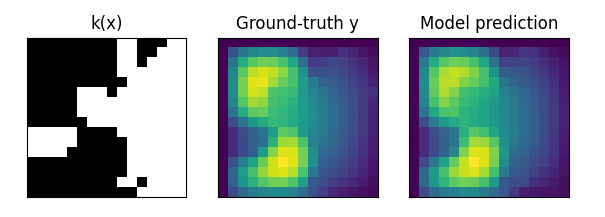
The figure below shows the prediction results and ground truth results of TFNO on Darcy-flow data. The black area of k(x) is the permeable area, and the white is the impermeable area. The right side is the target result, the brighter the color, the greater the pressure.
TFNO-predict

TFNO prediction result ("Model prediction") vs ground truth result ("Ground-truth y")

The figure below shows the prediction results and ground truth results of UNO on Darcy-flow data.
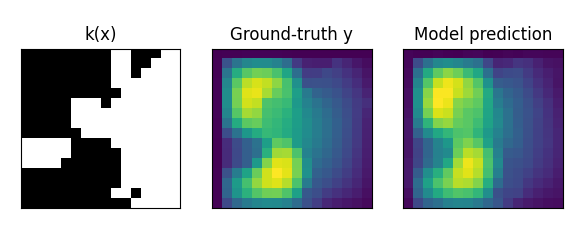
UNO-predict

UNO prediction result ("Model prediction") vs ground truth result ("Ground-truth y")

The figure below shows the prediction results and ground truth results of SFNO on SWE data.
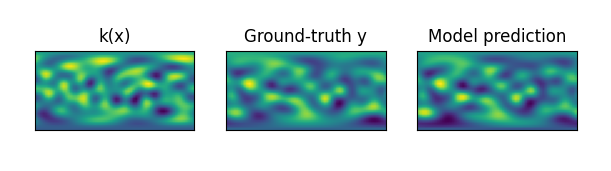
SFNO-predict

SFNO prediction result ("Model prediction") vs ground truth result ("Ground-truth y")