The Laplace equation, named after the French mathematician Pierre-Simon Laplace, is a pivotal partial differential equation in fields such as electromagnetism, astronomy, and fluid mechanics. While analytical solutions exist for simple geometries, complex practical problems typically require numerical methods like the Finite Element Method (FEM) or Finite Difference Method (FDM).
In this example, we demonstrate how to solve the 2D Laplace equation using deep learning techniques, specifically Physics-Informed Neural Networks (PINNs).
Next, we will explain how to convert the problem into PaddleScience code step by step and solve the problem using deep learning methods.
In order to quickly understand PaddleScience, only key steps such as model construction, equation construction, and computational domain construction are described below, while other details please refer to API Documentation.
We aim to determine the scalar field \(u(x, y)\) for any coordinate \((x, y)\) in the domain. We approximate this function using a Multilayer Perceptron (MLP) to learn the mapping \(f: \mathbb{R}^2 \to \mathbb{R}^1\):
\[
u = f(x, y)
\]
In the above formula, \(f\) is the MLP model itself, expressed in PaddleScience code as follows
The problem domain is a unit square defined by diagonal corners (0.0, 0.0) and (1.0, 1.0). We use the built-in Rectangle geometry to define this domain.
In this case, we use two constraints to guide the training of the model in the computational domain, namely the Laplace equation constraint acting on the sampling points and the constraint acting on the boundary points.
Before defining the constraints, it is necessary to specify the number of sampling points for each constraint, indicating the number of sampling data for each constraint in its corresponding computational domain, as well as the general sampling configuration.
# set constraintpde_constraint=ppsci.constraint.InteriorConstraint(equation["laplace"].equations,{"laplace":0},geom["rect"],{**train_dataloader_cfg,"batch_size":NPOINT_TOTAL},ppsci.loss.MSELoss("sum"),evenly=True,name="EQ",)
Equation: equation["laplace"].equations (the residual of the Laplace equation).
Target: 0 (minimizing the residual to zero).
Domain: geom["rect"] (the rectangular domain).
Sampling: Full batch training with batch_size=10201 (representing a 101x101 grid).
Loss: MSE with reduction="sum" to sum the loss across all points.
Equidistant: Enabled to ensure uniform sampling for better convergence.
Similarly, we also need to construct constraints for the four boundaries of the rectangle. But unlike constructing InteriorConstraint, since the active area is the boundary, we use the BoundaryConstraint class, the code is as follows:
Next, we need to specify the number of training epochs in the configuration file. Here, based on experimental experience, we use 20,000 training epochs, and the evaluation interval is 200 epochs.
Usually during the training process, the training status of the current model is evaluated using the validation set (test set) at a certain epoch interval, so ppsci.validate.GeometryValidator is used to construct the validator.
# set validatormse_metric=ppsci.validate.GeometryValidator({"u":lambdaout:out["u"]},{"u":u_solution_func},geom["rect"],{"dataset":"IterableNamedArrayDataset","total_size":NPOINT_TOTAL,},ppsci.loss.MSELoss(),evenly=True,metric={"MSE":ppsci.metric.MSE()},with_initial=True,name="MSE_Metric",)validator={mse_metric.name:mse_metric}
During model evaluation, if the evaluation result is data that can be visualized, we can select a suitable visualizer to visualize the output result.
The output data in this article is a two-dimensional point set in an area, so we only need to save the evaluation output data as a vtu format file, and finally open it with visualization software to view it. The code is as follows:
# set visualizer(optional)vis_points=geom["rect"].sample_interior(NPOINT_TOTAL,evenly=True)visualizer={"visualize_u":ppsci.visualize.VisualizerVtu(vis_points,{"u":lambdad:d["u"]},num_timestamps=1,prefix="result_u",)}
After completing the above settings, you only need to pass the instantiated objects to ppsci.solver.Solver, and then start training, evaluation, and visualization.
# Copyright (c) 2023 PaddlePaddle Authors. All Rights Reserved.## Licensed under the Apache License, Version 2.0 (the "License");# you may not use this file except in compliance with the License.# You may obtain a copy of the License at## http://www.apache.org/licenses/LICENSE-2.0## Unless required by applicable law or agreed to in writing, software# distributed under the License is distributed on an "AS IS" BASIS,# WITHOUT WARRANTIES OR CONDITIONS OF ANY KIND, either express or implied.# See the License for the specific language governing permissions and# limitations under the License.importhydraimportnumpyasnpfromomegaconfimportDictConfigimportppscideftrain(cfg:DictConfig):# set modelmodel=ppsci.arch.MLP(**cfg.MODEL)# set equationequation={"laplace":ppsci.equation.Laplace(dim=2)}# set geometrygeom={"rect":ppsci.geometry.Rectangle(cfg.DIAGONAL_COORD.xmin,cfg.DIAGONAL_COORD.xmax)}# compute ground truth functiondefu_solution_func(out):"""compute ground truth for u as label data"""x,y=out["x"],out["y"]returnnp.cos(x)*np.cosh(y)# set train dataloader configtrain_dataloader_cfg={"dataset":"IterableNamedArrayDataset","iters_per_epoch":cfg.TRAIN.iters_per_epoch,}NPOINT_TOTAL=cfg.NPOINT_INTERIOR+cfg.NPOINT_BC# set constraintpde_constraint=ppsci.constraint.InteriorConstraint(equation["laplace"].equations,{"laplace":0},geom["rect"],{**train_dataloader_cfg,"batch_size":NPOINT_TOTAL},ppsci.loss.MSELoss("sum"),evenly=True,name="EQ",)bc=ppsci.constraint.BoundaryConstraint({"u":lambdaout:out["u"]},{"u":u_solution_func},geom["rect"],{**train_dataloader_cfg,"batch_size":cfg.NPOINT_BC},ppsci.loss.MSELoss("sum"),name="BC",)# wrap constraints togetherconstraint={pde_constraint.name:pde_constraint,bc.name:bc,}# set optimizeroptimizer=ppsci.optimizer.Adam(learning_rate=cfg.TRAIN.learning_rate)(model)# set validatormse_metric=ppsci.validate.GeometryValidator({"u":lambdaout:out["u"]},{"u":u_solution_func},geom["rect"],{"dataset":"IterableNamedArrayDataset","total_size":NPOINT_TOTAL,},ppsci.loss.MSELoss(),evenly=True,metric={"MSE":ppsci.metric.MSE()},with_initial=True,name="MSE_Metric",)validator={mse_metric.name:mse_metric}# set visualizer(optional)vis_points=geom["rect"].sample_interior(NPOINT_TOTAL,evenly=True)visualizer={"visualize_u":ppsci.visualize.VisualizerVtu(vis_points,{"u":lambdad:d["u"]},num_timestamps=1,prefix="result_u",)}# initialize solversolver=ppsci.solver.Solver(model,constraint,cfg.output_dir,optimizer,epochs=cfg.TRAIN.epochs,iters_per_epoch=cfg.TRAIN.iters_per_epoch,eval_during_train=cfg.TRAIN.eval_during_train,eval_freq=cfg.TRAIN.eval_freq,equation=equation,geom=geom,validator=validator,visualizer=visualizer,)# train modelsolver.train()# evaluate after finished trainingsolver.eval()# visualize prediction after finished trainingsolver.visualize()defevaluate(cfg:DictConfig):# set modelmodel=ppsci.arch.MLP(**cfg.MODEL)# set equationequation={"laplace":ppsci.equation.Laplace(dim=2)}# set geometrygeom={"rect":ppsci.geometry.Rectangle(cfg.DIAGONAL_COORD.xmin,cfg.DIAGONAL_COORD.xmax)}# compute ground truth functiondefu_solution_func(out):"""compute ground truth for u as label data"""x,y=out["x"],out["y"]returnnp.cos(x)*np.cosh(y)NPOINT_TOTAL=cfg.NPOINT_INTERIOR+cfg.NPOINT_BC# set validatormse_metric=ppsci.validate.GeometryValidator({"u":lambdaout:out["u"]},{"u":u_solution_func},geom["rect"],{"dataset":"IterableNamedArrayDataset","total_size":NPOINT_TOTAL,},ppsci.loss.MSELoss(),evenly=True,metric={"MSE":ppsci.metric.MSE()},with_initial=True,name="MSE_Metric",)validator={mse_metric.name:mse_metric}# set visualizer(optional)vis_points=geom["rect"].sample_interior(NPOINT_TOTAL,evenly=True)visualizer={"visualize_u":ppsci.visualize.VisualizerVtu(vis_points,{"u":lambdad:d["u"]},num_timestamps=1,prefix="result_u",)}# initialize solversolver=ppsci.solver.Solver(model,output_dir=cfg.output_dir,seed=cfg.seed,equation=equation,geom=geom,validator=validator,visualizer=visualizer,pretrained_model_path=cfg.EVAL.pretrained_model_path,)solver.eval()# visualize predictionsolver.visualize()defexport(cfg:DictConfig):# set modelmodel=ppsci.arch.MLP(**cfg.MODEL)# initialize solversolver=ppsci.solver.Solver(model,pretrained_model_path=cfg.INFER.pretrained_model_path,)# export modelfrompaddle.staticimportInputSpecinput_spec=[{key:InputSpec([None,1],"float32",name=key)forkeyinmodel.input_keys},]solver.export(input_spec,cfg.INFER.export_path)definference(cfg:DictConfig):fromdeploy.python_inferimportpinn_predictorpredictor=pinn_predictor.PINNPredictor(cfg)# set geometrygeom={"rect":ppsci.geometry.Rectangle(cfg.DIAGONAL_COORD.xmin,cfg.DIAGONAL_COORD.xmax)}NPOINT_TOTAL=cfg.NPOINT_INTERIOR+cfg.NPOINT_BCinput_dict=geom["rect"].sample_interior(NPOINT_TOTAL,evenly=True)output_dict=predictor.predict({key:input_dict[key]forkeyincfg.MODEL.input_keys},cfg.INFER.batch_size)# mapping data to cfg.INFER.output_keysoutput_dict={store_key:output_dict[infer_key]forstore_key,infer_keyinzip(cfg.MODEL.output_keys,output_dict.keys())}# save resultppsci.visualize.save_vtu_from_dict("./laplace2d_pred.vtu",{**input_dict,**output_dict},input_dict.keys(),cfg.MODEL.output_keys,)@hydra.main(version_base=None,config_path="./conf",config_name="laplace2d.yaml")defmain(cfg:DictConfig):ifcfg.mode=="train":train(cfg)elifcfg.mode=="eval":evaluate(cfg)elifcfg.mode=="export":export(cfg)elifcfg.mode=="infer":inference(cfg)else:raiseValueError(f"cfg.mode should in ['train', 'eval', 'export', 'infer'], but got '{cfg.mode}'")if__name__=="__main__":main()
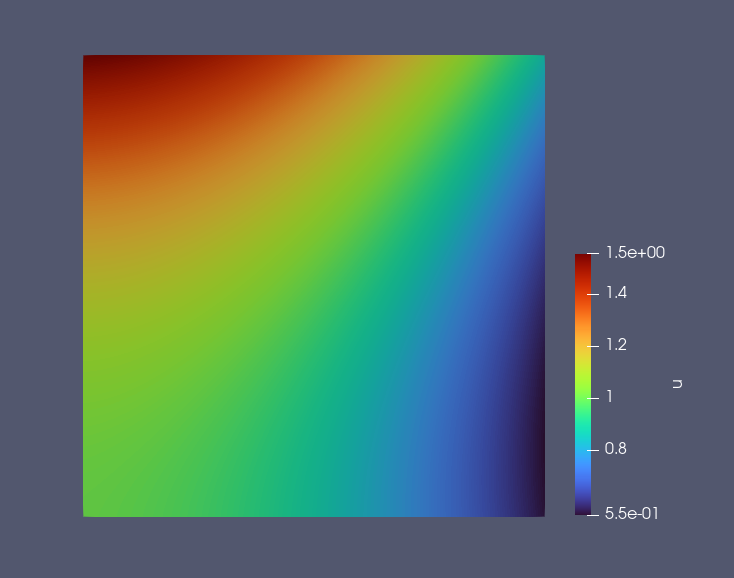
We use the trained model to predict values at NPOINT_TOTAL uniformly sampled points \((x_i, y_i)\). The figure below displays the predicted solution \(u(x, y)\) across the domain.