Learning to regularize with a variational autoencoder for hydrologic inverse analysis
1. Introduction
This project is reproduced based on the paddle framework.
The main points of the paper are as follows:
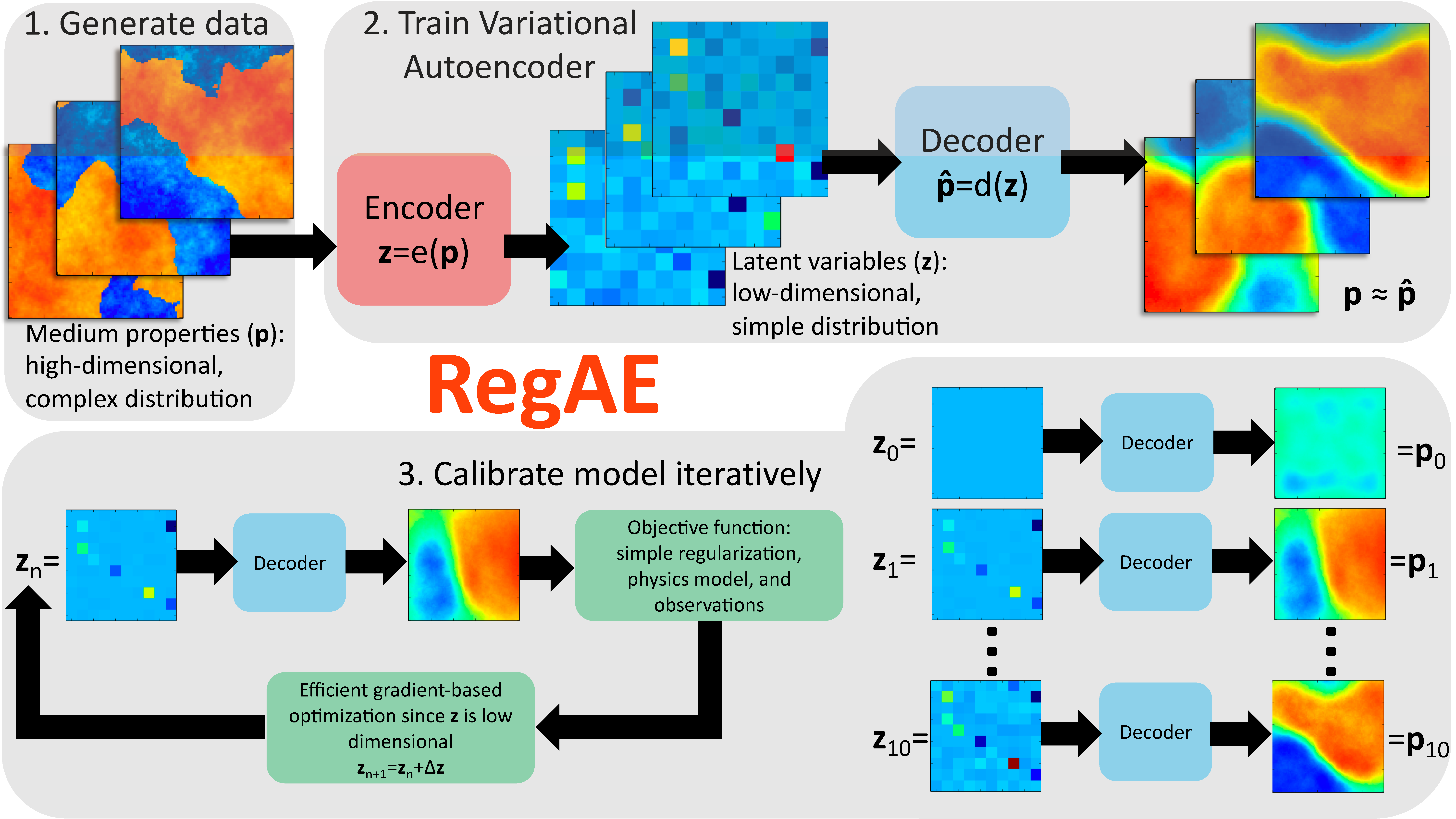
- The author proposes a regularization method based on variational autoencoder (VAE);
- Advantage 1 of this method: Performing regularization on latent variables from VAE (here refers to the output of encoder), which can be simply regularized;
- Advantage 2 of this method: VAE reduces the number of variables in the optimization problem, making gradient-based optimization computationally more efficient when the adjoint method is unavailable.
Key technical points of this project:
- Realize mixed code gradient transfer between paddle and julia, avoiding large-scale rewriting of julia code and being able to call excellent julia code;
- Found a problem with paddle minimize_lbfgs, to be submitted as an issue for confirmation.
Experimental result points:
- Successfully reproduced the paper code framework and full process operation test;
- Due to the inability to use the same samples, the accuracy of this reproduction cannot be compared with the data in the paper one by one. This project gives the results of the framework written in paddle.
Paper information: O'Malley D, Golden J K, Vesselinov V V. Learning to regularize with a variational autoencoder for hydrologic inverse analysis[J]. arXiv preprint arXiv:1906.02401, 2019.
Reference GitHub address: https://github.com/madsjulia/RegAE.jl
Project aistudio address: https://aistudio.baidu.com/aistudio/projectdetail/5541961
Model Structure
2. Dataset
The dataset of this project is generated by the julia code provided by the author, and saved as an npz file after generation. It has been uploaded to aistudio dataset and associated with this project.
The following is the description of data generation and data saving code
(1) The author uses DPFEHM and GaussianRandomFields in julia for data generation. The code can refer to this project /home/aistudio/RegAE.jl/examples/hydrology/ex_gaussian.jl, which can be modified according to the parameters;
(2) Data saving code. Add the following code in /home/aistudio/RegAE.jl/examples/hydrology/ex.jl code, which can convert data to numpy data and save as npz.
using Distributed
using PyCall # Add reference here

@everywhere variablename = "allloghycos"
@everywhere datafilename = "$(results_dir)/trainingdata.jld2"
if !isfile(datafilename)
    if nworkers() == 1
        error("Please run in parallel: julia -p 32")
    end
    numsamples = 10^5
    @time allloghycos = SharedArrays.SharedArray{Float32}(numsamples, ns[2], ns[1]; init=A -> samplehyco!(A; setseed=true))
    # @time JLD2.@save datafilename allloghycos

    ########### This is the added part ###########
    p_trues = SharedArrays.SharedArray{Float32}(3, ns[2], ns[1]; init=samplehyco!) # Calculate p_true

    np = pyimport("numpy")
    training_data = np.asarray(allloghycos)
    test_data = np.asarray(p_trues)

    np_coords = np.asarray(coords)
    np_neighbors = np.asarray(neighbors)
    np_areasoverlengths = np.asarray(areasoverlengths)
    np_dirichletnodes = np.asarray(dirichletnodes)
    np_dirichletheads = np.asarray(dirichletheads)

    np.savez("$(results_dir)/gaussian_train.npz",
        data=training_data,
        test_data=test_data,
        coords=np_coords,
        neighbors=np_neighbors,
        areasoverlengths=np_areasoverlengths,
        dirichletnodes=np_dirichletnodes,
        dirichletheads=np_dirichletheads)
end
Data Normalization
- Data normalization method: \(z = (x - \mu)/ \sigma\)
  class ScalerStd(object):
      """
      Desc: Normalization utilities with std mean
      """

      def __init__(self):
          self.mean = 0.
          self.std = 1.

      def fit(self, data):
          self.mean = np.mean(data)
          self.std = np.std(data)

      def transform(self, data):
          mean = paddle.to_tensor(self.mean).type_as(data).to(
              data.device) if paddle.is_tensor(data) else self.mean
          std = paddle.to_tensor(self.std).type_as(data).to(
              data.device) if paddle.is_tensor(data) else self.std
          return (data - mean) / std

      def inverse_transform(self, data):
          mean = paddle.to_tensor(self.mean) if paddle.is_tensor(data) else self.mean
          std = paddle.to_tensor(self.std) if paddle.is_tensor(data) else self.std
          return (data * std) + mean
Define Dataset
- Load data by reading pre-saved npz, current data type is [data_nums, 100, 100], here 100 is specified during data generation
- Reshape data to [data_nums, 10000]
- Divide data into 8:2 for train and test
- Get normalization parameters mean and std from train data, and use these parameters to normalize train and test datasets
- Data form obtained through dataloader is [batch_size, 10000]
   class CustomDataset(Dataset):
       def __init__(self, file_path, data_type="train"):
           """

           :param file_path:
           :param data_type: train or test
           """
           super().__init__()
           all_data = np.load(file_path)
           data = all_data["data"]
           num, _, _ = data.shape
           data = data.reshape(num, -1)

           self.neighbors = all_data['neighbors']
           self.areasoverlengths = all_data['areasoverlengths']
           self.dirichletnodes = all_data['dirichletnodes']
           self.dirichleths = all_data['dirichletheads']
           self.Qs = np.zeros([all_data['coords'].shape[-1]])
           self.val_data = all_data["test_data"]

           self.data_type = data_type

           self.train_len = int(num * 0.8)
           self.test_len = num - self.train_len

           self.train_data = data[:self.train_len]
           self.test_data = data[self.train_len:]

           self.scaler = ScalerStd()
           self.scaler.fit(self.train_data)

           self.train_data = self.scaler.transform(self.train_data)
           self.test_data = self.scaler.transform(self.test_data)

       def __getitem__(self, idx):
           if self.data_type == "train":
               return self.train_data[idx]
           else:
               return self.test_data[idx]

       def __len__(self):
           if self.data_type == "train":
               return self.train_len
           else:
               return self.test_len
Convert data to IterableNPZDataset form
3. Environment Dependencies
This project is a mixed project of julia and python.
julia dependencies
- DPFEHM
- Zygote
python dependencies
- paddle
- julia (pip install)
- matplotlib
This project has provided compressed documents after installation. You can fork this project and execute the following code to decompress and install.
# Decompress pre-downloaded files and pre-compiled files
!tar zxf /home/aistudio/opt/curl-7.88.1.tar.gz -C /home/aistudio/opt # curl pre-downloaded file
!tar zxf /home/aistudio/opt/curl-7.88.1-build.tgz -C /home/aistudio/opt # curl pre-compiled file
!tar zxf /home/aistudio/opt/julia-1.8.5-linux-x86_64.tar.gz -C /home/aistudio/opt # julia pre-downloaded file
!tar zxf /home/aistudio/opt/julia_package.tgz -C /home/aistudio/opt # julia dependency library file
!tar zxf /home/aistudio/opt/external-libraries.tgz -C /home/aistudio/opt # pip dependency library file
####### The following instructions can be referred to and executed when needed, the above compressed package has completed the following contents #######

# curl compilation instruction, use when decompression is invalid
!mkdir -p /home/aistudio/opt/curl-7.88.1-build
!/home/aistudio/opt/curl-7.88.1/configure --prefix=/home/aistudio/opt/curl-7.88.1-build --with-ssl --enable-tls-srp
!make install -j4

# Specify curl pre-compiled file
!export LD_LIBRARY_PATH=/home/aistudio/opt/curl-7.88.1-build/lib:$LD_LIBRARY_PATH
!export PATH=/home/aistudio/opt/curl-7.88.1-build/bin:$PATH
!export CPATH=/home/aistudio/opt/curl-7.88.1-build/include:$CPATH
!export LIBRARY_PATH=/home/aistudio/opt/curl-7.88.1-build/lib:$LIBRARY_PATH

# Specify installed julia package
!export JULIA_DEPOT_PATH=/home/aistudio/opt/julia_package
# Specify julia to use Tsinghua source
!export JULIA_PKG_SERVER=https://mirrors.tuna.tsinghua.edu.cn/julia
# julia install dependency library
# Need to export JULIA_DEPOT_PATH environment variable first, otherwise the installation location is ~/.julia, aistudio cannot save
!/home/aistudio/opt/julia-1.8.5/bin/julia -e "using Pkg; Pkg.add(\"DPFEHM\")"
!/home/aistudio/opt/julia-1.8.5/bin/julia -e "using Pkg; Pkg.add(\"Zygote\")"
!/home/aistudio/opt/julia-1.8.5/bin/julia -e "using Pkg; Pkg.add(\"PyCall\")"
The usage method can refer to the following code and julia derivative transfer test.ipynb file.
import paddle
import os
import sys

# julia dependency
os.environ['JULIA_DEPOT_PATH'] = '/home/aistudio/opt/julia_package'
# pip dependency
sys.path.append('/home/aistudio/opt/external-libraries')

# julieries
from julia.api import Julia

jl = Julia(compiled_modules=False,runtime="/home/aistudio/opt/julia-1.8.5/bin/julia")
# import julia
from julia import Main
4. Quick Start
This project runs in two steps:
- (1) Training step. By running the train.ipynb file, you can get the trained model parameters. Please refer to the train.ipynb file and the comments in it for specific code;
- (2) Test step. By running the test.ipynb file, apply the trained model parameters to optimize the latent domain.
5. Code Structure and Detailed Description
├── data                        # Pre-generated data file
│   └── data193595
├── main.ipynb                  # This description file
├── opt                         # Environment configuration file, compressed, unzip to use
│   ├── curl-7.88.1
│   ├── curl-7.88.1-build
│   ├── curl-7.88.1-build.tgz
│   ├── curl-7.88.1.tar.gz
│   ├── external-libraries
│   ├── external-libraries.tgz
│   ├── julia-1.8.5
│   ├── julia-1.8.5-linux-x86_64.tar.gz
│   ├── julia_package
│   └── julia_package.tgz
├── params_vae_nz100            # Model parameter file
│   └── model.pdparams
├── params_vae_nz200
│   └── model.pdparams
├── params_vae_nz400
│   └── model.pdparams
├── test.ipynb                  # Test file
├── train.ipynb                 # Training file
├── julia derivative transfer test.ipynb       # julia and python mixed test file
Explanation of correlation between train file and test file
We explain according to the symbols of the paper author, \(p\) is data input, \(\hat{p}\) is data output, \(loss=mse(p,\hat{p}) + loss_{kl}(\hat{p},N(0,1))\).
- (1) Through train, the trained Autoencoder (including encoder and decoder) can be obtained;
- (2) Through test, call the trained encoder to generate latent_test for testdata, and get latent_mean;
- (3) For new sample \(p_{new}\), continuously optimize latent_mean through LBFGS method until obj_fun is minimized, where obj_fun = mse(\(p_{new}\),\(\hat{p}_{new}\))+mse(sci_fun(\(p_{new}\)),sci_fun(\(\hat{p}_{new}\))), sci_fun is any other scientific calculation simulation method.
paddle.incubate.optimizer.functional.minimize_lbfgs problem
The following is paddle official minimize_lbfgs API:
paddle.incubate.optimizer.functional.minimize_lbfgs(objective_func, initial_position, history_size=100, max_iters=50, tolerance_grad=1e-08, tolerance_change=1e-08, initial_inverse_hessian_estimate=None, line_search_fn='strong_wolfe', max_line_search_iters=50, initial_step_length=1.0, dtype='float32', name=None)
- (1) Parameter max_line_search_iters is invalid. Although this parameter is set, the corresponding parameter is not passed internally;
- (2) wolfe condition 1 is wrong. line256 should be
phi_2 >= phi_1, the following is part of paddle source code.
        # 1. If phi(a2) > phi(0) + c_1 * a2 * phi'(0) or [phi(a2) >= phi(a1) and i > 1],
        #         a_star= zoom(a1, a2) and stop;
        pred1 = ~done & ((phi_2 > phi_0 + c1 * a2 * derphi_0) |
                         ((phi_2 >= phi_0) & (i > 1)))
6. Reproduction Results
Comparison of different latent dimensions
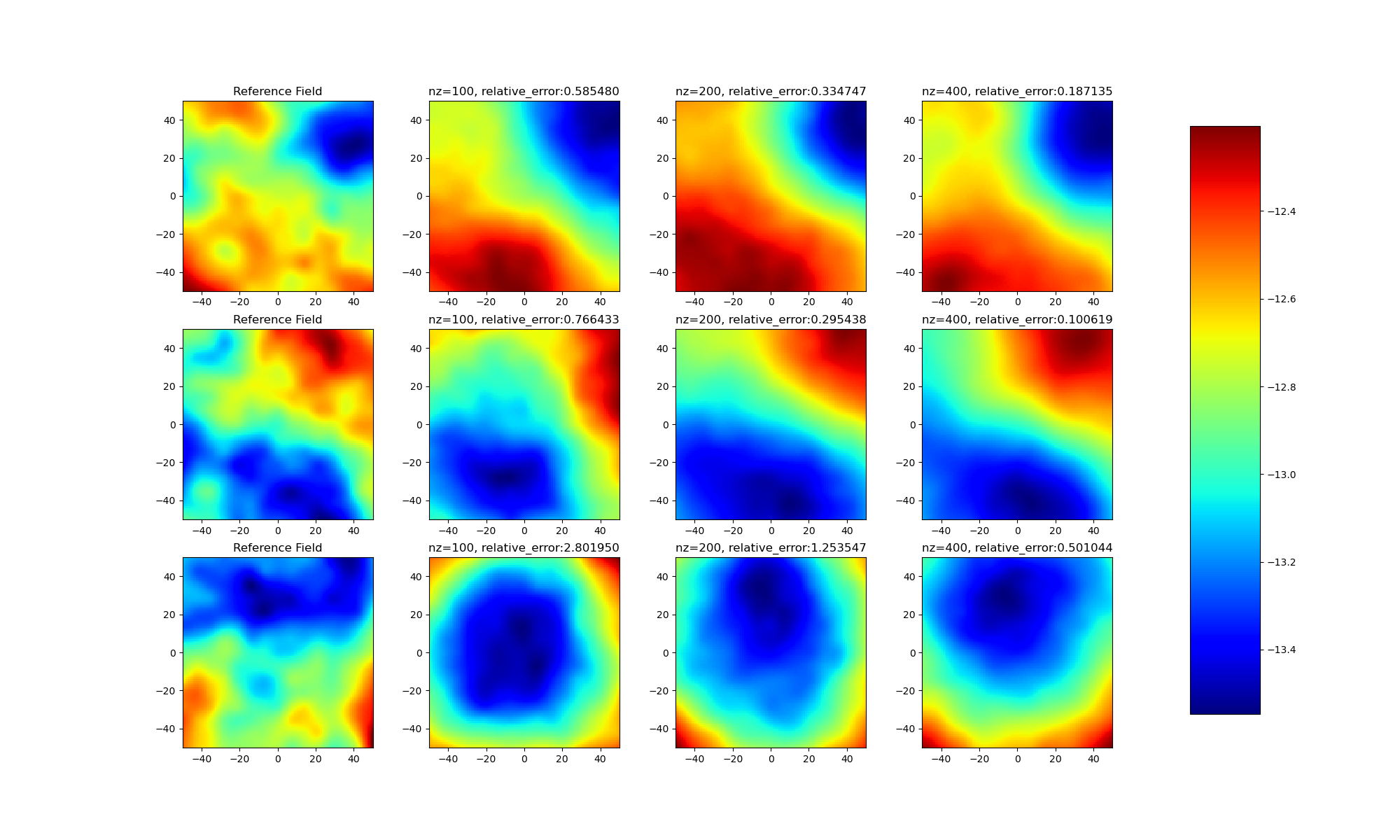
Through experimental results, it can be found:
- (1) There are gaps between different samples, not all samples can be optimized to obtain good latent variables;
- (2) As the model latent dimension rises, the model effect gradually improves.
Comparison of latent_random and latent_mean
This project also added comparison of latent_random and latent_mean on generation results. Here latent_random and latent_mean are explained again:
- latent_random: Obtained through Gaussian noise generated by paddle.randn;
- latent_mean: Obtained by averaging encoder results for all testdata.
The following are experimental results obtained through latent_random
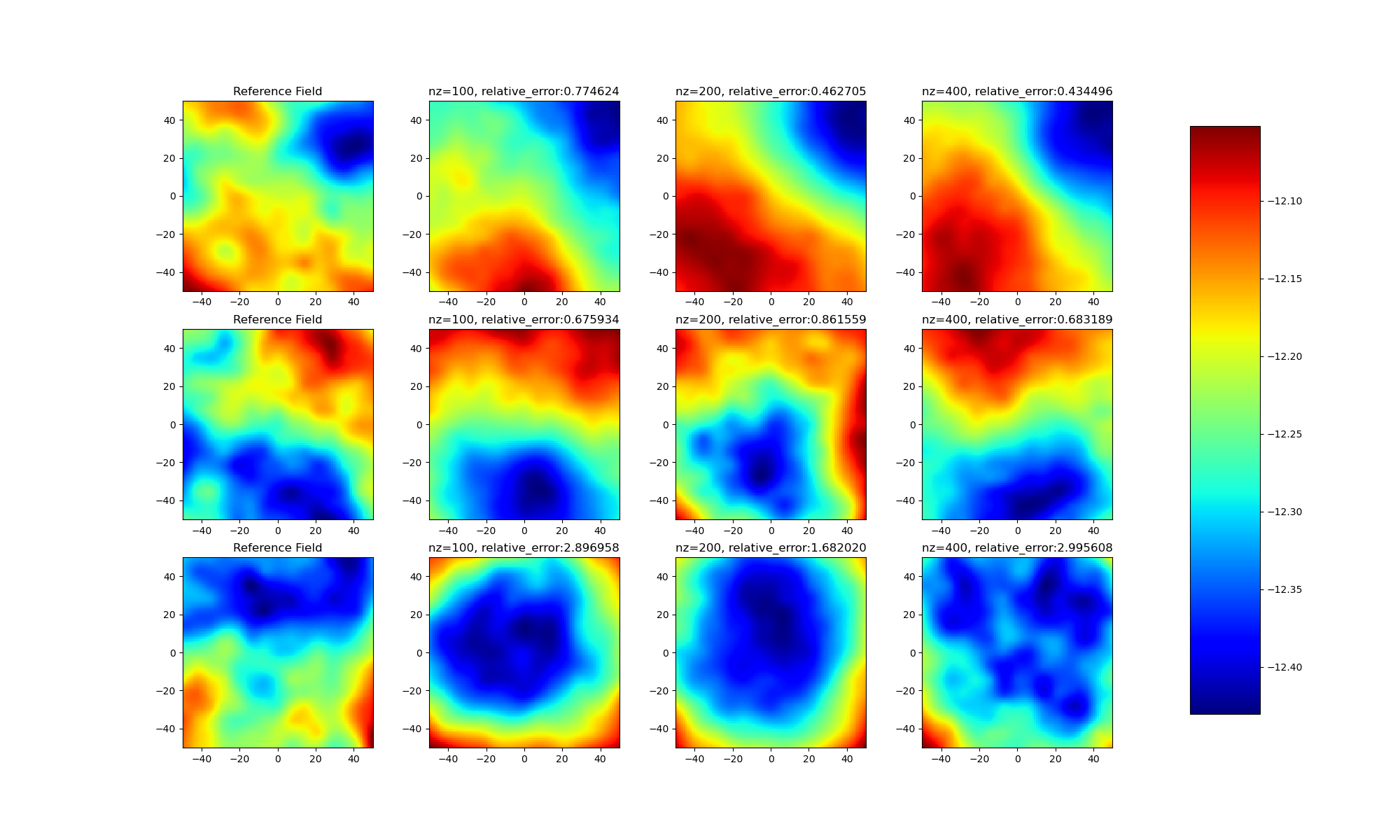
Through comparison, it can be found that latent_mean has an important impact on optimization results. Approximately correct latent variables can obtain better generation results.
LBFGS optimization convergence
It can be seen from the figure below that using paddle minimize_lbfgs can effectively optimize convergence.

7. Extended Thinking
If you think deeply about this project, you will find that the model uses real data as the target for lbfgs optimization in the test process. Is this calculation method still meaningful?
The answer is yes! Meaningful!
The following is my personal opinion:
- (1) By comparing the gap between final generation results of latent_random and latent_mean through experiments, it can be found that a good initial value has a huge impact on the model. Current diffusion models continuously perform denoise operations on generated Gaussian noise during the sample generation process. If the generated noise data is pre-optimized, it can not only accelerate the generation speed of diffusion, but also improve the quality of data generation.
- (2) In research fields such as domain transfer, this kind of latent can be used to gradually generate intermediate transition variables to achieve migration generation of data in different domains.
7. Model Information
| Information | Description |
|---|---|
| Publisher | Zhu Weiguo (DrownFish19) |
| Release Time | 2023.03 |
| Framework Version | paddle 2.4.1 |
| Supported Hardware | GPU, CPU |
| aistudio | notebook |
Please click here to view the basic usage of this environment. Please click here for more detailed instructions.